

- Posts: 301
- Thank you received: 6
Input Fields Depending On Product For Front End Product Page
7 years 3 months ago #307560
by fan4chevy
Hi,
I am using HikaBus and HikaMarket. I am building a site for cars and parts. So fields will be different whether car or parts. I want to put fields like
Make
Model
Year
Engine
Trans
Mileage
for the cars for sale.
On the Parts it may have different needs.
How do I do this? I tried custom fields but they are not showing on product add page for vendors.
I am using HikaBus and HikaMarket. I am building a site for cars and parts. So fields will be different whether car or parts. I want to put fields like
Make
Model
Year
Engine
Trans
Mileage
for the cars for sale.
On the Parts it may have different needs.
How do I do this? I tried custom fields but they are not showing on product add page for vendors.
Please Log in or Create an account to join the conversation.

7 years 3 months ago #307563
by Jerome
Jerome - Obsidev.com
HikaMarket & HikaSerial developer / HikaShop core dev team.
Replied by Jerome on topic Input Fields Depending On Product For Front End Product Page
Hello,
Please edit the product custom field and target the settings which are in the section "Display: HikaMarket" ; more specially the "product edition" option.
Afterwards, you need to be sure that your vendors do have the ACL to edit the product customfields (product/edit/customfields).
CF : www.hikashop.com/support/documentation/1...-multi-tutorial.html
Regards,
Please edit the product custom field and target the settings which are in the section "Display: HikaMarket" ; more specially the "product edition" option.
Afterwards, you need to be sure that your vendors do have the ACL to edit the product customfields (product/edit/customfields).
CF : www.hikashop.com/support/documentation/1...-multi-tutorial.html
Regards,
Jerome - Obsidev.com
HikaMarket & HikaSerial developer / HikaShop core dev team.
Please Log in or Create an account to join the conversation.
7 years 3 months ago - 7 years 3 months ago #307571
by fan4chevy
Replied by fan4chevy on topic Input Fields Depending On Product For Front End Product Page
Where do I find the product custom field?
Where is "Display: HikaMarket" ; more specially the "product edition" option.
Trying to allow my vendors to add easily (user friendly) details of their item for sale that is also searchable.
Having a hard time figuring the system out in the HikaMarket.
See attachment example
Where is "Display: HikaMarket" ; more specially the "product edition" option.
Trying to allow my vendors to add easily (user friendly) details of their item for sale that is also searchable.
Having a hard time figuring the system out in the HikaMarket.
See attachment example
Last edit: 7 years 3 months ago by fan4chevy.
Please Log in or Create an account to join the conversation.

7 years 3 months ago #307574
by nicolas
Replied by nicolas on topic Input Fields Depending On Product For Front End Product Page
Hi,
Go in the menu Display>Custom fields of HikaShop. There, you have all the fields, including the custom product field.
You can create new ones with the "new" button. Select the "product" table to have them for the products.
Once you save the custom product fields once, you'll see many display settings for the custom field, including settings specific to HikaMarket if you have it installed :
monosnap.com/file/umyvTqiv1pb2FZC7Nhnx1XIa4jLuV3
Go in the menu Display>Custom fields of HikaShop. There, you have all the fields, including the custom product field.
You can create new ones with the "new" button. Select the "product" table to have them for the products.
Once you save the custom product fields once, you'll see many display settings for the custom field, including settings specific to HikaMarket if you have it installed :
monosnap.com/file/umyvTqiv1pb2FZC7Nhnx1XIa4jLuV3
Please Log in or Create an account to join the conversation.
7 years 3 months ago #307597
by oxido
Replied by oxido on topic Input Fields Depending On Product For Front End Product Page
"Trying to allow my vendors to add easily (user friendly) details of their item for sale that is also searchable."
Take it easy, search the forum and documentation first.
Regarding your problem, check my attachment.
Take it easy, search the forum and documentation first.
Regarding your problem, check my attachment.
The following user(s) said Thank You: Jerome
Please Log in or Create an account to join the conversation.
7 years 3 months ago #307606
by fan4chevy
Replied by fan4chevy on topic Input Fields Depending On Product For Front End Product Page
I appreciate your assistance. I have been using hikabusiness for many years and it has been nice. New to hikamarket in building a car vendor site, gets quite hard.
With that said, I am not sure what I am doing incorrect, but when I make a custom field, I don't see it on the vender add product page. I made an image for you to see what I may not be doing correctly.
Thanks
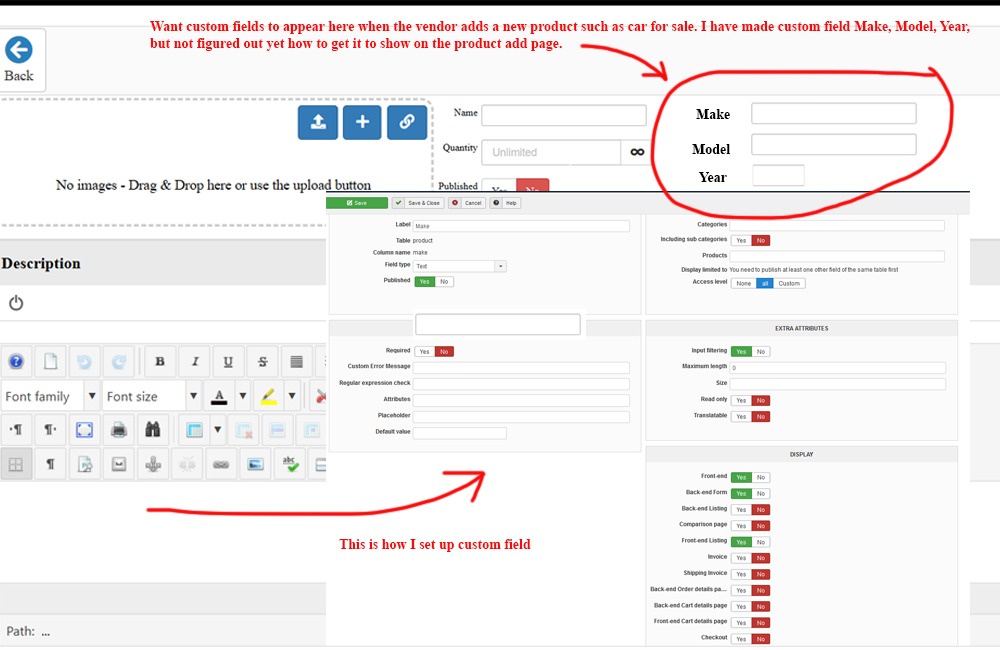
With that said, I am not sure what I am doing incorrect, but when I make a custom field, I don't see it on the vender add product page. I made an image for you to see what I may not be doing correctly.
Thanks
Please Log in or Create an account to join the conversation.
7 years 3 months ago - 7 years 3 months ago #307620
by oxido
Replied by oxido on topic Input Fields Depending On Product For Front End Product Page
After you save your fields, a new section it will apear , called "DISPLAY:HIKAMARKET", in that section you will have 2 options, to make your fields visible on product add page, you have to set "Vendor product edition = Yes", and to make it visible on the product page,set "Vendor product listing = Yes". You need to do this for each field.
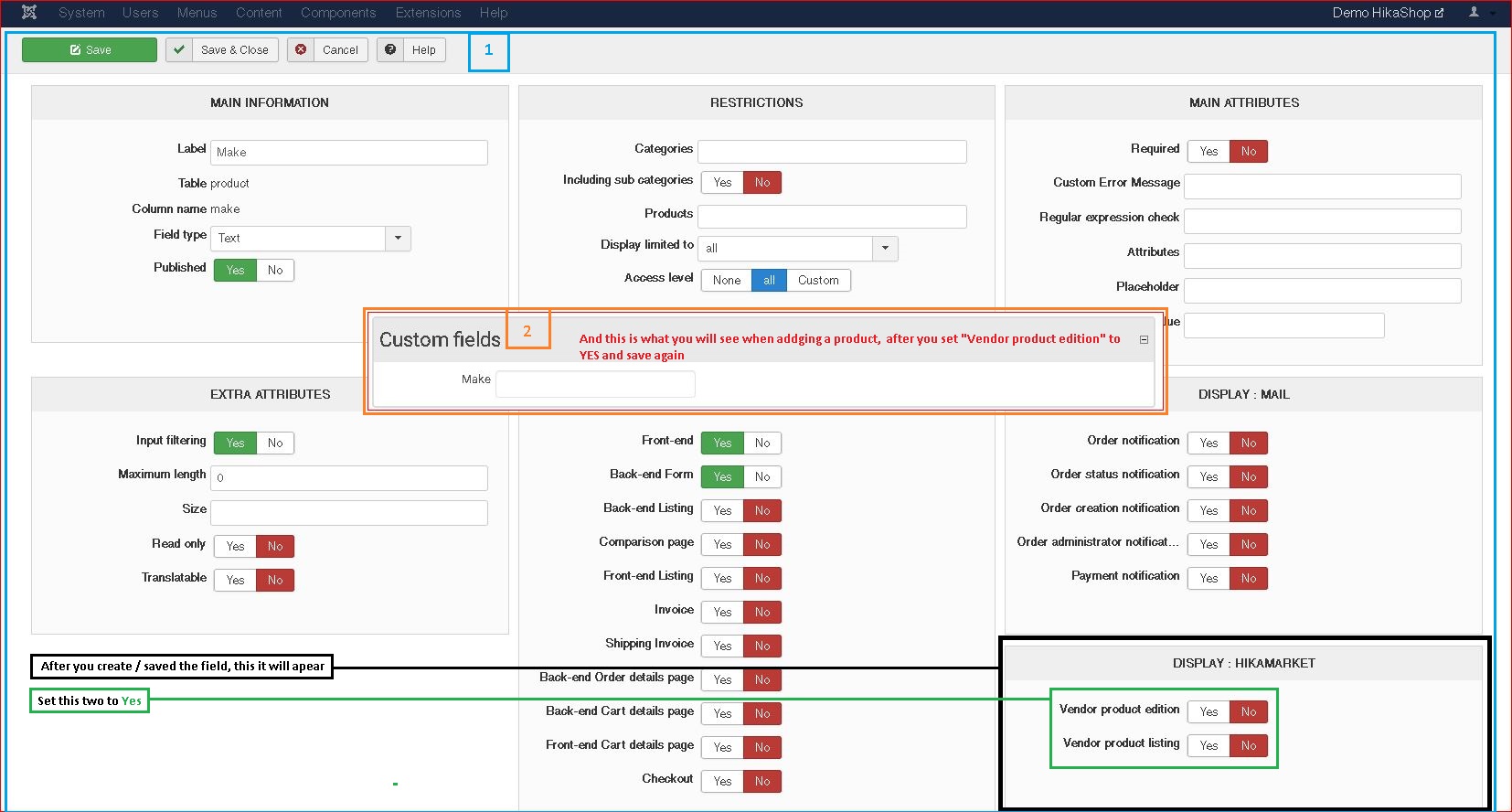
The custom fields will apear in product add page some whare at the bottom of the page. To move the field where you want, at the top of the page, you will have to edit the "view" of that page, called "productmarket / form.php" . To do this, in Hikashop go to Configuration > Advanced (tab), and the first option is: Display view files = "Front-End", save settings, After this, in front-end you will see this:
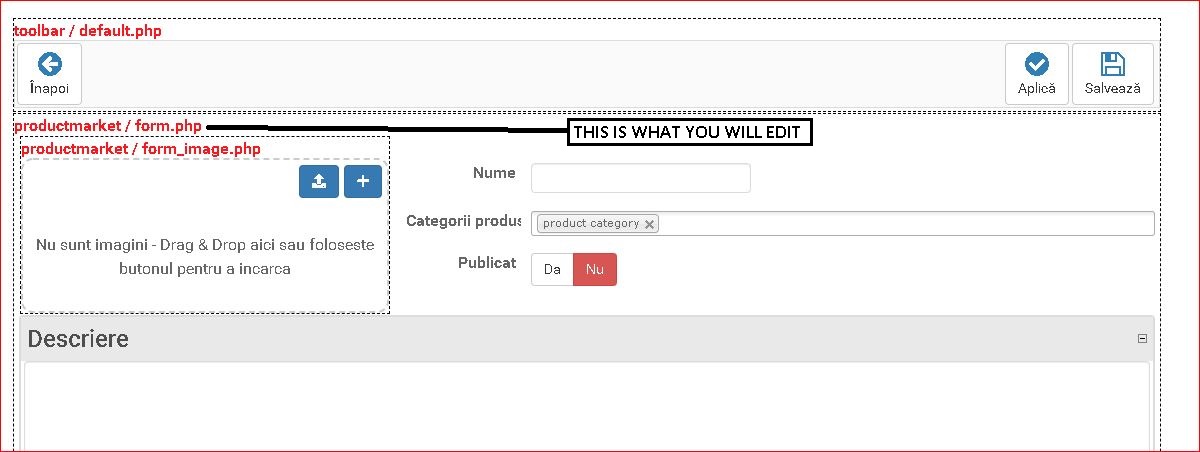
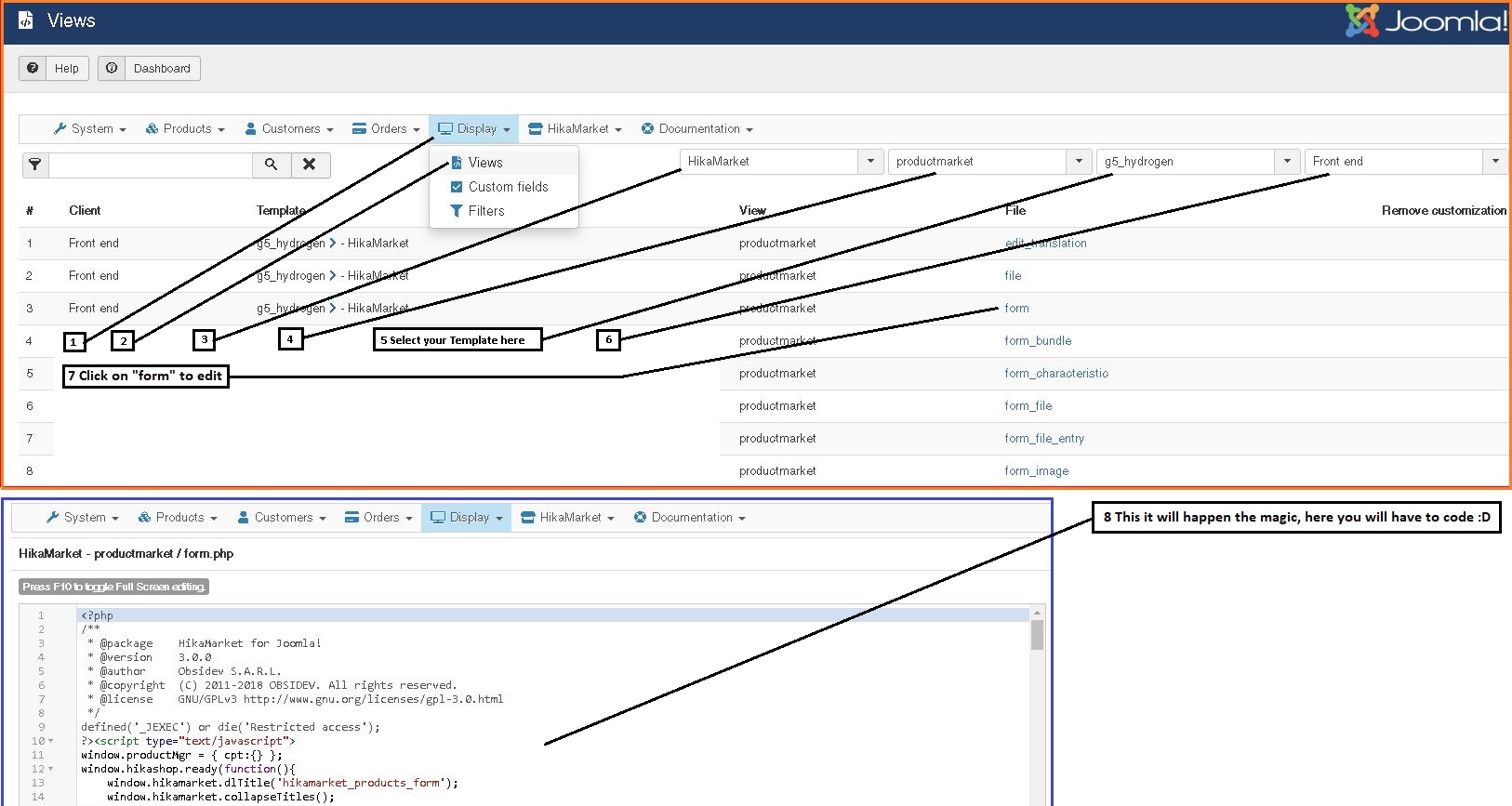
To edit the view, do this (you need to code here):
8 Here it will * : :
:
The custom fields will apear in product add page some whare at the bottom of the page. To move the field where you want, at the top of the page, you will have to edit the "view" of that page, called "productmarket / form.php" . To do this, in Hikashop go to Configuration > Advanced (tab), and the first option is: Display view files = "Front-End", save settings, After this, in front-end you will see this:
To edit the view, do this (you need to code here):
8 Here it will * :
:
Last edit: 7 years 3 months ago by oxido.
Please Log in or Create an account to join the conversation.
7 years 3 months ago - 7 years 3 months ago #307624
by fan4chevy
Replied by fan4chevy on topic Input Fields Depending On Product For Front End Product Page
Thank you. What part of the acl targets the permissions for fields?
What is difference between ACL of Default store access and Main vendor access?
What is difference between ACL of Default store access and Main vendor access?
Last edit: 7 years 3 months ago by fan4chevy.
Please Log in or Create an account to join the conversation.
7 years 3 months ago #307643
by oxido
The difference is this, your user / vendors are the "Default" one, they have access to the default settings, and You are the "Main" vendor, so tha MAIN VENDOR SETTING it will apply to you, as you will see in the image below.
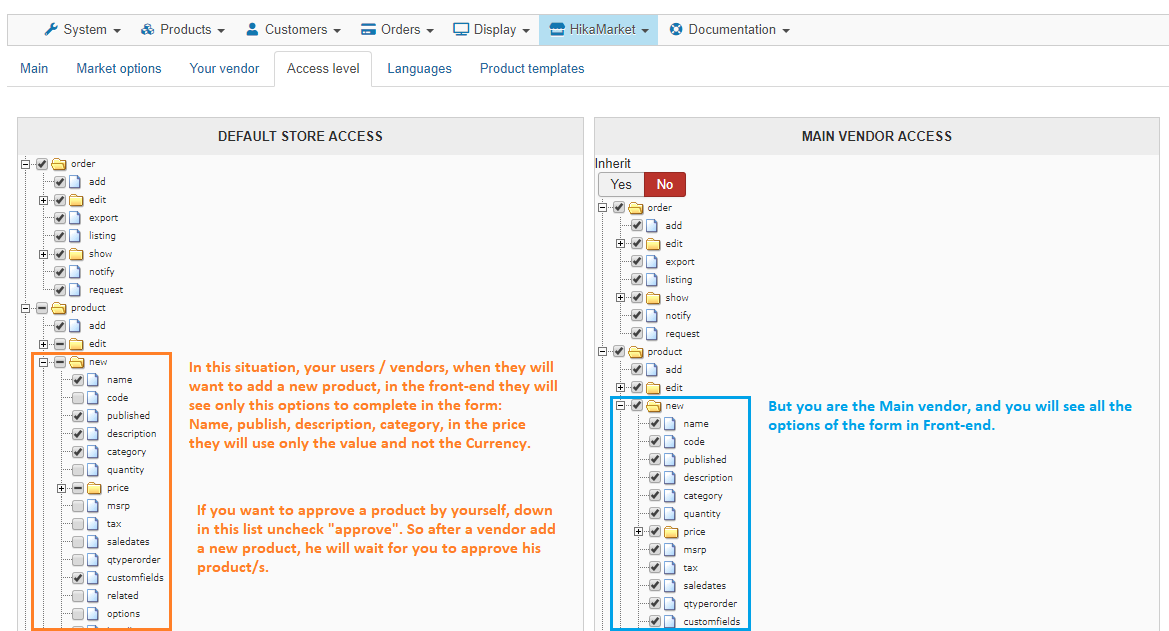
Replied by oxido on topic Input Fields Depending On Product For Front End Product Page
fan4chevy wrote: Thank you. What part of the acl targets the permissions for fields?
What is difference between ACL of Default store access and Main vendor access?
The difference is this, your user / vendors are the "Default" one, they have access to the default settings, and You are the "Main" vendor, so tha MAIN VENDOR SETTING it will apply to you, as you will see in the image below.
The following user(s) said Thank You: Jerome
Please Log in or Create an account to join the conversation.
7 years 3 months ago #307659
by Jerome
Jerome - Obsidev.com
HikaMarket & HikaSerial developer / HikaShop core dev team.
Replied by Jerome on topic Input Fields Depending On Product For Front End Product Page
Hello,
Thanks oxido
Exactly yes !
When you create a new field, the section is not available yet ; but once the field is created, you have the new sections.
It's exactly the same thing for the field "display limited to" ; but I admit that for this specific field you have a text telling you why you cannot modify it.
For "extra display" sections, since they are a lot of them and they are not for all kind of fields, we just don't display them at all when the field is not created in the database. And HikaMarket is not the only concerned for that, the "extra display" blocks depends on the type of custom field so it's only an information known once the field has been created in the database.
Regards,
Thanks oxido
Exactly yes !
When you create a new field, the section is not available yet ; but once the field is created, you have the new sections.
It's exactly the same thing for the field "display limited to" ; but I admit that for this specific field you have a text telling you why you cannot modify it.
For "extra display" sections, since they are a lot of them and they are not for all kind of fields, we just don't display them at all when the field is not created in the database. And HikaMarket is not the only concerned for that, the "extra display" blocks depends on the type of custom field so it's only an information known once the field has been created in the database.
Regards,
Jerome - Obsidev.com
HikaMarket & HikaSerial developer / HikaShop core dev team.
Please Log in or Create an account to join the conversation.
7 years 3 months ago #307661
by fan4chevy
Replied by fan4chevy on topic Input Fields Depending On Product For Front End Product Page
Thank you much. You have good support. Especially to help those that are new to the multivendor market that can be overwhelming at first.
Please Log in or Create an account to join the conversation.
Moderators: Obsidev
Time to create page: 0.253 seconds