

- Posts: 44
- Thank you received: 0
India Map shown wrong
6 years 3 months ago #321059
by Harrier
India Map shown wrong was created by Harrier
Hi
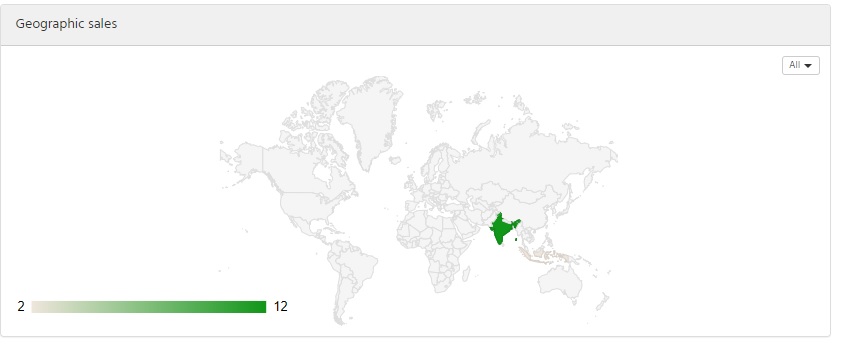
In the vendor dashboard of Hikamarket there is a global map in which the map of India is shown wrong. The boundaries at the top of our state Jammu and Kashmir are wrong. Please refer the correct India map at www.surveyofindia.gov.in/files/Political%20Map%20of%20India.jpg
Please correct it and confirm.
Thank you!
In the vendor dashboard of Hikamarket there is a global map in which the map of India is shown wrong. The boundaries at the top of our state Jammu and Kashmir are wrong. Please refer the correct India map at www.surveyofindia.gov.in/files/Political%20Map%20of%20India.jpg
Please correct it and confirm.
Thank you!
Please Log in or Create an account to join the conversation.

6 years 3 months ago #321064
by Jerome
Jerome - Obsidev.com
HikaMarket & HikaSerial developer / HikaShop core dev team.
Replied by Jerome on topic India Map shown wrong
Hello,
Since that map is a Google Geo Chart, I'm afraid that we can't change anything from our side.
developers.google.com/chart/interactive/docs/gallery/geochart
Regards,
Since that map is a Google Geo Chart, I'm afraid that we can't change anything from our side.
developers.google.com/chart/interactive/docs/gallery/geochart
Regards,
Jerome - Obsidev.com
HikaMarket & HikaSerial developer / HikaShop core dev team.
Please Log in or Create an account to join the conversation.
6 years 3 months ago #321383
by Harrier
Replied by Harrier on topic India Map shown wrong
I would then request to please don't use Google map as it shows wrong boundaries. Every country must be respected.
Please Log in or Create an account to join the conversation.
6 years 3 months ago #321384
by Jerome
Jerome - Obsidev.com
HikaMarket & HikaSerial developer / HikaShop core dev team.
Replied by Jerome on topic India Map shown wrong
Hello,
If you have an alternative, we are aware.
But please understand that we cannot remove that feature since it is used by the rest of the community.
You can deactivate the geographic map in the HikaMarket configuration. For every block display in the vendor stats, you can tweak some setting and even unpublish the module.
www.hikashop.com/support/documentation/1...ml#config_main_stats
Regards,
If you have an alternative, we are aware.
But please understand that we cannot remove that feature since it is used by the rest of the community.
You can deactivate the geographic map in the HikaMarket configuration. For every block display in the vendor stats, you can tweak some setting and even unpublish the module.
www.hikashop.com/support/documentation/1...ml#config_main_stats
Regards,
Jerome - Obsidev.com
HikaMarket & HikaSerial developer / HikaShop core dev team.
Please Log in or Create an account to join the conversation.
Moderators: Obsidev
Time to create page: 0.189 seconds