

- Posts: 152
- Thank you received: 11
Vendor control panel
5 years 3 months ago #335130
by gerryna09
Vendor control panel was created by gerryna09
-- url of the page with the problem -- :
www.hikashop.com/
-- HikaShop version -- : 4.4.3
-- HikaMarket version -- : 4.0.0
-- Joomla version -- : 3.10
-- PHP version -- : 7.4.14
-- Browser(s) name and version -- : Chrome
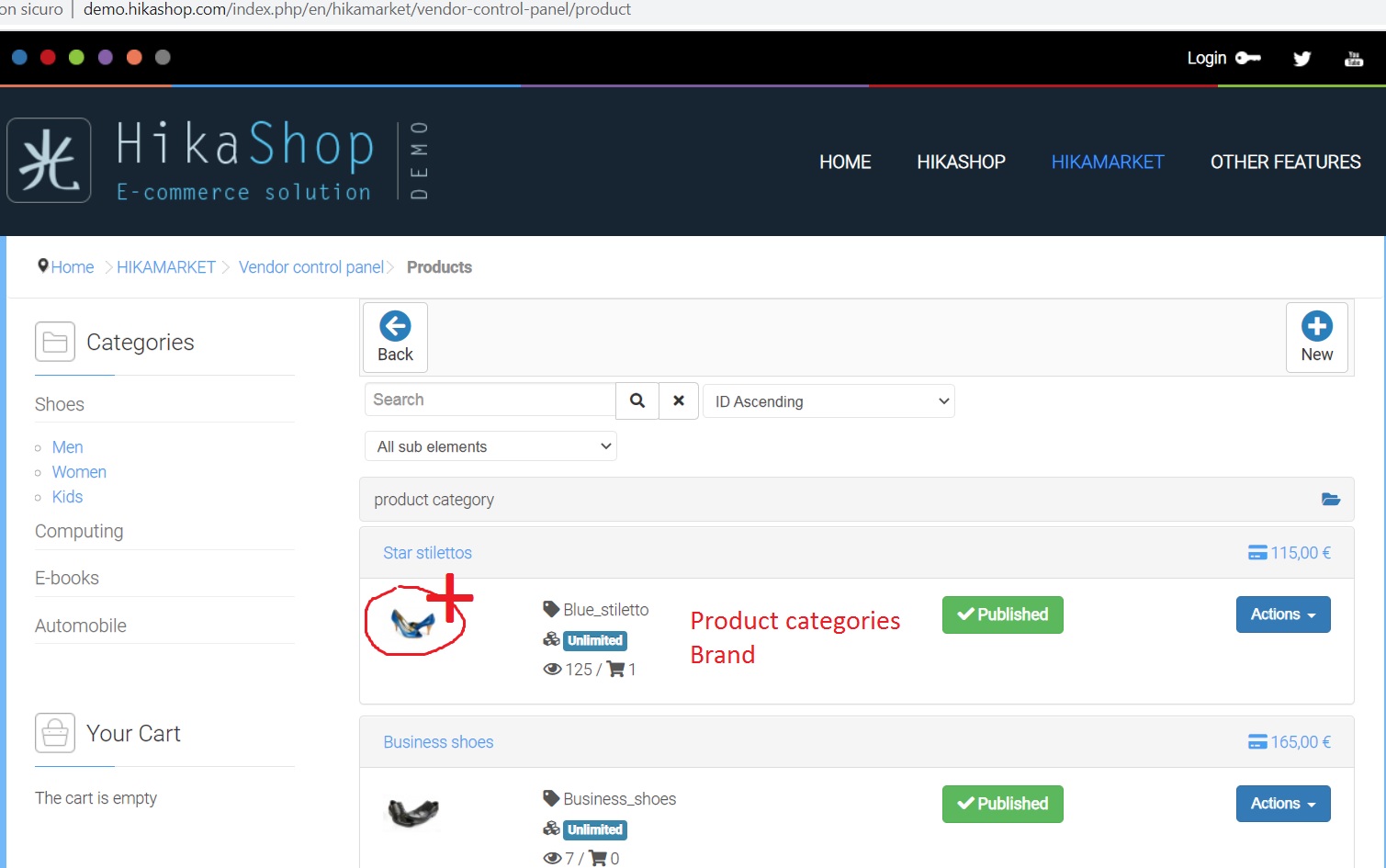
How can I add the name of the categories and the brand to each single product?
And enlarge the image?
Thanks
-- HikaShop version -- : 4.4.3
-- HikaMarket version -- : 4.0.0
-- Joomla version -- : 3.10
-- PHP version -- : 7.4.14
-- Browser(s) name and version -- : Chrome
How can I add the name of the categories and the brand to each single product?
And enlarge the image?
Thanks
Please Log in or Create an account to join the conversation.

5 years 3 months ago #335131
by Jerome
Jerome - Obsidev.com
HikaMarket & HikaSerial developer / HikaShop core dev team.
Replied by Jerome on topic Vendor control panel
Hello,
To customize that view, you need to override the "productmarket / listing" view (via the HikaShop backend).
The size of the thumbnail is handled by the line
Displaying the brand name is possible but it requires the addition of a SQL query in order to load the brands for the products in the current listing (using the product_manufacturer_id fields and looking in the hikashop_category table).
Display the categories is the almost the same but the SQL query is bigger because it requires to perform a join of two tables (hikashop_product_category and hikashop_category).
The best is to filter the categories by not displaying the one that the vendor does not have an access (if you have a vendor root category).
To do so, you first need to retrieve the vendor root category ID :
Regards,
To customize that view, you need to override the "productmarket / listing" view (via the HikaShop backend).
The size of the thumbnail is handled by the line
Code:
$thumb = $this->imageHelper->getThumbnail(@$product->file_path, array(50,50), array('default' => 1, 'forcesize' => 1));
Displaying the brand name is possible but it requires the addition of a SQL query in order to load the brands for the products in the current listing (using the product_manufacturer_id fields and looking in the hikashop_category table).
Display the categories is the almost the same but the SQL query is bigger because it requires to perform a join of two tables (hikashop_product_category and hikashop_category).
The best is to filter the categories by not displaying the one that the vendor does not have an access (if you have a vendor root category).
To do so, you first need to retrieve the vendor root category ID :
Code:
$vendorClass = hikamarket::get('class.vendor');
// $vendor_id is required.
// In the productmarket listing view, you can use : $this->vendor->vendor_id
$rootCategory = $vendorClass->getRootCategory($vendor_id);
Regards,
Jerome - Obsidev.com
HikaMarket & HikaSerial developer / HikaShop core dev team.
Please Log in or Create an account to join the conversation.
Moderators: Obsidev
Time to create page: 0.062 seconds