

- Posts: 48
- Thank you received: 0
The name of customer not in customer tab (backend)
15 years 4 months ago #18805
by vasjaf
The name of customer not in customer tab (backend) was created by vasjaf
Hello.
A customer fills a form with his name, email and address (non-registration type).
The email and address is shown in the Customer tab (backend).
But the name is not shown there.
What can I do?
A customer fills a form with his name, email and address (non-registration type).
The email and address is shown in the Customer tab (backend).
But the name is not shown there.
What can I do?
Please Log in or Create an account to join the conversation.

15 years 4 months ago #18824
by nicolas
Replied by nicolas on topic Re: The name of customer not in customer tab (backend)
I'm not following you. Could you do a screenshot of that ?
Please Log in or Create an account to join the conversation.
15 years 4 months ago - 15 years 4 months ago #18887
by vasjaf
Replied by vasjaf on topic Re: The name of customer not in customer tab (backend)
1. Customer fills a form (Your Details).
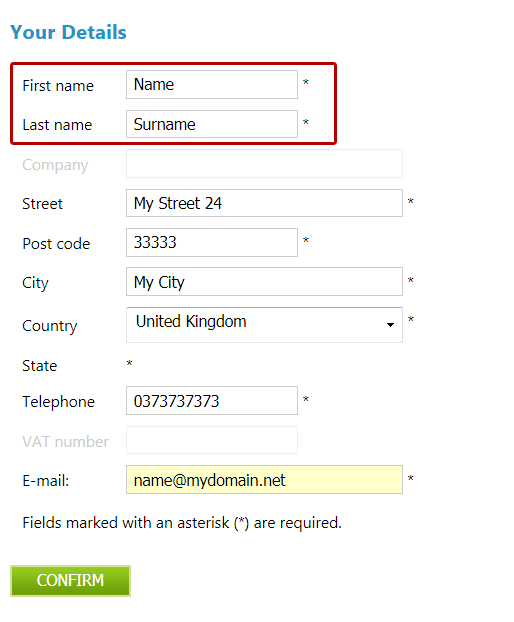
2. Name field is empty in backend. Address is ok.
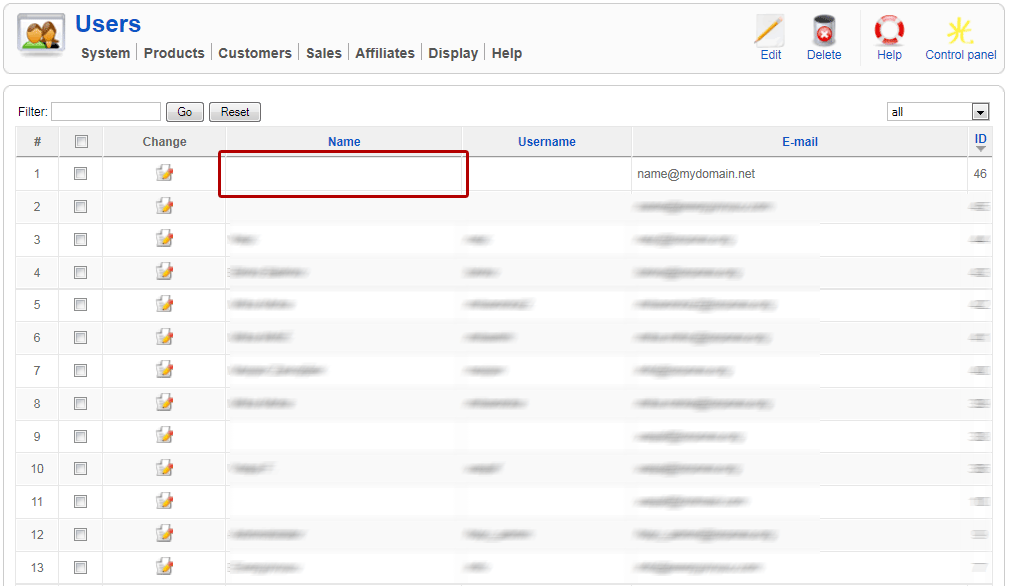
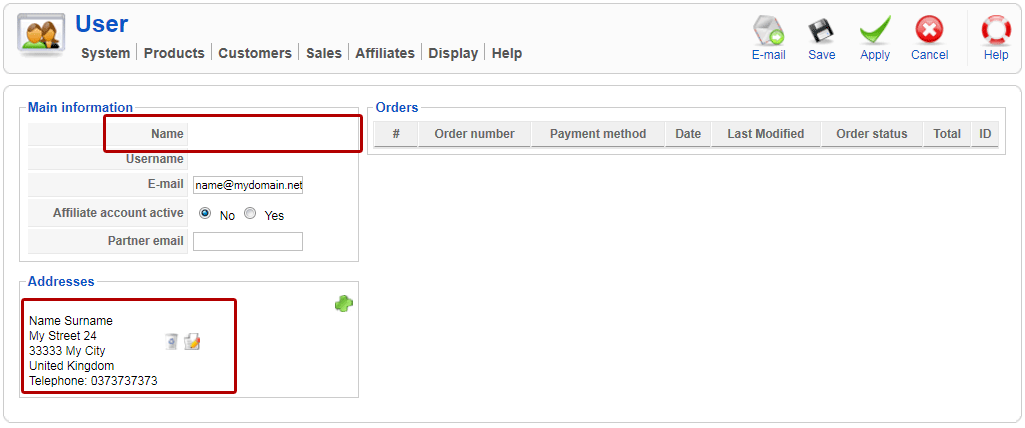
2. Name field is empty in backend. Address is ok.
Last edit: 15 years 4 months ago by vasjaf.
Please Log in or Create an account to join the conversation.
15 years 4 months ago #18892
by nicolas
Replied by nicolas on topic Re: The name of customer not in customer tab (backend)
It seems that you change the option "registration" of the configuration to "no registration".
That means that there is no joomla account created for the user. The "name" column on the listing of customers and on the form is for the name of the user which is stored by joomla in the user account. Since there is no joomla user account, there is no name stored.The first name and last name fields are only for the address.
So that's normal with your configuration.
If you change the registration option to "registration" or to "simplified registration", you will get the name filled.
That means that there is no joomla account created for the user. The "name" column on the listing of customers and on the form is for the name of the user which is stored by joomla in the user account. Since there is no joomla user account, there is no name stored.The first name and last name fields are only for the address.
So that's normal with your configuration.
If you change the registration option to "registration" or to "simplified registration", you will get the name filled.
Please Log in or Create an account to join the conversation.
15 years 4 months ago #18927
by vasjaf
Replied by vasjaf on topic Re: The name of customer not in customer tab (backend)
Right I use no-registration option.
I supposed this is it, because the email, which is in fact joomla e-mail is visible.
I was thinking also to change the joomla email with address email (HikaShop email).
Because when user enters his email, the Address window appears and he doesn't see the email and can not change it.
1.
So I would like the "First name + Second name" would be visible under HikaShop>Customer tab in the field "Name" (in back-end).
Can I do that?
2.
What code should I replace in HikaShop>Display tab
to change the joomla email with address email and to still be visible under HikaShop>Customer tab.
Will this change influence the registration option?
Do you have any better suggestion to solve this problem (I mean both of them)?
Best.
I supposed this is it, because the email, which is in fact joomla e-mail is visible.
I was thinking also to change the joomla email with address email (HikaShop email).
Because when user enters his email, the Address window appears and he doesn't see the email and can not change it.
1.
So I would like the "First name + Second name" would be visible under HikaShop>Customer tab in the field "Name" (in back-end).
Can I do that?
2.
What code should I replace in HikaShop>Display tab
to change the joomla email with address email and to still be visible under HikaShop>Customer tab.
Will this change influence the registration option?
Do you have any better suggestion to solve this problem (I mean both of them)?
Best.
Please Log in or Create an account to join the conversation.
15 years 4 months ago #18930
by vasjaf
Replied by vasjaf on topic Re: The name of customer not in customer tab (backend)
Nicolas,
I would like to do this, because I don't like you have to activate the account during a shopping process.
This compicates it and can even stop it. I even don't like user get any warning on shopping cart (checkout), that he was registered...
If he would get just email with password, maybe this would be ok, without warning on checkout (shopping cart) sreen of that.
I would like to do this, because I don't like you have to activate the account during a shopping process.
This compicates it and can even stop it. I even don't like user get any warning on shopping cart (checkout), that he was registered...
If he would get just email with password, maybe this would be ok, without warning on checkout (shopping cart) sreen of that.
Please Log in or Create an account to join the conversation.
15 years 4 months ago #18931
by nicolas
Replied by nicolas on topic Re: The name of customer not in customer tab (backend)
There are three things here:
1. The joomla user information
2. The hikashop user information
3. The hikashop address information
The email of the user is in 2 while the address edition screen only allows you to change 3. You can't make it change 2 as it's not the same data.
1. You cannot with the options in HikaShop. We can't provide such modifications on the forum as it's more than a few lines of code to do it properly. You would first have to load an address of the user and then display the values. But you also need to handle the other case of when the name is already in joomla...
2. The hikashop user email is already displayed on the listing of customers... It's even on your screenshot. So there is nothing to do
The email activation can be deactivated in the configuration of joomla. The message of successful registration can be removed by overriding it's translation via the translation edition interface under the tab Languages of the config. So you could do like this quite easily with the simplified registration mode.
1. The joomla user information
2. The hikashop user information
3. The hikashop address information
The email of the user is in 2 while the address edition screen only allows you to change 3. You can't make it change 2 as it's not the same data.
1. You cannot with the options in HikaShop. We can't provide such modifications on the forum as it's more than a few lines of code to do it properly. You would first have to load an address of the user and then display the values. But you also need to handle the other case of when the name is already in joomla...
2. The hikashop user email is already displayed on the listing of customers... It's even on your screenshot. So there is nothing to do
The email activation can be deactivated in the configuration of joomla. The message of successful registration can be removed by overriding it's translation via the translation edition interface under the tab Languages of the config. So you could do like this quite easily with the simplified registration mode.
Please Log in or Create an account to join the conversation.
15 years 4 months ago - 15 years 4 months ago #18947
by vasjaf
Replied by vasjaf on topic Re: The name of customer not in customer tab (backend)
Ok. Thank you.
Simple registration with disabled option of getting activation email in joomla works now fine.
User is automaticly enabled in joomla users list. That's great.
By the way do you know why is it not automaticly enabled if he registers throu regular registration (not HIkaShop).
I have still the problem with e-mail:
I'd like to have just one e-mail field:
1. in "Your Details" (which shows first)
2. and in Billing Adddress or somewhere close to Billing Adddress (this shows when user fills "Your Details").
Email should be shown when user fills it in "Your details". He should not fill it twice. (But he could change it if he would like to. So it should be editable.)
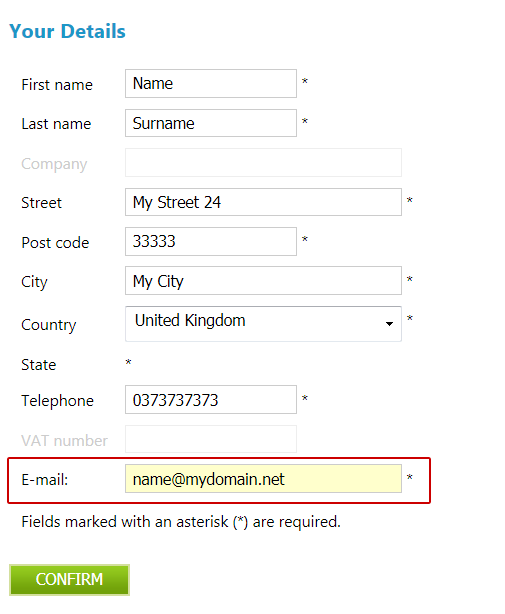
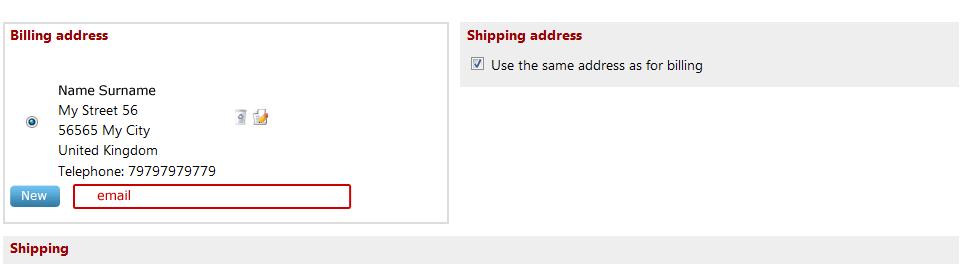
Simple registration with disabled option of getting activation email in joomla works now fine.
User is automaticly enabled in joomla users list. That's great.
By the way do you know why is it not automaticly enabled if he registers throu regular registration (not HIkaShop).
I have still the problem with e-mail:
I'd like to have just one e-mail field:
1. in "Your Details" (which shows first)
2. and in Billing Adddress or somewhere close to Billing Adddress (this shows when user fills "Your Details").
Email should be shown when user fills it in "Your details". He should not fill it twice. (But he could change it if he would like to. So it should be editable.)
Last edit: 15 years 4 months ago by vasjaf.
Please Log in or Create an account to join the conversation.
15 years 4 months ago #18948
by nicolas
Replied by nicolas on topic Re: The name of customer not in customer tab (backend)
For the joomla registration, that's because it's the way they're doing it...
There is only one email field on your screenshot. I'm not following you.
There is only one email field on your screenshot. I'm not following you.
Please Log in or Create an account to join the conversation.
15 years 4 months ago #18949
by vasjaf
Replied by vasjaf on topic Re: The name of customer not in customer tab (backend)
I changed the images. Look now previous post. You were too fast.
I would like to have the email also in Billing Address.
Thanks for your super fast reply.
I would like to have the email also in Billing Address.
Thanks for your super fast reply.
Please Log in or Create an account to join the conversation.
15 years 4 months ago #18950
by nicolas
Replied by nicolas on topic Re: The name of customer not in customer tab (backend)
You can't. User information is user information. Address information is address information. That's two different things.
Please Log in or Create an account to join the conversation.
15 years 4 months ago #18953
by vasjaf
Replied by vasjaf on topic Re: The name of customer not in customer tab (backend)
Can be changed the default value of address email with value of user email,
when user presses CONFIRM button?
when user presses CONFIRM button?
Please Log in or Create an account to join the conversation.
15 years 4 months ago #18956
by nicolas
Replied by nicolas on topic Re: The name of customer not in customer tab (backend)
Everything is possible if you code it...but there is no option for that and that would mean some js code in the view.
Please Log in or Create an account to join the conversation.
15 years 4 months ago #18963
by vasjaf
Replied by vasjaf on topic Re: The name of customer not in customer tab (backend)
I am confused now. I don't know which way to choose. With registration or without.
Thanks Nicolas. I always appreciate your quick and good replies.
Thanks Nicolas. I always appreciate your quick and good replies.
Please Log in or Create an account to join the conversation.
15 years 4 months ago #18967
by nicolas
Replied by nicolas on topic Re: The name of customer not in customer tab (backend)
What you should do maybe is add a link to the user details page where the user can change his email. That's a joomla page. You can create such link via the joomla menu manager by creating a menu of the type user "User Form Layout".
Please Log in or Create an account to join the conversation.
15 years 3 months ago #20058
by vasjaf
Replied by vasjaf on topic Re: The name of customer not in customer tab (backend)
Finally I'm back.
Thanks. I've done something similar.
Thanks. I've done something similar.
Please Log in or Create an account to join the conversation.
15 years 3 months ago #20630
by vasjaf
Replied by vasjaf on topic Re: The name of customer not in customer tab (backend)
Hi,
if customer updates his email in "user details", it doesn't update in PayPal (express checkout).
When customer registers (quick registration) to HikaShop (cart checkout) with "email-1@site.com" and procedes to PayPal (express checkout) site.
There is everything OK. Customer's email field is already filled with "email-1@site.com" on PayPal site.
But if the customer changes his email for example to "email-2@site.com" in HikaShop checkout before proceding to PayPal - I've done a form the customer cah change his email. In the "_users" table of joomla database it changes to "email-2@site.com", which is OK. And when he procedes to PayPal (express checkout) site it shows the old one "email-1@site.com" and not the updated one "email-2@site.com".
Do you have any idea what is wrong?
I suppose the email variable HikaShop sends to PayPal does not update.
if customer updates his email in "user details", it doesn't update in PayPal (express checkout).
When customer registers (quick registration) to HikaShop (cart checkout) with "email-1@site.com" and procedes to PayPal (express checkout) site.
There is everything OK. Customer's email field is already filled with "email-1@site.com" on PayPal site.
But if the customer changes his email for example to "email-2@site.com" in HikaShop checkout before proceding to PayPal - I've done a form the customer cah change his email. In the "_users" table of joomla database it changes to "email-2@site.com", which is OK. And when he procedes to PayPal (express checkout) site it shows the old one "email-1@site.com" and not the updated one "email-2@site.com".
Do you have any idea what is wrong?
I suppose the email variable HikaShop sends to PayPal does not update.
Please Log in or Create an account to join the conversation.
15 years 3 months ago #20656
by nicolas
Replied by nicolas on topic Re: The name of customer not in customer tab (backend)
Hi,
It's because you don't trigger the user plugins when you update the user information of joomla. Because of that, the user syncrhonization plugin cannot synchronize the new information in HikaShop and HikaShop still has the old address email stored in the table jos_hikashop_user. You would have the same problem with any user plugin which would not be triggered when the email is changed via your form.
There is only two solutions:
1. You trigger the user plugins when changign the user information
2. You update manually the table jos_hikashop_user when you update jos_users.
It's because you don't trigger the user plugins when you update the user information of joomla. Because of that, the user syncrhonization plugin cannot synchronize the new information in HikaShop and HikaShop still has the old address email stored in the table jos_hikashop_user. You would have the same problem with any user plugin which would not be triggered when the email is changed via your form.
There is only two solutions:
1. You trigger the user plugins when changign the user information
2. You update manually the table jos_hikashop_user when you update jos_users.
Please Log in or Create an account to join the conversation.
15 years 3 months ago #20681
by vasjaf
Replied by vasjaf on topic Re: The name of customer not in customer tab (backend)
Thanks. I solved it as you said and it works.
Please Log in or Create an account to join the conversation.
Time to create page: 0.439 seconds