

- Posts: 51
- Thank you received: 0
Default picture at 'Add to Cart' stage - Go Back
15 years 6 days ago #27266
by IanK
Default picture at 'Add to Cart' stage - Go Back was created by IanK
When at the Add to Cart stage, if a product has an associated picture, it shows beside the Add to Cart button. If the default image is used, it does not show. Is there any way to force the default image to show beside the Add to Cart button?
Also, is there anyway to add a Go Back/Previous Page button, rather than having to use the Browser Go Back while navigating the cart?
The testing site is www.pokeintheeye.co.uk/brspools
Also, is there anyway to add a Go Back/Previous Page button, rather than having to use the Browser Go Back while navigating the cart?
The testing site is www.pokeintheeye.co.uk/brspools
Please Log in or Create an account to join the conversation.

15 years 6 days ago - 15 years 6 days ago #27270
by nicolas
Replied by nicolas on topic Re: Default picture at 'Add to Cart' stage - Go Back
You would have to edit the file "show" of the view "product" via the menu Display->Views and change the line:
if(!empty($this->element->images)){
to:
if(true || !empty($this->element->images)){
if(!empty($this->element->images)){
to:
if(true || !empty($this->element->images)){
Last edit: 15 years 6 days ago by nicolas.
Please Log in or Create an account to join the conversation.
15 years 6 days ago #27278
by IanK
Replied by IanK on topic Re: Default picture at 'Add to Cart' stage - Go Back
Hi Nicolas, I've tried this, and yes, the image shows, but also the error
Warning: reset() [function.reset]: Passed variable is not an array or object in /home/iankenny/public_html/pokeintheeye.co.uk/brspools/templates/brspools139_3col/html/com_hikashop/product/show.php on line 44
Warning: reset() [function.reset]: Passed variable is not an array or object in /home/iankenny/public_html/pokeintheeye.co.uk/brspools/templates/brspools139_3col/html/com_hikashop/product/show.php on line 44
Please Log in or Create an account to join the conversation.
15 years 6 days ago #27281
by nicolas
Replied by nicolas on topic Re: Default picture at 'Add to Cart' stage - Go Back
you can just change the line
$image = reset($this->element->images);
to:
$image = @reset($this->element->images);
in order to remove that warning.
$image = reset($this->element->images);
to:
$image = @reset($this->element->images);
in order to remove that warning.
Please Log in or Create an account to join the conversation.
15 years 6 days ago #27287
by IanK
Replied by IanK on topic Re: Default picture at 'Add to Cart' stage - Go Back
Thank you Nicolas. This works.
Good luck with JED. Have you any further news?
Good luck with JED. Have you any further news?
Please Log in or Create an account to join the conversation.
15 years 6 days ago #27288
by nicolas
Replied by nicolas on topic Re: Default picture at 'Add to Cart' stage - Go Back
No news from them since we sent our last email to them two weeks ago unfortunately.
Please Log in or Create an account to join the conversation.
15 years 5 days ago - 15 years 5 days ago #27336
by IanK
Replied by IanK on topic Re: Default picture at 'Add to Cart' stage - Go Back
pokeintheeye.co.uk/brspools/index.php/sh.../category_pathway-59
Nicolas - is there a way to force the item details to the centre (or even just further down) of the available space rather than at the top?
Thank you!
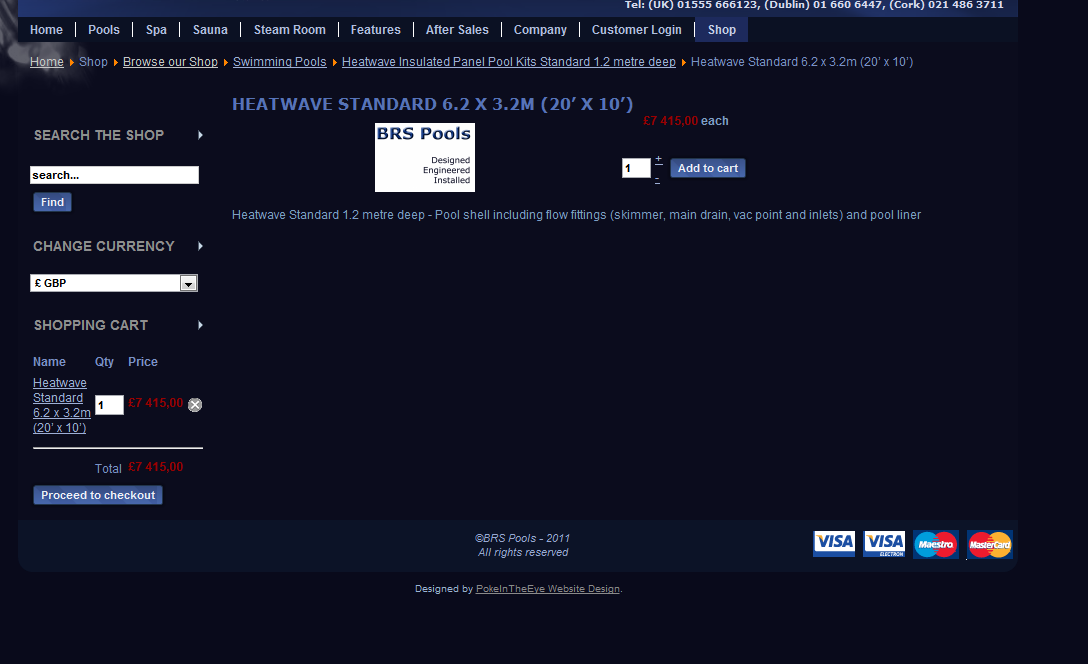
Nicolas - is there a way to force the item details to the centre (or even just further down) of the available space rather than at the top?
Thank you!
Last edit: 15 years 5 days ago by IanK.
Please Log in or Create an account to join the conversation.
15 years 5 days ago #27337
by nicolas
Replied by nicolas on topic Re: Default picture at 'Add to Cart' stage - Go Back
You can use that CSS:
.hikashop_product_page{
margin-top: 200px;
}
.hikashop_product_page{
margin-top: 200px;
}
Please Log in or Create an account to join the conversation.
15 years 3 days ago #27429
by IanK
Replied by IanK on topic Re: Default picture at 'Add to Cart' stage - Go Back
Thanks Nicolas, should this be in frontend or backend css?
Please Log in or Create an account to join the conversation.
15 years 3 days ago #27441
by nicolas
Replied by nicolas on topic Re: Default picture at 'Add to Cart' stage - Go Back
The front end.
Please Log in or Create an account to join the conversation.
14 years 11 months ago - 14 years 11 months ago #28062
by IanK
Replied by IanK on topic Re: Default picture at 'Add to Cart' stage - Go Back
Nicolas,
1) Can the thumbnail be forced to sit to the left
2) Can the thumbnail and price be forced down by
50px, so that they do not sit tightly below the
product description.
3) Is there any way to add a 'Go Back' button
4) Can the money amount be formatted £10,000.00 instead
of £10 000,00
This is for a particularly 'fastidious' client.
Thank you once again for your help.
IanK
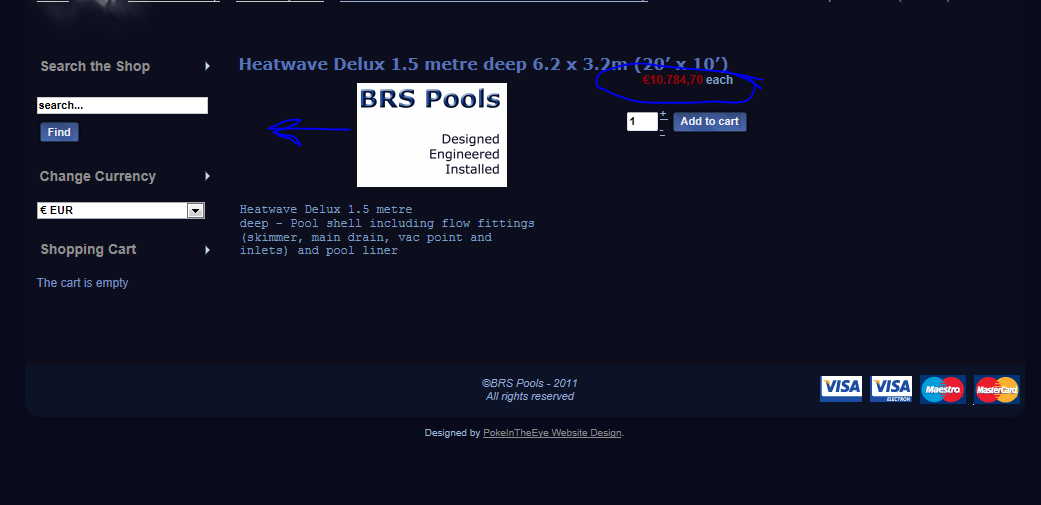
1) Can the thumbnail be forced to sit to the left
2) Can the thumbnail and price be forced down by
50px, so that they do not sit tightly below the
product description.
3) Is there any way to add a 'Go Back' button
4) Can the money amount be formatted £10,000.00 instead
of £10 000,00
This is for a particularly 'fastidious' client.
Thank you once again for your help.
IanK
Last edit: 14 years 11 months ago by IanK.
Please Log in or Create an account to join the conversation.
14 years 11 months ago #28091
by nicolas
Replied by nicolas on topic Re: Default picture at 'Add to Cart' stage - Go Back
1. You can use that CSS:
#hikashop_product_left_part div {
text-align: left !important;
}
2.You can use that CSS:
.hikashop_product_right_part {
padding-top: 50px;
}
3. There is always a way. You can edit the file show of the view product via the menu Display->Views and add the code:
<button onclick="history.go(-1);">Back</button>
4. You can change the format of display of prices by editing your currency via the menu System->Currencies.
#hikashop_product_left_part div {
text-align: left !important;
}
2.You can use that CSS:
.hikashop_product_right_part {
padding-top: 50px;
}
3. There is always a way. You can edit the file show of the view product via the menu Display->Views and add the code:
<button onclick="history.go(-1);">Back</button>
4. You can change the format of display of prices by editing your currency via the menu System->Currencies.
Please Log in or Create an account to join the conversation.
14 years 11 months ago #28112
by IanK
Replied by IanK on topic Re: Default picture at 'Add to Cart' stage - Go Back
Thank you Nicolas.
Please Log in or Create an account to join the conversation.
Time to create page: 0.150 seconds