

- Posts: 209
- Thank you received: 18
How to put the variants in a particular order?
14 years 9 months ago #37735
by JIK
How to put the variants in a particular order? was created by JIK
Hi Nicolas,
Is there a way to put the vaiants in a set order? I can't see any ordering boxes in the manage variant window. My problem is that I have a site where the users need to choose a date for available events.
So, for example, I have a characterstic called "Choose date" and the variants are:
2 Feb 2012
12 March 2012
1 April 2012 etc
From what I can see, I can tell the system to display the characteristics by ID or Name (Alphabetical) and the variants then inherit that setting. When I add the variants the ID is set by the system by some sort of logic but I can't change it or control the order. So, my only option is to set the display to Name. In the above example I end up with:
1 April 2012
12 March 2012
2 Feb 2012
or if I put the name of the day I get:
Monday, 12 March 2012
Sunday, 1 April 2012
Thursday, 2 Feb 2012
The ordering only seems to cater for straight numbers, 1, 2, 3 etc, like sizes.
Also, I can see in the HS demo site a field in the product setup called "Layout on product page" as seen in attached pic. Is this new to 1.5.6? How does it work? There does not appear to be anything in the help files.
Thanks!
Is there a way to put the vaiants in a set order? I can't see any ordering boxes in the manage variant window. My problem is that I have a site where the users need to choose a date for available events.
So, for example, I have a characterstic called "Choose date" and the variants are:
2 Feb 2012
12 March 2012
1 April 2012 etc
From what I can see, I can tell the system to display the characteristics by ID or Name (Alphabetical) and the variants then inherit that setting. When I add the variants the ID is set by the system by some sort of logic but I can't change it or control the order. So, my only option is to set the display to Name. In the above example I end up with:
1 April 2012
12 March 2012
2 Feb 2012
or if I put the name of the day I get:
Monday, 12 March 2012
Sunday, 1 April 2012
Thursday, 2 Feb 2012
The ordering only seems to cater for straight numbers, 1, 2, 3 etc, like sizes.
Also, I can see in the HS demo site a field in the product setup called "Layout on product page" as seen in attached pic. Is this new to 1.5.6? How does it work? There does not appear to be anything in the help files.
Thanks!
Please Log in or Create an account to join the conversation.
14 years 9 months ago #37739
by JIK
Replied by JIK on topic Re: How to put the variants in a particular order?
Also, in the "Manage Variants" area, setting a variant to "unpublished" has no effect whatsoever.
Please Log in or Create an account to join the conversation.

14 years 9 months ago #37827
by nicolas
Replied by nicolas on topic Re: How to put the variants in a particular order?
Unpublishing a variant has the effect of not being able to purchase it.
If you don't want to see an option, you should delete all the variants using it.
There is no ordering to the variants, you should do that in the characteristics by adding the values in the correct order.
Why not just use custom item fields instead of characteristics ? If you're trying to have a selection for the user without any price change, information change or stock, you should use custom fields. It's more adapted to what you want and thus way simpler to use.
For that new option it allows you to select a different layout for the product page.
If you don't want to see an option, you should delete all the variants using it.
There is no ordering to the variants, you should do that in the characteristics by adding the values in the correct order.
Why not just use custom item fields instead of characteristics ? If you're trying to have a selection for the user without any price change, information change or stock, you should use custom fields. It's more adapted to what you want and thus way simpler to use.
For that new option it allows you to select a different layout for the product page.
Please Log in or Create an account to join the conversation.
14 years 9 months ago #38369
by JIK
Replied by JIK on topic Re: How to put the variants in a particular order?
1. What I'm saying is, there should be an ability to set an order for the variants. When you add the values to the characteristics in the correct order (which I have done), and then add the characteristic to the product, Hikashop builds the variant list in an order that seems to be totally random especially if you have more than one characteristic. A simple fix to this would be to allow us to order the variants by the variant code maybe, at least that way there would be some control other than inherited alphabetic or ID. Been asking for this for
quite some time
and was told it was on the to do list well over a year ago!
2. I have two characteristics for each of my products. The values displayed are specific to the product and do vary between products. In order to force the user to make a selection in each of the characteristics, I have included a non-break space value, set it's quantity to zero and set it as the default for each characteristic. The result is that a user cannot add a product to the cart without first making a selection in each of the two characteristic boxes. This works well.
In moving away from characteristics to custom fields as you suggest, I found that you can add a product to the cart without making selections. I have tried everything including setting a disabled "Please select" value and setting the field to required. Makes no difference.
3. How to create a custom field that can be assigned to just a single product? The "item" type automatically assigns it to EVERY product and the "product" type automatically assigns it to every new and modified product. How do you create a custom field that is for just one product? And then how do you assign it to just that product?
4. A "product" type custom field does not appear on the product page at all - just a line with the field name and the first value under the heading specifications, or, if the product has not be edited since the creation of the field nothing appears except the heading "specifications". Is this a bug in 1.5.6?
(Before you ask, in trying the above and in complete frustration, I totally uninstalled Hikashop including removing the tables in PHPMyadmin and then did a completely fresh install of Business 1.5.6 to ensure that none of my many overrides were creating problems! They weren't.)
Thanks.
2. I have two characteristics for each of my products. The values displayed are specific to the product and do vary between products. In order to force the user to make a selection in each of the characteristics, I have included a non-break space value, set it's quantity to zero and set it as the default for each characteristic. The result is that a user cannot add a product to the cart without first making a selection in each of the two characteristic boxes. This works well.
In moving away from characteristics to custom fields as you suggest, I found that you can add a product to the cart without making selections. I have tried everything including setting a disabled "Please select" value and setting the field to required. Makes no difference.
3. How to create a custom field that can be assigned to just a single product? The "item" type automatically assigns it to EVERY product and the "product" type automatically assigns it to every new and modified product. How do you create a custom field that is for just one product? And then how do you assign it to just that product?
4. A "product" type custom field does not appear on the product page at all - just a line with the field name and the first value under the heading specifications, or, if the product has not be edited since the creation of the field nothing appears except the heading "specifications". Is this a bug in 1.5.6?
(Before you ask, in trying the above and in complete frustration, I totally uninstalled Hikashop including removing the tables in PHPMyadmin and then did a completely fresh install of Business 1.5.6 to ensure that none of my many overrides were creating problems! They weren't.)
Thanks.
Please Log in or Create an account to join the conversation.
14 years 8 months ago #38654
by nicolas
Replied by nicolas on topic Re: How to put the variants in a particular order?
Hi,
1. Yes, it's still in the todo list. The multiple taxes feature was also in the list for more than a year before we developed it, after someone paid for its development. The more something is requested the more we tend to do it quickly. This one is not a priority. It doesn't mean we won't do it. It's just that there are only 24h in a day, and we try to do as much as possible but we can't do everything so we have to prioritize.
2. The first value of the dropdown with the "make a selection" should have an empty "value". That way the system will consider that there is nothing selected if that option of the dropdown is selected and that the field "require" option is turned on. This works fine for us. If it doesn't for you, please give a link to that product page so that we can see the problem.
3. You can't assign it to a product. But you can assign it to a category. So you will have to create one unpbulished category, assign it in the custom field and in the products where you want that field with these values as a second category and it will only display for these products.
4. That's normal. You should create custom fields of the table "item" and not "product".
1. Yes, it's still in the todo list. The multiple taxes feature was also in the list for more than a year before we developed it, after someone paid for its development. The more something is requested the more we tend to do it quickly. This one is not a priority. It doesn't mean we won't do it. It's just that there are only 24h in a day, and we try to do as much as possible but we can't do everything so we have to prioritize.
2. The first value of the dropdown with the "make a selection" should have an empty "value". That way the system will consider that there is nothing selected if that option of the dropdown is selected and that the field "require" option is turned on. This works fine for us. If it doesn't for you, please give a link to that product page so that we can see the problem.
3. You can't assign it to a product. But you can assign it to a category. So you will have to create one unpbulished category, assign it in the custom field and in the products where you want that field with these values as a second category and it will only display for these products.
4. That's normal. You should create custom fields of the table "item" and not "product".
Please Log in or Create an account to join the conversation.
14 years 8 months ago - 14 years 8 months ago #38766
by svarmuza
Replied by svarmuza on topic Re: How to put the variants in a particular order?
SOLVED...update,
Sorry i havent noticed DEFAULT column in characteristics where i can set default value from select list...now I got it...thanks...
Hello,
Im another person who would like to see this variant ordering (of select list) to be fixed right since now it has its own weird way of order (when i click to product detail page it displays the price of last characteristic value I entered...and it should be first)
. You said that if people make more requests, it gets higher to priority list...so Im making a request
Im checking your great component to do a site for my client, and im willing to pay for commercial licence, but I would like to fix these small bugs, so everything can work fine.
Thanks,
Sasa
Sorry i havent noticed DEFAULT column in characteristics where i can set default value from select list...now I got it...thanks...
Hello,
Im another person who would like to see this variant ordering (of select list) to be fixed right since now it has its own weird way of order (when i click to product detail page it displays the price of last characteristic value I entered...and it should be first)
. You said that if people make more requests, it gets higher to priority list...so Im making a request
Im checking your great component to do a site for my client, and im willing to pay for commercial licence, but I would like to fix these small bugs, so everything can work fine.
Thanks,
Sasa
Last edit: 14 years 8 months ago by svarmuza.
Please Log in or Create an account to join the conversation.
14 years 8 months ago #38922
by nicolas
Replied by nicolas on topic Re: How to put the variants in a particular order?
It's noted
Please Log in or Create an account to join the conversation.
13 years 6 months ago #99305
by rikatos
Replied by rikatos on topic How to put the variants in a particular order?
just imported variants from old site, and its decided to reorder them all and theres still no option to order them yourself it seems? 
Please Log in or Create an account to join the conversation.
13 years 6 months ago #99308
by nicolas
Replied by nicolas on topic How to put the variants in a particular order?
The ordering is done with the "order" field of the values of the characteristics.
Please Log in or Create an account to join the conversation.
13 years 6 months ago #99310
by rikatos
Replied by rikatos on topic How to put the variants in a particular order?
I am talking about the variants inside the characteristics. I know there is a order field in the Characteristic fields themselves but as I have one characteristic with 10 variants of that characteristic it is redundant to me.
Please Log in or Create an account to join the conversation.

13 years 6 months ago #99378
by Xavier
Replied by Xavier on topic How to put the variants in a particular order?
The characteristic values can be ordered in the Characteristic menu, the variants can be order in the product edition page.
I don't see of which variants you are talking about, can you give us a screenshot of the place you need to order them ?
I don't see of which variants you are talking about, can you give us a screenshot of the place you need to order them ?
Please Log in or Create an account to join the conversation.
13 years 6 months ago #99439
by JIK
Replied by JIK on topic How to put the variants in a particular order?
Xavier, if you edit a product that has characteristics assigned and click on "manage variants" it opens the variants screen. On this screen there is no ordering functionality resulting in the characteristic's variants being all over the place in the front end.
Has been like this since day one and I too wish it would be solved.
Has been like this since day one and I too wish it would be solved.
Please Log in or Create an account to join the conversation.
13 years 6 months ago #99440
by nicolas
Replied by nicolas on topic How to put the variants in a particular order?
As I already said in my previous message the ordering is done with the "order" field of the values of the characteristics.
That was added a few months ago in HikaShop (a year?) in order to order the values of the characteristics on the frontend.
Thanks to that, you configure the ordering once for the values of the characteristic, and it reorder them for all the variants of all the products on the frontend, which is why there is no order column in the "manage variants" area since it is not needed.
That was added a few months ago in HikaShop (a year?) in order to order the values of the characteristics on the frontend.
Thanks to that, you configure the ordering once for the values of the characteristic, and it reorder them for all the variants of all the products on the frontend, which is why there is no order column in the "manage variants" area since it is not needed.
Please Log in or Create an account to join the conversation.
13 years 6 months ago #99451
by JIK
Replied by JIK on topic How to put the variants in a particular order?
Hi Nicolas, that would be great except it doesn't work. Changing the order of the variants in the characteristics window has no impact on what is displayed on the front end. See pics.
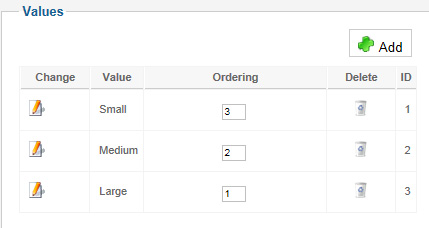
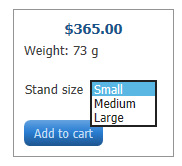

Maybe I'm missing something and would be very happy to know how this is done.
Tks.
Maybe I'm missing something and would be very happy to know how this is done.
Tks.
Please Log in or Create an account to join the conversation.
13 years 6 months ago #99462
by nicolas
Replied by nicolas on topic How to put the variants in a particular order?
Then it means that you changed the HikaShop configuration option "Characteristics values ordering" to something else than "ordering", which is the default value, and because of that it is ordering the values on something else that the ordering that you entered.
I can assure you that this has been working since a long time in hikaShop for everyone.
I can assure you that this has been working since a long time in hikaShop for everyone.
The following user(s) said Thank You: JIK
Please Log in or Create an account to join the conversation.
13 years 6 months ago - 13 years 6 months ago #99489
by rikatos
Replied by rikatos on topic How to put the variants in a particular order?
Am I missing something ? Changed nothing in the configuration. and please see below.
My product characteristics are as follows :
image missing http://oceans17.co.uk/images/characteristics.JPG
Then when I click 'Manage Variants' I get :
image missing http://oceans17.co.uk/images/variants.JPG
as you can see, not ordering on variants ?
My product characteristics are as follows :
image missing http://oceans17.co.uk/images/characteristics.JPG
Then when I click 'Manage Variants' I get :
image missing http://oceans17.co.uk/images/variants.JPG
as you can see, not ordering on variants ?
Last edit: 13 years 6 months ago by rikatos.
Please Log in or Create an account to join the conversation.
13 years 6 months ago #99503
by nicolas
Replied by nicolas on topic How to put the variants in a particular order?
Please check the option "Characteristics values ordering" of the configuration and make sure that it is set to "ordering" and the values of the characteristics will be ordered based on the ordering on the frontend.
As I already said, the "manage variants" listing is not ordered based on that.
As I already said, the "manage variants" listing is not ordered based on that.
Please Log in or Create an account to join the conversation.
13 years 6 months ago #99525
by rikatos
Replied by rikatos on topic How to put the variants in a particular order?
Ahh ok, gotcha, have put to id and now working.
SO this means all characteristics ordering can only be set globally rather than by each product ? or am I missing something ?
SO this means all characteristics ordering can only be set globally rather than by each product ? or am I missing something ?
Please Log in or Create an account to join the conversation.
13 years 6 months ago #99533
by nicolas
Replied by nicolas on topic How to put the variants in a particular order?
That's the case.
But I don't see why it would be a problem ?
If you want to order by S, M, L, XL, XXL you want the same ordering for each product for that characteristic. So I see that as an advantage to not have to set the ordering for each product where in fact you normally want the same for each product.
But I don't see why it would be a problem ?
If you want to order by S, M, L, XL, XXL you want the same ordering for each product for that characteristic. So I see that as an advantage to not have to set the ordering for each product where in fact you normally want the same for each product.
Please Log in or Create an account to join the conversation.
13 years 6 months ago #99539
by rikatos
Replied by rikatos on topic How to put the variants in a particular order?
At the most basics of levels I agree with you totally
But when you are dealing with many products all with different variants where it may be beneficial to be able to change the order in what the variants are listed then it would be advantageous.
I have a few places where this is the case, but its not a deal breaker so Im not fussed at the moment
But when you are dealing with many products all with different variants where it may be beneficial to be able to change the order in what the variants are listed then it would be advantageous.
I have a few places where this is the case, but its not a deal breaker so Im not fussed at the moment
Please Log in or Create an account to join the conversation.
Time to create page: 0.278 seconds