

- Posts: 82
- Thank you received: 0
a few suggestions
15 years 9 months ago #4161
by amitm
a few suggestions was created by amitm
hi,
i have a suggestion that can move hikashop one step ahead.
in the custom field (product)
thanks
Amit
i have a suggestion that can move hikashop one step ahead.
in the custom field (product)
-
when choosing a text area i thing that it should have an editor - it can make the product page more sexy
-
add the possibility of a form - simple one that will use the customer ask a question about the product - this is very important before a buying decision to let the customer the ability to ask Q about a product
thanks
Amit
Please Log in or Create an account to join the conversation.

15 years 9 months ago #4166
by nicolas
Replied by nicolas on topic Re: a few suggestions
Hi,
Thank you for your feedback.
The first option is nice. However, joomla does not handle well multiple html editors on the same page and we had trouble with that. So having custom fields with an html editor could break the product edition screen depending of your editor, the version of joomla , your browser etc. We couldn't find a way to solve all the cases and had to abandon that idea (we wanted to do that for the multiple translations edition but had to use popups in the end).
Point 2 is taken into account.
Thank you
Thank you for your feedback.
The first option is nice. However, joomla does not handle well multiple html editors on the same page and we had trouble with that. So having custom fields with an html editor could break the product edition screen depending of your editor, the version of joomla , your browser etc. We couldn't find a way to solve all the cases and had to abandon that idea (we wanted to do that for the multiple translations edition but had to use popups in the end).
Point 2 is taken into account.
Thank you
Please Log in or Create an account to join the conversation.
15 years 9 months ago #4242
by amitm
Replied by amitm on topic Re: a few suggestions
hi again,
1. Related products - if i am adding it to the product page and i have jComments working, the user want know about what is the comment, beacause it will be under the related products!
2. in the custom fields - i need to add a url, how can i do it? i need that it will be a link.
BR
Amit
1. Related products - if i am adding it to the product page and i have jComments working, the user want know about what is the comment, beacause it will be under the related products!
2. in the custom fields - i need to add a url, how can i do it? i need that it will be a link.
BR
Amit
Please Log in or Create an account to join the conversation.
15 years 9 months ago #4244
by nicolas
Replied by nicolas on topic Re: a few suggestions
Hi,
1. you can switch the comment section and the sub modules of the product page easily by editing the file show of the view product via themenu Display->Views. The code is near the end.
2. you can add html in the field and it will become a link: <a href="MY_LINK">TEXT</a>
1. you can switch the comment section and the sub modules of the product page easily by editing the file show of the view product via themenu Display->Views. The code is near the end.
2. you can add html in the field and it will become a link: <a href="MY_LINK">TEXT</a>
Please Log in or Create an account to join the conversation.
15 years 9 months ago #4245
by amitm
Replied by amitm on topic Re: a few suggestions
hi,
1. i tried to add an html to the custom field for example: <a href=" www.youtube.com ">youtube
but after saving the system delete the code and just the youtube text remain and its not becoming a link at the front.
2. i understand thats its a problom to have 2 editors in 1 page, maybe its possible to do something like that:
to split the desription of the product page, that some of the text will show at the category view and the second part will show just at the product page. (i think its a must for a product page)
enclose a pic that describe it.
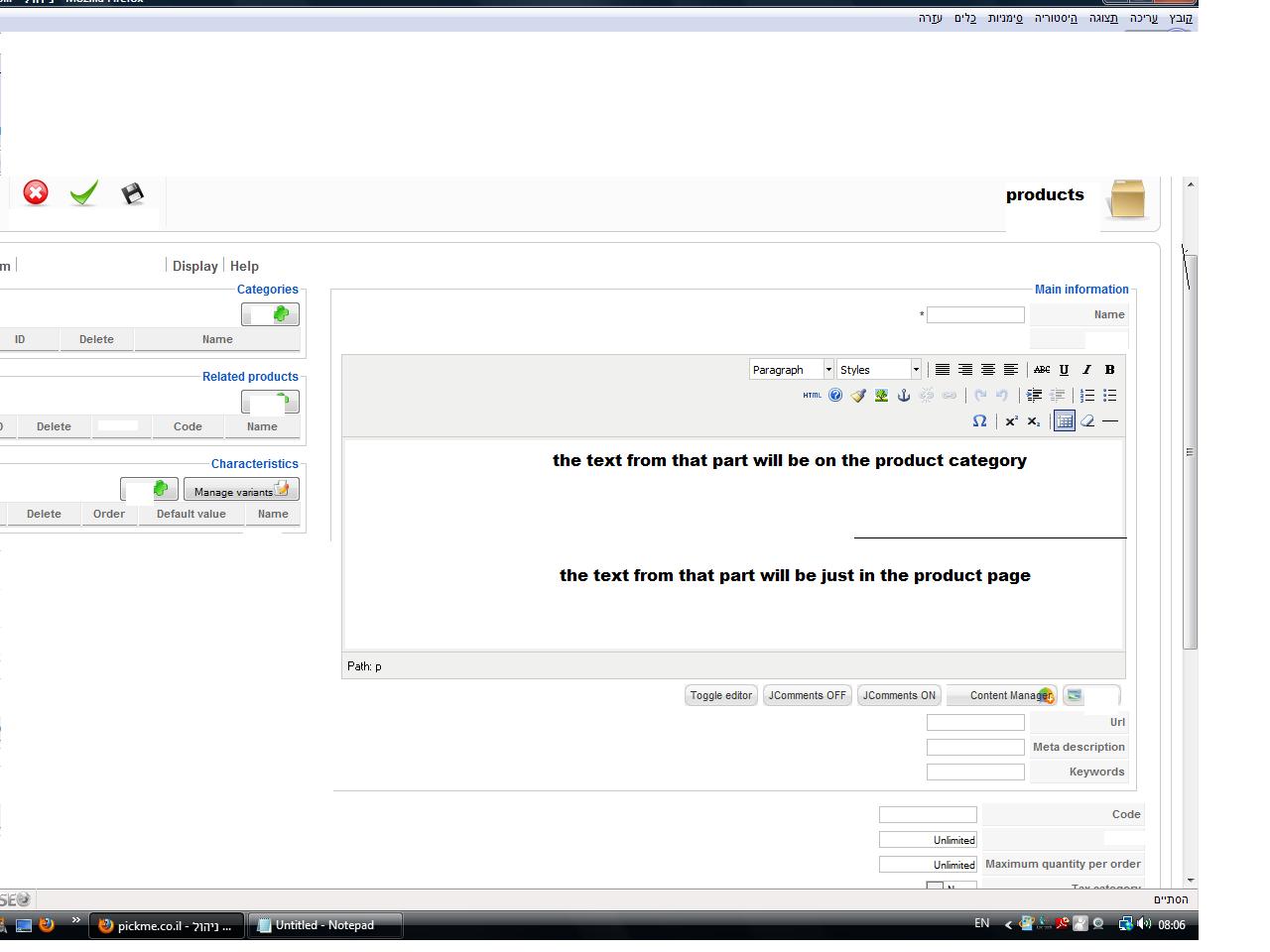
1. i tried to add an html to the custom field for example: <a href=" www.youtube.com ">youtube
but after saving the system delete the code and just the youtube text remain and its not becoming a link at the front.
2. i understand thats its a problom to have 2 editors in 1 page, maybe its possible to do something like that:
to split the desription of the product page, that some of the text will show at the category view and the second part will show just at the product page. (i think its a must for a product page)
enclose a pic that describe it.
Please Log in or Create an account to join the conversation.
15 years 9 months ago #4246
by amitm
Replied by amitm on topic Re: a few suggestions
for the first thing the link : <a href="
www.youtube.com
">youtube
Please Log in or Create an account to join the conversation.
15 years 9 months ago - 15 years 9 months ago #4249
by nicolas
Replied by nicolas on topic Re: a few suggestions
Hi,
1. Indeed HTML tags are removed from custom fields for security reasons.
You can change the line
to
in the file administrator/components/com_hikashop/classes/field.php
2. You can already do that by adding a read more link to the description. Normally you should have a read more button on your html editor for that. Otherwise, you can just add the html code
in the description (by editing the html directly).
1. Indeed HTML tags are removed from custom fields for security reasons.
You can change the line
Code:
$object->$column = strip_tags($value);
Code:
$safeHtmlFilter = & JFilterInput::getInstance(null, null, 1, 1); $object->$column = $safeHtmlFilter->clean($value, 'string');
2. You can already do that by adding a read more link to the description. Normally you should have a read more button on your html editor for that. Otherwise, you can just add the html code
Code:
<hr id="system-readmore" />
Last edit: 15 years 9 months ago by nicolas.
Please Log in or Create an account to join the conversation.
15 years 9 months ago #4310
by YakNarak
Replied by YakNarak on topic Re: a few suggestions
Nicholas,
Please ignore my last post. Forgot to upload the changes.
Working fine now.
Gert.
Please ignore my last post. Forgot to upload the changes.
Working fine now.
Gert.
Please Log in or Create an account to join the conversation.
15 years 8 months ago #6223
by YakNarak
Replied by YakNarak on topic Re: a few suggestions
Nicholas,
Has something changed in the latest version?
I tried to apply the above patch in field.php. The string to replace exists twice. I have tried changing either of them and both of them, but my custom field keeps stripping the html code out.
Gert.
Has something changed in the latest version?
I tried to apply the above patch in field.php. The string to replace exists twice. I have tried changing either of them and both of them, but my custom field keeps stripping the html code out.
Gert.
Please Log in or Create an account to join the conversation.
15 years 8 months ago #6226
by nicolas
Replied by nicolas on topic Re: a few suggestions
Since 1.4.2, we integrated the modification (a bit more evolved to increase the speed) so you should not need it.
Please Log in or Create an account to join the conversation.
15 years 8 months ago #6228
by YakNarak
Replied by YakNarak on topic Re: a few suggestions
Hi Nicholas,
I restored the original field.php and html code is still stripped when using this.
Gert.
I restored the original field.php and html code is still stripped when using this.
Gert.
Please Log in or Create an account to join the conversation.
15 years 8 months ago #6230
by nicolas
Replied by nicolas on topic Re: a few suggestions
Please try to replace:
if(!$app->isAdmin()){
by:
if($app->isAdmin()){
in the function checkFields
if(!$app->isAdmin()){
by:
if($app->isAdmin()){
in the function checkFields
Please Log in or Create an account to join the conversation.
15 years 8 months ago #6232
by YakNarak
Replied by YakNarak on topic Re: a few suggestions
I did. It still strips the html code.
Please Log in or Create an account to join the conversation.
15 years 8 months ago #6233
by YakNarak
Replied by YakNarak on topic Re: a few suggestions
Correction. It's working now! Made a mistake in the code.
Thanks again Nicolas.
Gert.
Thanks again Nicolas.
Gert.
Please Log in or Create an account to join the conversation.
Time to create page: 0.393 seconds