

- Posts: 40
- Thank you received: 0
HikaShop Cart Module
14 years 7 months ago #44261
by kizza2
HikaShop Cart Module was created by kizza2
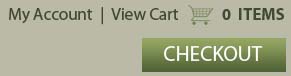
I have been trying to get the cart module to display the same as in the attached image but so far i have had no success. Is it possible and if so could you let me know how. Thanks
Please Log in or Create an account to join the conversation.

14 years 6 months ago #44450
by nicolas
Replied by nicolas on topic Re: HikaShop Cart Module
Yes that's possible. You need to turn on the "mini cart" option of the cart module. The image can be added in CSS and the checkout button via a hikashop checkout menu link.
Please Log in or Create an account to join the conversation.
14 years 6 months ago #44463
by kizza2
Replied by kizza2 on topic Re: HikaShop Cart Module
I do have the mini cart option turned on but it is not displaying the cart. Where is the css relating to this and i am not sure where to find the hikashop checkout menu link. As you can see i am a little confused by it all. Thanks
Please Log in or Create an account to join the conversation.
14 years 6 months ago #44588
by nicolas
Replied by nicolas on topic Re: HikaShop Cart Module
You don't see the cart ? Did you publish your module in a position of your template ?
For the CSS, you can edit it under the Display tab of the configuration.
For the checkout menu link, you need to create a new menu item of the type "hikashop checkout" via the menu manager of Joomla.
For the CSS, you can edit it under the Display tab of the configuration.
For the checkout menu link, you need to create a new menu item of the type "hikashop checkout" via the menu manager of Joomla.
Please Log in or Create an account to join the conversation.
14 years 6 months ago #44662
by kizza2
Replied by kizza2 on topic Re: HikaShop Cart Module
No there is no cart. I have tried it in a few different positions in the template and all i get is a message the cart is empty or a price if there is something in it.
Please Log in or Create an account to join the conversation.
14 years 6 months ago #44794
by nicolas
Replied by nicolas on topic Re: HikaShop Cart Module
Now that I saw the cart module on your template I understand. I thought that you were saying that the whole cart module was not there. But you're talking about the cart ICON that is not there...
Well, there is no option for that.
That has to be added by adding some CSS OR by adding the HTML of your cart image at the beginning of the file "cart" of the view "product" via the menu Display->Views.
Well, there is no option for that.
That has to be added by adding some CSS OR by adding the HTML of your cart image at the beginning of the file "cart" of the view "product" via the menu Display->Views.
Please Log in or Create an account to join the conversation.
14 years 6 months ago #44832
by kizza2
Replied by kizza2 on topic Re: HikaShop Cart Module
Ok thanks i have done that. Just one other thing is it possible just to show '2 ITEMS' instead of '2 items for $85.00' when something is added to the cart.
Please Log in or Create an account to join the conversation.
14 years 6 months ago #45045
by nicolas
Replied by nicolas on topic Re: HikaShop Cart Module
You can change that via a translation override of the translation key X_ITEMS_FOR_X to:
X_ITEMS_FOR_X="%s ITEMS"
More info on translation overrides: www.hikashop.com/en/download/languages.html#modify
X_ITEMS_FOR_X="%s ITEMS"
More info on translation overrides: www.hikashop.com/en/download/languages.html#modify
Please Log in or Create an account to join the conversation.
14 years 1 month ago #64162
by boopoo
Replied by boopoo on topic Adding 'Checkout' graphic on Mini Cart Module
Hi there,
Maybe you can help a novice
I would like to add a small graphic which says 'Checkout' and display it at the bottom of the mini cart which is in my header. On clicking this, the user would be taken straight to Checkout. At present the user cannot easily see how to go to checkout, as this text does not appear in the 'mini cart'.
Can you possibly help me with a) the code to use (I guess just my /online-shop/checkout URL)(b) which hikashop file to place it in and (c) where in the file to place it?
If you could help I would be very appreciative.
Kind regards
Maybe you can help a novice
I would like to add a small graphic which says 'Checkout' and display it at the bottom of the mini cart which is in my header. On clicking this, the user would be taken straight to Checkout. At present the user cannot easily see how to go to checkout, as this text does not appear in the 'mini cart'.
Can you possibly help me with a) the code to use (I guess just my /online-shop/checkout URL)(b) which hikashop file to place it in and (c) where in the file to place it?
If you could help I would be very appreciative.
Kind regards
Please Log in or Create an account to join the conversation.
14 years 1 month ago #64351
by nicolas
Replied by nicolas on topic Re: Adding 'Checkout' graphic on Mini Cart Module
Hi,
You can add a simple link like that:
at the end of the file "cart" of the view "product" via the menu Display->Views
You can add a simple link like that:
Code:
<a href="http://mywebsite.com/online-shop/checkout">Checkout</a>
Please Log in or Create an account to join the conversation.
14 years 1 month ago #64377
by boopoo
Replied by boopoo on topic Re: Adding 'Checkout' graphic on Mini Cart Module
Hi Nicolas,
Many thanks. Can you tell me exactly where I add that line of code?
I quite literally added it to the very end of the file which gave me a 'parse error'.
Your help on the exact location of where to add that line would be greatly appreciated
Many thanks. Can you tell me exactly where I add that line of code?
I quite literally added it to the very end of the file which gave me a 'parse error'.
Your help on the exact location of where to add that line would be greatly appreciated
Please Log in or Create an account to join the conversation.
14 years 1 month ago #64518
by nicolas
Replied by nicolas on topic Re: Adding 'Checkout' graphic on Mini Cart Module
At the end is fine but since it's PHP code, you need to add the PHP closing tag ?> just before the link.
Please Log in or Create an account to join the conversation.
14 years 1 month ago #64558
by boopoo
Replied by boopoo on topic Re: Adding 'Checkout' graphic on Mini Cart Module
Thats what I forgot Thanks
Thanks Please Log in or Create an account to join the conversation.
Time to create page: 0.418 seconds