
- Posts: 81
- Thank you received: 2
double voting at products
- rockoladeluxe
-
 Topic Author
- Offline
Less
More
14 years 7 months ago #45537
by rockoladeluxe
double voting at products was created by rockoladeluxe
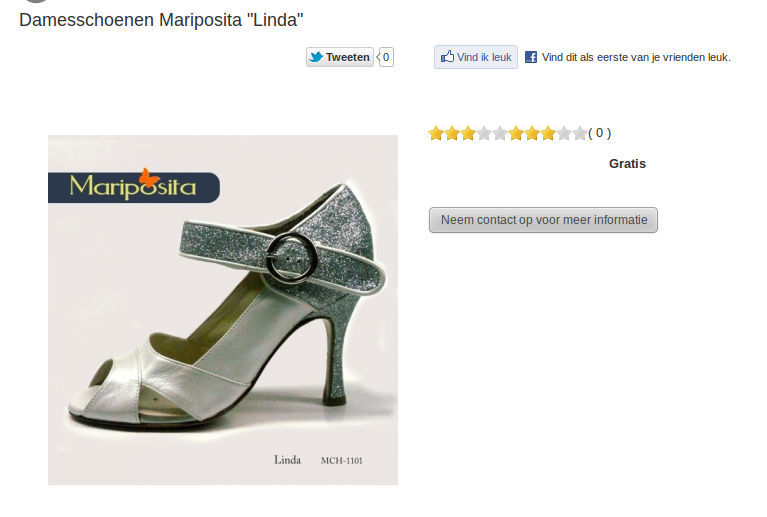
Hi, I activated the voting system, and in either configuration I get 2 groups of stars.
I t must be a small thing, but in the configuration i am not able to get rid of the second group of stars.
i attached a screenshot
Best regards,
Roy
I t must be a small thing, but in the configuration i am not able to get rid of the second group of stars.
i attached a screenshot
Best regards,
Roy
Please Log in or Create an account to join the conversation.

14 years 7 months ago #45655
by nicolas
Replied by nicolas on topic Re: double voting at products
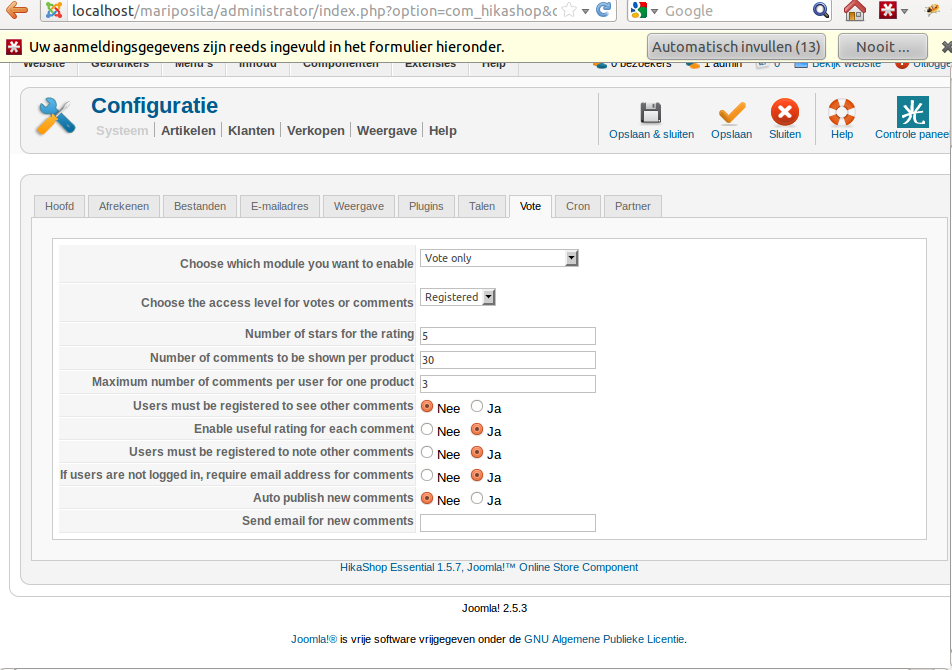
Could you do a screenshot of the vote tab of the configuration so that we can try to reproduce the problem ?
Please Log in or Create an account to join the conversation.
- rockoladeluxe
-
Topic Author
- Offline
Less
More
- Posts: 81
- Thank you received: 2
14 years 7 months ago #45731
by rockoladeluxe
Replied by rockoladeluxe on topic Re: double voting at products
here is my screenshot:
Please Log in or Create an account to join the conversation.

14 years 6 months ago - 14 years 6 months ago #47149
by Xavier
Replied by Xavier on topic Re: double voting at products
Hi rockoladeluxe,
This problem have been corrected recently, it come from the name and the id for the vote module which are the same.
So some explorer don't make the difference between the both, that's why the stars of the comment module are called at the same time than the stars of the vote module.
In the next release this bug is corrected, but you can correct it by yourself if you want.
It involves some modifications.
Edit the file: YourSite/component/com_hikashop/views/vote/tmpl/form.php
Change:
And edit the file: YourSite/administrator/component/com_hikashop/classes/vote.php
Replace all the:
This problem have been corrected recently, it come from the name and the id for the vote module which are the same.
So some explorer don't make the difference between the both, that's why the stars of the comment module are called at the same time than the stars of the vote module.
In the next release this bug is corrected, but you can correct it by yourself if you want.
It involves some modifications.
Edit the file: YourSite/component/com_hikashop/views/vote/tmpl/form.php
Change:
Code:
echo "<select name='hikashop_vote_rating' id='hikashop_vote_rating' style='display:none;'>";
TO
echo '<select name="hikashop_vote_rating" id="hikashop_vote_rating_id">';
And edit the file: YourSite/administrator/component/com_hikashop/classes/vote.php
Replace all the:
Code:
hikashop_vote_rating
TO
hikashop_vote_rating_id
Last edit: 14 years 6 months ago by Xavier.
Please Log in or Create an account to join the conversation.
- rockoladeluxe
-
Topic Author
- Offline
Less
More
- Posts: 81
- Thank you received: 2
14 years 6 months ago #47158
by rockoladeluxe
Replied by rockoladeluxe on topic Re: double voting at products
Hi Xavier,
thanks for the anwser, I'm working with Firefox11 and Chromium for Ubuntu 11.10.
I did the changes then cleared my cache but the double voting is still here.
thanks for the anwser, I'm working with Firefox11 and Chromium for Ubuntu 11.10.
I did the changes then cleared my cache but the double voting is still here.
Please Log in or Create an account to join the conversation.
- rockoladeluxe
-
Topic Author
- Offline
Less
More
- Posts: 81
- Thank you received: 2
14 years 6 months ago #47159
by rockoladeluxe
Replied by rockoladeluxe on topic Re: double voting at products
Hi Xavier,
thanks for the anwser, I'm working with Firefox11 and Chromium for Ubuntu 11.10.
I did the 2 changes you described and then cleared my cache but the double voting is still here...
Thanks,
Roy
thanks for the anwser, I'm working with Firefox11 and Chromium for Ubuntu 11.10.
I did the 2 changes you described and then cleared my cache but the double voting is still here...
Thanks,
Roy
Please Log in or Create an account to join the conversation.
14 years 6 months ago #47164
by Xavier
Replied by Xavier on topic Re: double voting at products
We are going to correct it.
If you only use the vote system and no the comments.
Try to comment the line:
In HikaShop > Display > Views, edit: product / show.php or (show_default.php) it depends of your version of hikashop.
If you only use the vote system and no the comments.
Try to comment the line:
Code:
echo hikashop_getLayout('vote', 'form', $params, $js);
In HikaShop > Display > Views, edit: product / show.php or (show_default.php) it depends of your version of hikashop.
Please Log in or Create an account to join the conversation.
Time to create page: 0.081 seconds