
- Posts: 28
- Thank you received: 0
Hikashop Layout with custom fields
- neil@sm.co.za
-
 Topic Author
- Offline
Less
More
14 years 6 months ago #48976
by neil@sm.co.za
Hikashop Layout with custom fields was created by neil@sm.co.za
I am Building a Real estate website with Hikashop business. I would like to use the custom fields but I cannot het the layout right.
I did look for a tutorial but could not find it. Is the following lay out with custom fields possible is Hikashop?
The bottom layout is the one i would like to have.
The top layout is the current layout.
Thanks Neil
the
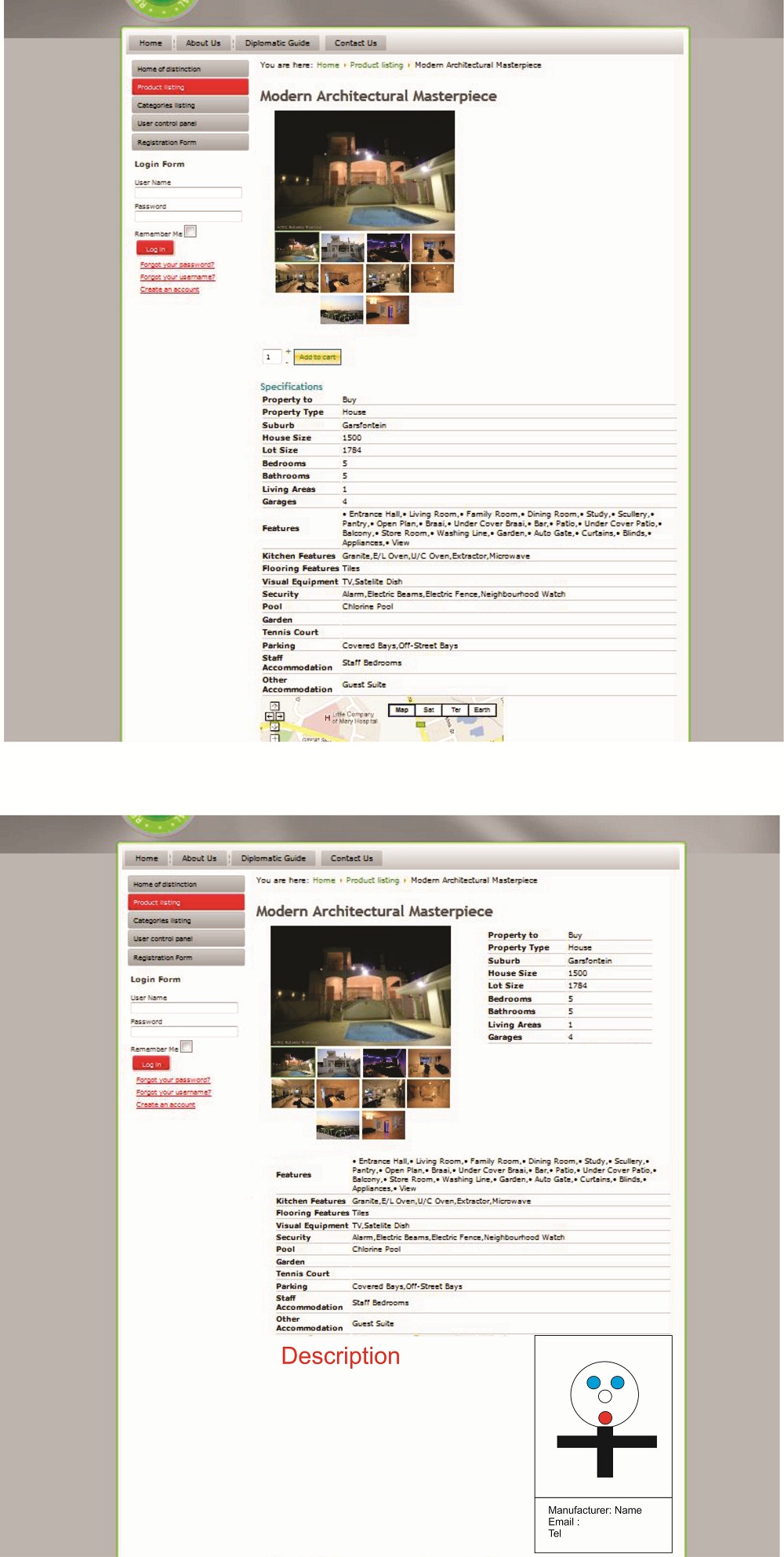
I did look for a tutorial but could not find it. Is the following lay out with custom fields possible is Hikashop?
The bottom layout is the one i would like to have.
The top layout is the current layout.
Thanks Neil
the
Please Log in or Create an account to join the conversation.

14 years 6 months ago #49050
by nicolas
Replied by nicolas on topic Re: Hikashop Layout with custom fields
It's possible yes, but you will have to change the code of the product view files.
The custom fields are displayed by the file "show_block_custom_main" which is displayed inside the file "show_default" where the different elements of the product page are displayed.
You can edit these view files via the menu Display->Views.
The custom fields are displayed by the file "show_block_custom_main" which is displayed inside the file "show_default" where the different elements of the product page are displayed.
You can edit these view files via the menu Display->Views.
Please Log in or Create an account to join the conversation.
- neil@sm.co.za
-
Topic Author
- Offline
Less
More
- Posts: 28
- Thank you received: 0
14 years 5 months ago #49334
by neil@sm.co.za
Replied by neil@sm.co.za on topic Re: Hikashop Layout with custom fields
Hi Nicolas,
I had a look at the code on the show_default and show_block_custom_main files. Unfortunately I am not a php developer myself and although I'm quite familiar with HTML and CSS - I'm not able to figure it out. My first question is how do I split the Specifications section with my custom fields in two or will I have to create two different types of custom fields? Second question, if/now that I'm able to split my custom fields into two sections how do I now move these around with CSS? Can you just send me an example or two?
Highly appreciated!
I had a look at the code on the show_default and show_block_custom_main files. Unfortunately I am not a php developer myself and although I'm quite familiar with HTML and CSS - I'm not able to figure it out. My first question is how do I split the Specifications section with my custom fields in two or will I have to create two different types of custom fields? Second question, if/now that I'm able to split my custom fields into two sections how do I now move these around with CSS? Can you just send me an example or two?
Highly appreciated!
Please Log in or Create an account to join the conversation.
14 years 5 months ago #49399
by nicolas
Replied by nicolas on topic Re: Hikashop Layout with custom fields
the simplest will be to copy/paste the code from show_block_custom_main to show_default and then add a counter in the foreach like that:
$i=0;
foreach(...){
$i++;
if($i>10 continue;
....
}
on our foreach, you use a < and on the other you use a >
$i=0;
foreach(...){
$i++;
if($i>10 continue;
....
}
on our foreach, you use a < and on the other you use a >
Please Log in or Create an account to join the conversation.
Time to create page: 0.063 seconds