
Trouble with back button - page expires

14 years 5 months ago - 14 years 5 months ago #49434
by angelcc79
Trouble with back button - page expires was created by angelcc79
Hi,
When I'm logged in as a registered user, enter into a shop item and press the browser back button, it works fine, but when I go on browsing items and change current page with footer pagination bar and try to enter into the item and then press back button, the page expires and requieres to reload the page.
When I'm not logged in, works fine and there's no issue.
Just tried to enable/disable cache but doesn't work.
The page is ' www.alven.cat ', and there's a menu called "Botiga on-line" where you can find my on-line shop.
Can anyone help me?
Thanks in advance,
When I'm logged in as a registered user, enter into a shop item and press the browser back button, it works fine, but when I go on browsing items and change current page with footer pagination bar and try to enter into the item and then press back button, the page expires and requieres to reload the page.
When I'm not logged in, works fine and there's no issue.
Just tried to enable/disable cache but doesn't work.
The page is ' www.alven.cat ', and there's a menu called "Botiga on-line" where you can find my on-line shop.
Can anyone help me?
Thanks in advance,
Last edit: 14 years 5 months ago by angelcc79.
Please Log in or Create an account to join the conversation.

14 years 5 months ago #49509
by nicolas
Replied by nicolas on topic Re: Trouble with back button - page expires
Hi,
I just tried on your website with Chrome and I didn't had such problem.
I just tried on your website with Chrome and I didn't had such problem.
Please Log in or Create an account to join the conversation.
14 years 5 months ago #49521
by angelcc79
Replied by angelcc79 on topic Re: Trouble with back button - page expires
Hi Nicolas,
First of all, thanks for your quick response and great work with Hikashop.
If you are not logged it works properly, but when you are logged in is when give problems. To check you can follow these steps:
1-Log in as user 'test'- password 'test'
2-Enter into 'Botiga on-line'
3-Choose any of three categories
4-Browse to another page with footer paginator
5-Enter into any item
6-Then press browser back button
7-Here is where page expires and ask to refresh to update page.
Tried with Chrome, Mozilla and IE.
Thanks!!
First of all, thanks for your quick response and great work with Hikashop.
If you are not logged it works properly, but when you are logged in is when give problems. To check you can follow these steps:
1-Log in as user 'test'- password 'test'
2-Enter into 'Botiga on-line'
3-Choose any of three categories
4-Browse to another page with footer paginator
5-Enter into any item
6-Then press browser back button
7-Here is where page expires and ask to refresh to update page.
Tried with Chrome, Mozilla and IE.
Thanks!!
Please Log in or Create an account to join the conversation.
14 years 5 months ago #49600
by nicolas
Replied by nicolas on topic Re: Trouble with back button - page expires
That's normal since you're logged in.
Here is an explanation with a solution if you want to avoid that:
shiflett.org/articles/how-to-avoid-page-has-expired-warnings
Basically, you need to edit the file "listing" of the view "product" of the front end via Display->Views and add such line of code:
ini_set('session.cache_limiter', 'private');
Note that it will only work if your hosting allows the use of ini_set. Otherwise, that has to be set in the php.ini of your server.
Here is an explanation with a solution if you want to avoid that:
shiflett.org/articles/how-to-avoid-page-has-expired-warnings
Basically, you need to edit the file "listing" of the view "product" of the front end via Display->Views and add such line of code:
ini_set('session.cache_limiter', 'private');
Note that it will only work if your hosting allows the use of ini_set. Otherwise, that has to be set in the php.ini of your server.
Please Log in or Create an account to join the conversation.
14 years 5 months ago - 14 years 5 months ago #49649
by angelcc79
Replied by angelcc79 on topic Re: Trouble with back button - page expires
Hello,
Tried with both solutions and still doesn't works.
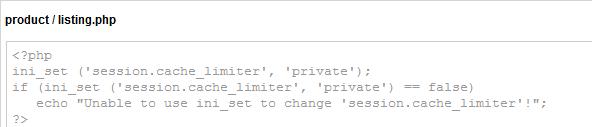
Edited file product/listing.php and edited php.ini of my server as attached images.
Tried with a 'if' sentence to check if the server allows the use of ini_set and doesn't return the 'echo' error sentence.

Thanks for your time.
Tried with both solutions and still doesn't works.
Edited file product/listing.php and edited php.ini of my server as attached images.
Tried with a 'if' sentence to check if the server allows the use of ini_set and doesn't return the 'echo' error sentence.
Thanks for your time.
Last edit: 14 years 5 months ago by angelcc79.
Please Log in or Create an account to join the conversation.
14 years 5 months ago #49738
by nicolas
Replied by nicolas on topic Re: Trouble with back button - page expires
Make sure that you're editing the product/listing.php of your front end template, and not another template.
Other than, that I don't have any solution.
Other than, that I don't have any solution.
Please Log in or Create an account to join the conversation.
14 years 5 months ago - 14 years 5 months ago #49815
by angelcc79
Replied by angelcc79 on topic Re: Trouble with back button - page expires
Hi Nicolas,
Finally solved it by another way. Edited file mywebsite/components/com_hikashop/views/product/tmpl/cart.php and changed 'no cache' value for 'prvate_no_expire' as you can see on image below:

But now I have another problem, it works properly in Mozilla and Chrome, but doesn't work in IE.
Do you know what may be the cause?
Thanks,
Finally solved it by another way. Edited file mywebsite/components/com_hikashop/views/product/tmpl/cart.php and changed 'no cache' value for 'prvate_no_expire' as you can see on image below:
But now I have another problem, it works properly in Mozilla and Chrome, but doesn't work in IE.
Do you know what may be the cause?
Thanks,
Last edit: 14 years 5 months ago by angelcc79.
Please Log in or Create an account to join the conversation.
14 years 5 months ago #49911
by nicolas
Replied by nicolas on topic Re: Trouble with back button - page expires
IE handles the cache differently than FF and chrome.
You should try to add these HTML headers too for IE:
www.php.net/manual/en/function.session-cache-limiter.php#86057
You should try to add these HTML headers too for IE:
www.php.net/manual/en/function.session-cache-limiter.php#86057
Please Log in or Create an account to join the conversation.
Time to create page: 0.125 seconds