
change product page layout

14 years 5 months ago - 14 years 5 months ago #51817
by coentrast
Hi,
I would like to change the layout and also remove items on product level.
If i'm correct the custom css have a left part and right part. But I can't figure out how to change it. i.e.: image left/right, product description:left/right, product title etc.
I've checked the php in the 'view' section, and couldn't find any 'template' or 'layout' php file with the references.
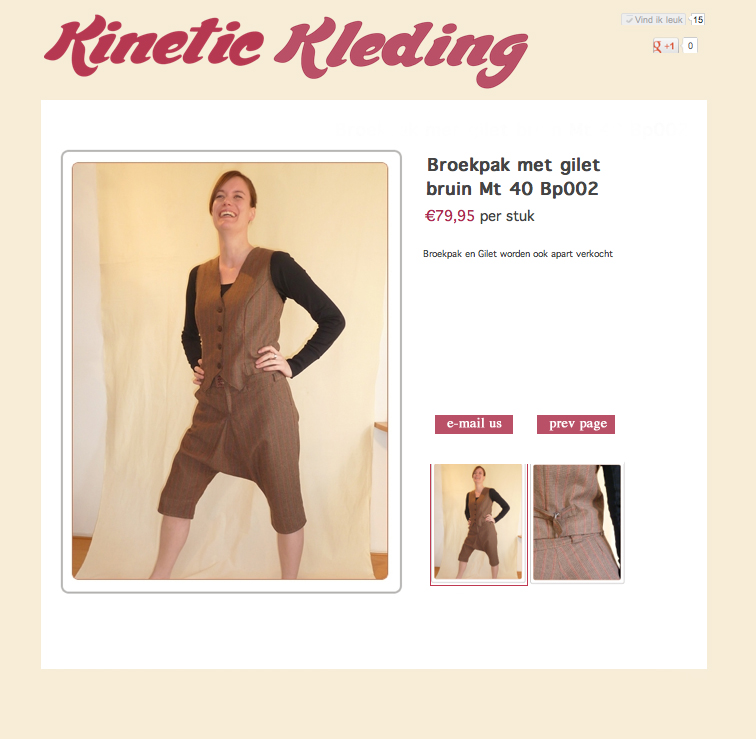
Attached is the way I would like to have it, and you see how it is now in the link
Is this even possible in the free version?
Thanks in advance for the help
Coen
change product page layout was created by coentrast
Hi,
I would like to change the layout and also remove items on product level.
If i'm correct the custom css have a left part and right part. But I can't figure out how to change it. i.e.: image left/right, product description:left/right, product title etc.
I've checked the php in the 'view' section, and couldn't find any 'template' or 'layout' php file with the references.
Attached is the way I would like to have it, and you see how it is now in the link
Is this even possible in the free version?
Thanks in advance for the help
Coen
Last edit: 14 years 5 months ago by coentrast. Reason: image wasn't attached
Please Log in or Create an account to join the conversation.

14 years 5 months ago #51880
by nicolas
Replied by nicolas on topic Re: change product page layout
Hi,
You will have to edit the view file indeed. Of course, you can do that with all the editions of HikaShop.
You need to edit the file "show_default" of the view "product" of your front end template via the menu Display->Views. You will see there the left/right/top/bottom areas mentioned in the CSS.
You will have to edit the view file indeed. Of course, you can do that with all the editions of HikaShop.
You need to edit the file "show_default" of the view "product" of your front end template via the menu Display->Views. You will see there the left/right/top/bottom areas mentioned in the CSS.
The following user(s) said Thank You: coentrast
Please Log in or Create an account to join the conversation.
14 years 5 months ago #51896
by coentrast
Replied by coentrast on topic Re: change product page layout
Hi Nicolas,
Thanks for your quick reply
I did look at that php file but obviously didn't look very well.
I see all the layout css references there now and gonna try to get the right elements in the right css references.
Cheers,
Coen
Thanks for your quick reply
I did look at that php file but obviously didn't look very well.
I see all the layout css references there now and gonna try to get the right elements in the right css references.
Cheers,
Coen
Please Log in or Create an account to join the conversation.
14 years 5 months ago #51906
by coentrast
Replied by coentrast on topic Re: change product page layout
I'm almost there but still a small question considering removing product portions.
I've checked the show_default.php and now there is this line
<span id="hikashop_product_price_main" class="hikashop_product_price_with_options_main">
</span>
But I don't want the 'with-options' behind the price. I've tried several things to delete the part 'with-options' but no result yet.
I get rid of the product code, but can't figure out to loose 'per stuck'
see attachment on my progress
Thanks for the help!
Coen
I've checked the show_default.php and now there is this line
<span id="hikashop_product_price_main" class="hikashop_product_price_with_options_main">
</span>
But I don't want the 'with-options' behind the price. I've tried several things to delete the part 'with-options' but no result yet.
I get rid of the product code, but can't figure out to loose 'per stuck'
see attachment on my progress
Thanks for the help!
Coen
Please Log in or Create an account to join the conversation.
14 years 5 months ago #51920
by coentrast
Replied by coentrast on topic Re: change product page layout
...sorry forgot the screenshot I see!
Cheers
Cheers
Please Log in or Create an account to join the conversation.
14 years 5 months ago #51975
by nicolas
Replied by nicolas on topic Re: change product page layout
You can remove the "price with options" by editing the file "option_price" for your front end template via Display>Views.
The "per unit" text can be removed with a translation override:
www.hikashop.com/en/support/documentatio...html#characteristics
The "per unit" text can be removed with a translation override:
www.hikashop.com/en/support/documentatio...html#characteristics
Please Log in or Create an account to join the conversation.
14 years 5 months ago #52234
by coentrast
Replied by coentrast on topic Re: change product page layout
I managed it by deleting the .ini language file. worked out perfectly! I don't need it in the future so I can del it.
Thanks for your support :side:
cheers
Thanks for your support :side:
cheers
Please Log in or Create an account to join the conversation.
Time to create page: 0.118 seconds