

- Posts: 11
- Thank you received: 0
Customising Product Layout
14 years 4 months ago #53101
by Afrosaxon
Customising Product Layout was created by Afrosaxon
Hi, I currently have all 6 added products 3 in a row on the products page.
would it be possible to create a layout similar to image attached?
Kind Regards,
Afro.
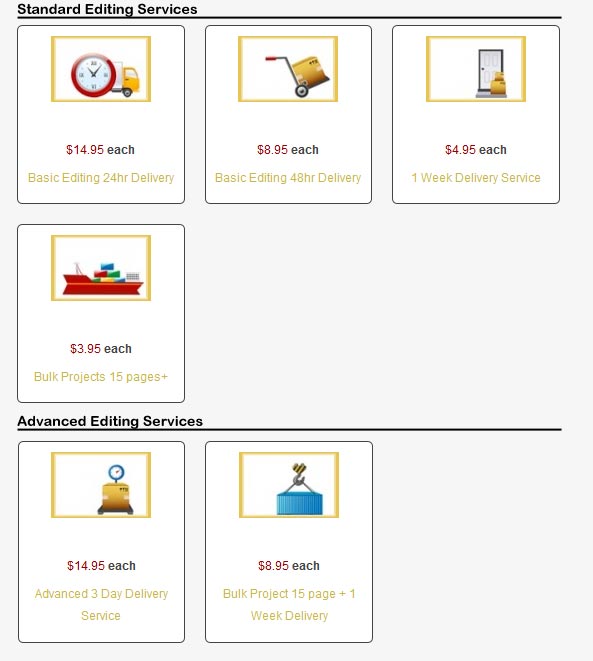
would it be possible to create a layout similar to image attached?
Kind Regards,
Afro.
Please Log in or Create an account to join the conversation.

14 years 4 months ago #53220
by nicolas
Replied by nicolas on topic Re: Customising Product Layout
Sure.
Put the products in two different categories. Create a hikashop products listing menu item with the first category as associated category via the joomla menu manager.
Then, create a hikashop products listing module with the second category as associated category and turn off the content synchro via the joomla modules manager.
Finally, add the module as associated module in the options of the menu item and you should be able to get such display.
Put the products in two different categories. Create a hikashop products listing menu item with the first category as associated category via the joomla menu manager.
Then, create a hikashop products listing module with the second category as associated category and turn off the content synchro via the joomla modules manager.
Finally, add the module as associated module in the options of the menu item and you should be able to get such display.
The following user(s) said Thank You: Afrosaxon
Please Log in or Create an account to join the conversation.
14 years 4 months ago #53597
by Afrosaxon
Replied by Afrosaxon on topic Re: Customising Product Layout
Thanks, got it working, whilst on the subject, is it possible to do the following: Format for Products to be - Product Description at top - icon in middle - price at bottom?
Please Log in or Create an account to join the conversation.
14 years 4 months ago #53685
by nicolas
Replied by nicolas on topic Re: Customising Product Layout
You will have to edit the file "listing_img_title" of the view "product" via the menu Display->Views in order to change that.
Please Log in or Create an account to join the conversation.
Time to create page: 0.131 seconds