

- Posts: 22
- Thank you received: 0
hikashop_social does not work
14 years 4 months ago #55093
by Felix2000
hikashop_social does not work was created by Felix2000
hikashop_social ( Google, Twitter, Facebook )
not work (shows: {hikashop_social})
work ok
not work (shows: {hikashop_social})
work ok
not work (shows: {hikashop_social})
work ok
What's the problem?
not work
(shows: {hikashop_social})work ok
not work
(shows: {hikashop_social})work ok
not work
(shows: {hikashop_social})work ok
What's the problem?
Please Log in or Create an account to join the conversation.

14 years 4 months ago #55127
by nicolas
Replied by nicolas on topic Re: hikashop_social does not work
The hikashop social networks plugin must be disabled. Please plugin it and it should work.
Please Log in or Create an account to join the conversation.
14 years 4 months ago #55325
by Felix2000
Replied by Felix2000 on topic Re: hikashop_social does not work
Hikashop Social Networks Plugin
if disable - does not show anything. OK
if enable - shows {hikashop_social}
if enable and log in - show all OK
if enable and log out - show {hikashop_social}
:blink:
if disable - does not show anything. OK
if enable - shows {hikashop_social}
if enable and log in - show all OK
if enable and log out - show {hikashop_social}
:blink:
Please Log in or Create an account to join the conversation.
14 years 4 months ago #55363
by nicolas
Replied by nicolas on topic Re: hikashop_social does not work
That's probably because you changed the "access" option of the plugin to something else than public.
Please change it back to public and it should work for all the users, logged in or not.
Please change it back to public and it should work for all the users, logged in or not.
Please Log in or Create an account to join the conversation.
13 years 10 months ago #80701
by undak
Replied by undak on topic Re: hikashop_social does not work
I have the same problem.
Hikashop social plug in is enabled. Access level is public. But it shows only {hikashop_social} on the product page.
Here is link: beta.oliver.mn/index.php/classic/classic...t/product/1-9284-266
Thank You for your answer in advance.
Undak
Hikashop social plug in is enabled. Access level is public. But it shows only {hikashop_social} on the product page.
Here is link: beta.oliver.mn/index.php/classic/classic...t/product/1-9284-266
Thank You for your answer in advance.
Undak
Please Log in or Create an account to join the conversation.
13 years 10 months ago #80908
by nicolas
Replied by nicolas on topic Re: hikashop_social does not work
Could you provide a screenshot of the options screen of the Social networks plugin ? There has to be something not configured right in there.
Please Log in or Create an account to join the conversation.

13 years 10 months ago - 13 years 10 months ago #80995
by Mainzer
Replied by Mainzer on topic hikashop_social does not work
Same here,
Hikashop Social Networks Plugin Enabled
Joomla global configuration / System cache off
System - Cache plugin Disabled
Access level public
Browser cache cleared
Don't know where to look more.
Link to a product: [url] www.fotoconde.com/hikashop-menu-for-prod...1-alcacer-do-sal-001 [/url]
Screenshot of the Social networks plugin:
image missing http://img191.imageshack.us/img191/8320/socialplug.png
Thank you,
Mainzer
Hikashop Social Networks Plugin Enabled
Joomla global configuration / System cache off
System - Cache plugin Disabled
Access level public
Browser cache cleared
Don't know where to look more.
Link to a product: [url] www.fotoconde.com/hikashop-menu-for-prod...1-alcacer-do-sal-001 [/url]
Screenshot of the Social networks plugin:
image missing http://img191.imageshack.us/img191/8320/socialplug.png
Thank you,
Mainzer
Last edit: 13 years 10 months ago by Mainzer.
Please Log in or Create an account to join the conversation.
13 years 10 months ago #81212
by undak
Replied by undak on topic Re: hikashop_social does not work
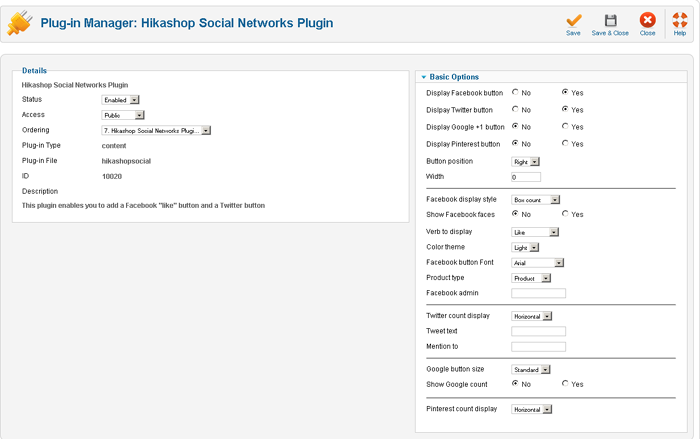
Here is screen shot of plug-in.
Please Log in or Create an account to join the conversation.
13 years 10 months ago #81307
by nicolas
Replied by nicolas on topic Re: hikashop_social does not work
@Mainzer : I see that you removed the description from the product page or didn't enter any. However, the plugin will only be triggered if there is a description in the product. Please check on that.
The following user(s) said Thank You: Mainzer
Please Log in or Create an account to join the conversation.

13 years 10 months ago - 13 years 10 months ago #81359
by hnelke
Replied by hnelke on topic Re: hikashop_social does not work
Hello,
I have the same problem.
Only the text {hikashop_social} was shown and I have a product descrition and it is public???
I use Joomla 3.02 and Hikashop 2.0.0.
nelkies.nelke.com/index.php/nelkies-shop...lau-weiss-mit-bommel
Hubert
I have the same problem.
Only the text {hikashop_social} was shown and I have a product descrition and it is public???
I use Joomla 3.02 and Hikashop 2.0.0.
nelkies.nelke.com/index.php/nelkies-shop...lau-weiss-mit-bommel
Hubert
Last edit: 13 years 10 months ago by hnelke.
Please Log in or Create an account to join the conversation.
13 years 10 months ago - 13 years 10 months ago #81409
by Mainzer
Replied by Mainzer on topic hikashop_social does not work
Thank you for your reply nicolas,
I added a description to the product but no change.
[url] www.fotoconde.com/hikashop-menu-for-prod...1-alcacer-do-sal-001 ][/url]
I added a description to the product but no change.
[url] www.fotoconde.com/hikashop-menu-for-prod...1-alcacer-do-sal-001 ][/url]
Last edit: 13 years 10 months ago by Mainzer.
Please Log in or Create an account to join the conversation.
13 years 10 months ago #81552
by nicolas
Replied by nicolas on topic hikashop_social does not work
Would someone be able to provide a backend + FTP access to his website as we can't seem able to reproduce the problem on our end ? There really seem to be a bug somewhere but that might come from a 3rd party extension which would explain why we can't reproduce it on our end.
Please Log in or Create an account to join the conversation.
13 years 10 months ago #81561
by undak
Replied by undak on topic hikashop_social does not work
I have sent email to You.
BR,
Undak
BR,
Undak
Please Log in or Create an account to join the conversation.
13 years 10 months ago - 13 years 10 months ago #81625
by hnelke
Replied by hnelke on topic hikashop_social does not work
Hello,
after installing two Joomlashine products "imageshow" and "uniform" it happens again.
The socal plugin don't work. ({hikashop_social}
Link: nelkies.nelke.com/index.php/hikashop/product/1-jacke-black
I send the admin access data to forum@hikashop.com!
regards Hubert
after installing two Joomlashine products "imageshow" and "uniform" it happens again.
The socal plugin don't work. ({hikashop_social}
Link: nelkies.nelke.com/index.php/hikashop/product/1-jacke-black
I send the admin access data to forum@hikashop.com!
regards Hubert
Last edit: 13 years 10 months ago by hnelke.
Please Log in or Create an account to join the conversation.

13 years 10 months ago #81637
by Jerome
Jerome - Obsidev.com
HikaMarket & HikaSerial developer / HikaShop core dev team.
Replied by Jerome on topic hikashop_social does not work
Hi undak and hnelke
I have just started to investigate in your website and I saw something "strange".
With these urls, the plugin is working fine :
[undak] beta.oliver.mn/index.php?option=com_hika...duct&task=show&cid=1
[hnelke] nelkies.nelke.com/index.php?option=com_h...uct&&task=show&cid=1
So I think that you have an external plugin or something which is activated in your menu which is incompatible with the HikaShop social plugin.
I will continue to investigate on "what could broke the onAfterRender process".
Regards,
I have just started to investigate in your website and I saw something "strange".
With these urls, the plugin is working fine :
[undak] beta.oliver.mn/index.php?option=com_hika...duct&task=show&cid=1
[hnelke] nelkies.nelke.com/index.php?option=com_h...uct&&task=show&cid=1
So I think that you have an external plugin or something which is activated in your menu which is incompatible with the HikaShop social plugin.
I will continue to investigate on "what could broke the onAfterRender process".
Regards,
Jerome - Obsidev.com
HikaMarket & HikaSerial developer / HikaShop core dev team.
Please Log in or Create an account to join the conversation.
13 years 10 months ago #81646
by Mainzer
Replied by Mainzer on topic hikashop_social does not work
Hello,
Probably this problem has something to do with the joomlashine extensions. Like hnelke I also have Joomlashine template + uniform + imageshow and poweradmin installed.
I already send you access details for backend and ftp to forum@hikashop.com
Probably this problem has something to do with the joomlashine extensions. Like hnelke I also have Joomlashine template + uniform + imageshow and poweradmin installed.
I already send you access details for backend and ftp to forum@hikashop.com
Please Log in or Create an account to join the conversation.
13 years 10 months ago - 13 years 10 months ago #81649
by Jerome
Jerome - Obsidev.com
HikaMarket & HikaSerial developer / HikaShop core dev team.
Replied by Jerome on topic hikashop_social does not work
Hi all,
Thanks to backend access, I could find the problem and, even if I don't know which element creates the incompatibility, I was able to make a patch.
So you can use this version of the plugin and it should fix the issue:
The patch would be included in the next release of HikaShop.
Regards,
Thanks to backend access, I could find the problem and, even if I don't know which element creates the incompatibility, I was able to make a patch.
So you can use this version of the plugin and it should fix the issue:
This attachment is hidden for guests.
Please log in or register to see it.
Please log in or register to see it.
The patch would be included in the next release of HikaShop.
Regards,
Jerome - Obsidev.com
HikaMarket & HikaSerial developer / HikaShop core dev team.
Last edit: 13 years 10 months ago by Jerome.
The following user(s) said Thank You: Mainzer
Please Log in or Create an account to join the conversation.
13 years 10 months ago #81651
by Mainzer
Replied by Mainzer on topic hikashop_social does not work
Hy Jerome,
just installed new version you posted, but it seems not to solve the problem for me.
I'm curious if it works for hnelke or undak
regards
just installed new version you posted, but it seems not to solve the problem for me.
I'm curious if it works for hnelke or undak
regards
Please Log in or Create an account to join the conversation.
13 years 10 months ago #81653
by Mainzer
Replied by Mainzer on topic hikashop_social does not work
Hi again,
Forget my last post, suddenly it works. I just refreshed page several times and it appeared.
@ hnelke and undak, just install the new version of the plugin that Jerome posted and it works fine
Thank you Jerome
Forget my last post, suddenly it works. I just refreshed page several times and it appeared.
@ hnelke and undak, just install the new version of the plugin that Jerome posted and it works fine
Thank you Jerome
Please Log in or Create an account to join the conversation.
13 years 10 months ago #81662
by Jerome
Jerome - Obsidev.com
HikaMarket & HikaSerial developer / HikaShop core dev team.
Replied by Jerome on topic hikashop_social does not work
Hi,
I have already install the plugin on undak and hnelke websites (for testing the problem and test my fix too).
Regards,
I have already install the plugin on undak and hnelke websites (for testing the problem and test my fix too).
Regards,
Jerome - Obsidev.com
HikaMarket & HikaSerial developer / HikaShop core dev team.
The following user(s) said Thank You: hnelke
Please Log in or Create an account to join the conversation.
Time to create page: 0.568 seconds