

- Posts: 4
- Thank you received: 0
Add Tabbed pane in the product detail page!
14 years 4 months ago #55405
by devkbsc
Add Tabbed pane in the product detail page! was created by devkbsc
Hello,
I am using nonumber's tabber plugin for desining the tabbed description product detail page.But i don't know how to add this tab's tag and also don't exactly which template to modify.
Please help to to find template for product detail page. And please help me to add this tabber code in the page.
{tab=Tab Title 1}
Your text...
{tab=Tab Title 2}
Your text...
{/tabs}
I am using nonumber's tabber plugin for desining the tabbed description product detail page.But i don't know how to add this tab's tag and also don't exactly which template to modify.
Please help to to find template for product detail page. And please help me to add this tabber code in the page.
{tab=Tab Title 1}
Your text...
{tab=Tab Title 2}
Your text...
{/tabs}
Please Log in or Create an account to join the conversation.

14 years 4 months ago #55408
by nicolas
Replied by nicolas on topic Re: Add Tabbed pane in the product detail page!
Hi,
You can add it directly in the description of your products.
You can add it directly in the description of your products.
The following user(s) said Thank You: devkbsc
Please Log in or Create an account to join the conversation.
14 years 4 months ago - 14 years 4 months ago #55414
by devkbsc
Replied by devkbsc on topic Re: Add Tabbed pane in the product detail page!
Hi,
the problem is where my client is zero in computer science. So, he don't want to see any code in the text area! any other options?
it's possible to create custom fields for product detail page. by the i can create fields for each tabs! is it?
the problem is where my client is zero in computer science. So, he don't want to see any code in the text area! any other options?
it's possible to create custom fields for product detail page. by the i can create fields for each tabs! is it?
Last edit: 14 years 4 months ago by devkbsc.
Please Log in or Create an account to join the conversation.
14 years 4 months ago #55425
by devkbsc
Replied by devkbsc on topic Re: Add Tabbed pane in the product detail page!
Excuse me! i think you are not very clear about my question!
It is possible to add custom field in the product page?
It is possible to add custom field in the product page?
Please Log in or Create an account to join the conversation.
14 years 4 months ago #55505
by nicolas
Replied by nicolas on topic Re: Add Tabbed pane in the product detail page!
You can do that yes.
You will have to create custom fields of the table "product". That will allow your user to enter the text of each tab in a textarea for each product.
Then, you would have to edit the file "show_default" of the view "product" via the menu Display->Views in order to display the fields in the tabs:
{tab=Tab Title 1}
<?php ehco $this->element->custom_field_1; ?>
{tab=Tab Title 2}
<?php ehco $this->element->custom_field_2; ?>
{/tabs}
where custom_field_1 and custom_field_2 are the column names of the fields.
Finally, you will have to edit the file "show" of the view "product" and change the code:
$this->setLayout($this->productlayout);
echo $this->loadTemplate();
to:
$this->setLayout($this->productlayout);
echo JHTML::_('content.prepare',$this->loadTemplate());
so that the tab plugin can replace the tab tags into real tabs.
You will have to create custom fields of the table "product". That will allow your user to enter the text of each tab in a textarea for each product.
Then, you would have to edit the file "show_default" of the view "product" via the menu Display->Views in order to display the fields in the tabs:
{tab=Tab Title 1}
<?php ehco $this->element->custom_field_1; ?>
{tab=Tab Title 2}
<?php ehco $this->element->custom_field_2; ?>
{/tabs}
where custom_field_1 and custom_field_2 are the column names of the fields.
Finally, you will have to edit the file "show" of the view "product" and change the code:
$this->setLayout($this->productlayout);
echo $this->loadTemplate();
to:
$this->setLayout($this->productlayout);
echo JHTML::_('content.prepare',$this->loadTemplate());
so that the tab plugin can replace the tab tags into real tabs.
Please Log in or Create an account to join the conversation.

14 years 3 weeks ago #68872
by protorob
Replied by protorob on topic Re: Add Tabbed pane in the product detail page!
This is really cool. Thanks for this great answer.
Please Log in or Create an account to join the conversation.
Less
More
- Posts: 32
- Thank you received: 3
13 years 11 months ago #79843
by jwmartinez
Replied by jwmartinez on topic Add Tabbed pane in the product detail page!
Hi love these, exactly what I was looking for!!!
Just one more question to make it perfect for me:
It's there a way to put the product vote/comments inside a Tab?
Just one more question to make it perfect for me:
It's there a way to put the product vote/comments inside a Tab?
Please Log in or Create an account to join the conversation.

13 years 10 months ago #79974
by Xavier
Replied by Xavier on topic Add Tabbed pane in the product detail page!
Hi,
Since the post of protorob, we added a real tab view in HikaShop using jQuery and including the vote & comments.
To try it, you have to use the option "Layout on product page" and set it to "tabular".
Else you can edit the view "product / show_default" and add "{tab=Tab Title 3}" before the vote&comment part of the view and use the tag "{/tags}" after the comment part.
Since the post of protorob, we added a real tab view in HikaShop using jQuery and including the vote & comments.
To try it, you have to use the option "Layout on product page" and set it to "tabular".
Else you can edit the view "product / show_default" and add "{tab=Tab Title 3}" before the vote&comment part of the view and use the tag "{/tags}" after the comment part.
Please Log in or Create an account to join the conversation.
Less
More
- Posts: 32
- Thank you received: 3
13 years 10 months ago #80128
by jwmartinez
Replied by jwmartinez on topic Add Tabbed pane in the product detail page!
Yeah, found the tabular display, but on witch display I change the way they look. They don't look like a tabbed display...
I attach a capture of how they look right now.
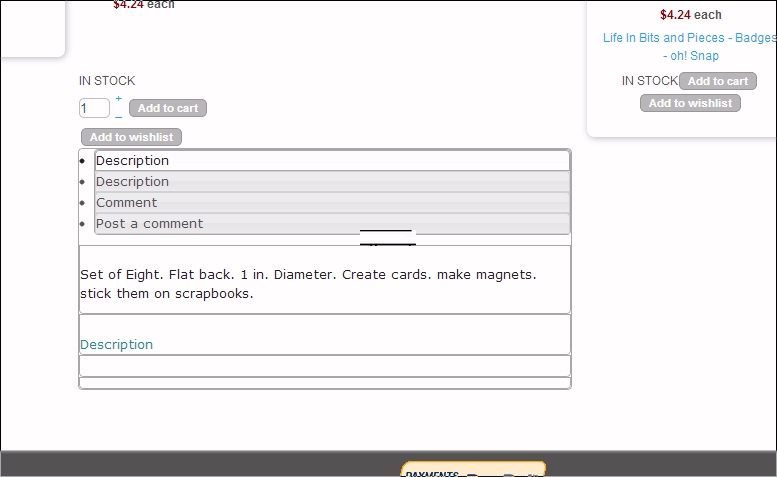
I attach a capture of how they look right now.
Please Log in or Create an account to join the conversation.
13 years 10 months ago #80153
by Xavier
Replied by Xavier on topic Add Tabbed pane in the product detail page!
Hi,
You changed the display ?
Maybe you have broke the html, so jQuery cannot manage it correctly to display the tabs.
Or you have maybe a Javascript error or a conflict between jQuery and Mootools, try to install the jQuery easy plugin, which can be found on the JED: extensions.joomla.org
You changed the display ?
Maybe you have broke the html, so jQuery cannot manage it correctly to display the tabs.
Or you have maybe a Javascript error or a conflict between jQuery and Mootools, try to install the jQuery easy plugin, which can be found on the JED: extensions.joomla.org
Please Log in or Create an account to join the conversation.
Less
More
- Posts: 32
- Thank you received: 3
13 years 10 months ago - 13 years 10 months ago #80411
by jwmartinez
Replied by jwmartinez on topic Add Tabbed pane in the product detail page!
Hi Xavier,
I don't recall changing anything on the HTML, and this the display I got after installing jQuery Easy, before I didn't get any display at all.
Just in case I have change something on the HTML, which file I have to look for and, if you know which lines you think may be broken.
Jose
I don't recall changing anything on the HTML, and this the display I got after installing jQuery Easy, before I didn't get any display at all.
Just in case I have change something on the HTML, which file I have to look for and, if you know which lines you think may be broken.
Jose
Last edit: 13 years 10 months ago by jwmartinez.
Please Log in or Create an account to join the conversation.
13 years 10 months ago #80460
by Xavier
Replied by Xavier on topic Add Tabbed pane in the product detail page!
Hi,
Can you check if jQuery is loaded in the page ?
You should find it in the source code of the page, the library needed is "jquery-ui-1.8.22.custom.min.js"
Can you check if jQuery is loaded in the page ?
You should find it in the source code of the page, the library needed is "jquery-ui-1.8.22.custom.min.js"
Please Log in or Create an account to join the conversation.
Less
More
- Posts: 32
- Thank you received: 3
13 years 10 months ago #80613
by jwmartinez
Replied by jwmartinez on topic Add Tabbed pane in the product detail page!
Yes jquery appears to be loading on the page I found it it looks like this:
But were the code mention tabs it only shows like this :
Code:
</style>
<script src="/media/system/js/mootools-core.js" type="text/javascript"></script>
<script src="/media/system/js/core.js" type="text/javascript"></script>
<script src="/media/system/js/mootools-more.js" type="text/javascript"></script>
<script src="/media/system/js/modal.js" type="text/javascript"></script>
<script src="https://ajax.googleapis.com/ajax/libs/jquery/1.8/jquery.min.js" type="text/javascript"></script>
<script src="/plugins/system/jqueryeasy/jquerynoconflict.js" type="text/javascript"></script>
<script src="/media/com_hikashop/js/hikashop.js?v=200" type="text/javascript"></script>
<script src="/media/com_hikashop/js/jquery-ui-1.8.22.custom.min.js" type="text/javascript"></script>
<script src="/media/com_hikashop/js/vote.js" type="text/javascript"></script>
<script type="text/javascript">
But were the code mention tabs it only shows like this :
Code:
<script>
(function($) {
jQuery( "#hikashop_tabs" ).tabs();
})(jQuery);
</script>
Please Log in or Create an account to join the conversation.
13 years 10 months ago #80657
by Xavier
Replied by Xavier on topic Add Tabbed pane in the product detail page!
Hi,
The JavaScript seems to be ok, so the problem should come from the CSS, try to add:
In the Frontend CSS File in HikaShop > Configuration > Display.
The JavaScript seems to be ok, so the problem should come from the CSS, try to add:
Code:
.ui-tabs { position: relative; padding: .2em; zoom: 1; } /* position: relative prevents IE scroll bug (element with position: relative inside container with overflow: auto appear as "fixed") */
.ui-tabs .ui-tabs-nav { margin: 0; padding: .2em .2em 0; }
.ui-tabs .ui-tabs-nav li { list-style: none; float: left; position: relative; top: 1px; margin: 0 .2em 1px 0; border-bottom: 0 !important; padding: 0; white-space: nowrap; }
.ui-tabs .ui-tabs-nav li a { float: left; padding: .5em 1em; text-decoration: none; }
.ui-tabs .ui-tabs-nav li.ui-tabs-selected { margin-bottom: 0; padding-bottom: 1px; }
.ui-tabs .ui-tabs-nav li.ui-tabs-selected a, .ui-tabs .ui-tabs-nav li.ui-state-disabled a, .ui-tabs .ui-tabs-nav li.ui-state-processing a { cursor: text; }
.ui-tabs .ui-tabs-nav li a, .ui-tabs.ui-tabs-collapsible .ui-tabs-nav li.ui-tabs-selected a { cursor: pointer; } /* first selector in group seems obsolete, but required to overcome bug in Opera applying cursor: text overall if defined elsewhere... */
.ui-tabs .ui-tabs-panel { display: block; border-width: 0; padding: 1em 1.4em; background: none; }
.ui-tabs .ui-tabs-hide { display: none !important; }
#hikashop_tabs .ui-widget-header{
border: 0 none;
}
#hikashop_tabs ul li{
position: relative;
top: -53px;
}
#hikashop_tabs .ui-tabs-panel{
margin-top: 35px;
}
.hikashop_product_bottom_part.show_tabular{
padding-top: 50px;
}
The following user(s) said Thank You: jwmartinez
Please Log in or Create an account to join the conversation.
Less
More
- Posts: 32
- Thank you received: 3
13 years 10 months ago #81129
by jwmartinez
Replied by jwmartinez on topic Add Tabbed pane in the product detail page!
That seems to fix it just fine, just need to Change the CSS to add the colors and style of my site.
Let you know if I find any other problems.
Thanks Jose
Let you know if I find any other problems.
Thanks Jose
Please Log in or Create an account to join the conversation.

13 years 3 months ago #112051
by zlenko
my project ibaby.com.ua
Replied by zlenko on topic Add Tabbed pane in the product detail page!
Еxcellent Bootstrap tabs
demo.nonumber.nl/index.php/3-tabs
my project ibaby.com.ua
The following user(s) said Thank You: Xavier
Please Log in or Create an account to join the conversation.
Time to create page: 0.155 seconds