
- Posts: 45
- Thank you received: 1
Tax namekey Displayed in Cart in HikaShop 1.5.8
14 years 4 months ago - 14 years 4 months ago #56225
by ELHS
Tax namekey Displayed in Cart in HikaShop 1.5.8 was created by ELHS
Hello,
I updated my test site to HikeShop 1.5.8 and noticed that the Tax namekey is display in the shopping cart instead of the word VAT or Taxes. This is not occurring on my production site which is running HikaShop 1.5.5
For example I have sales tax set at 6% for the State of Pennsylvania with a Tax namekey = VM_TAX_6. VM_TAX_6 is displayed next to the calculated tax rather than just the word "Taxes" (see attached screenshot)
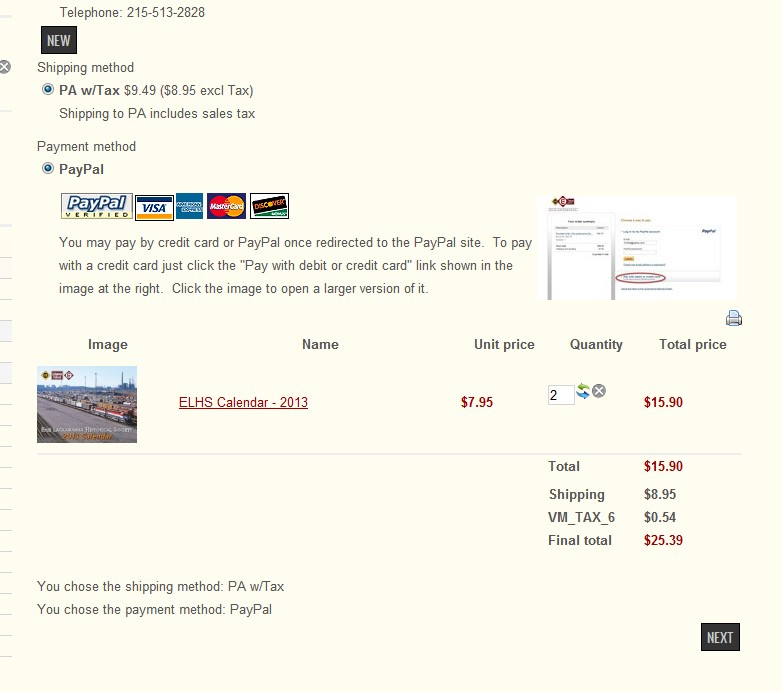
I updated my test site to HikeShop 1.5.8 and noticed that the Tax namekey is display in the shopping cart instead of the word VAT or Taxes. This is not occurring on my production site which is running HikaShop 1.5.5
For example I have sales tax set at 6% for the State of Pennsylvania with a Tax namekey = VM_TAX_6. VM_TAX_6 is displayed next to the calculated tax rather than just the word "Taxes" (see attached screenshot)
Last edit: 14 years 4 months ago by ELHS. Reason: file upload issue
Please Log in or Create an account to join the conversation.

14 years 4 months ago #56271
by nicolas
Replied by nicolas on topic Re: Tax namekey Displayed in Cart in HikaShop 1.5.8
That's indeed the case since we changed the taxes system in order to handle multiple tax rates.
If you don't need it, you can just turn off the "show detailed taxes" option in the Display tab of the configuration and it will revert to the previous display.
If you don't need it, you can just turn off the "show detailed taxes" option in the Display tab of the configuration and it will revert to the previous display.
Please Log in or Create an account to join the conversation.
Time to create page: 0.059 seconds