

- Posts: 5
- Thank you received: 0
Re: Automatic attaching invoices
13 years 3 months ago #109481
by Magiweb
Replied by Magiweb on topic Re: Automatic attaching invoices
I did try a relative file path. I even tried the complete file path from root on the server. Nothing worked. I had to enable allow_url_fopen and use http://.
What can I say - no idea how they setup this server for my client...
What can I say - no idea how they setup this server for my client...
Please Log in or Create an account to join the conversation.

13 years 3 months ago - 13 years 3 months ago #109953
by erix
Adishatz, erix
www.agerix.fr
Replied by erix on topic Re: Automatic attaching invoices
Hi,
I'm not really an expert of override so excuse me if my question is stupid but if I add my modified file invoice.php in media/com_hikashop/plugins/ in my template folder it will be enought to replace the file "attachinvoice/invoice.php" in the plugin hikashop > attachinvoice ?
Thx for answer
[EDIT] answer is here : www.hikashop.com/en/forum/4-how-to/82783...question.html#108230 ;)
Xavier wrote: Hi,
To edit the template of the invoice, you have to edit the file "attachinvoice/invoice.php" in the plugin hikashop > attachinvoice.
You can also create a view override: "media/com_hikashop/plugins/invoice.php".
Regards,
I'm not really an expert of override so excuse me if my question is stupid but if I add my modified file invoice.php in media/com_hikashop/plugins/ in my template folder it will be enought to replace the file "attachinvoice/invoice.php" in the plugin hikashop > attachinvoice ?
Thx for answer
[EDIT] answer is here : www.hikashop.com/en/forum/4-how-to/82783...question.html#108230 ;)
Adishatz, erix
www.agerix.fr
Last edit: 13 years 3 months ago by erix. Reason: found by myself
Please Log in or Create an account to join the conversation.
13 years 3 months ago #109956
by erix
Adishatz, erix
www.agerix.fr
Replied by erix on topic Re: Automatic attaching invoices
Hi,
And if I want a name like that : firstname_lastname__myowntext_date_commandID ?
note: myowntext will be facture+coorporate acronyme
Thx for answer
Jerome wrote: Hi
Code:$mailer->AddAttachment($invoiceFolder.DS.$invoiceFile,JText::_('INVOICE').str_pad($order->invoice_id, 4, "0", STR_PAD_LEFT).'.pdf');
And if I want a name like that : firstname_lastname__myowntext_date_commandID ?
note: myowntext will be facture+coorporate acronyme
Thx for answer
Adishatz, erix
www.agerix.fr
Please Log in or Create an account to join the conversation.

13 years 3 months ago #109963
by nicolas
Replied by nicolas on topic Re: Automatic attaching invoices
Then like that:
Code:
$mailer->AddAttachment($invoiceFolder.DS.$invoiceFile,$order->billing_address->address_firstname.'_'.$order->billing_address->address_lastname.'__myowntext_'.date("Y-m-d").'_'.$order->order_id.'.pdf');
The following user(s) said Thank You: erix
Please Log in or Create an account to join the conversation.

12 years 6 months ago #146842
by Zafer
Replied by Zafer on topic Re: Automatic attaching invoices
Hi Jerome,
can you please describe in few steps how to add a company Logo to the attached PDF invoice above the Company address.
Thank you very much
can you please describe in few steps how to add a company Logo to the attached PDF invoice above the Company address.
Thank you very much
Please Log in or Create an account to join the conversation.

12 years 6 months ago #146978
by Eliot
Replied by Eliot on topic Re: Automatic attaching invoices
Hi there,
I think this has been explained multiple times: www.hikashop.com/forum/install-update/86...a-editer.html#142085
If you really can't do this we'll help you but it's very easy
I think this has been explained multiple times: www.hikashop.com/forum/install-update/86...a-editer.html#142085
If you really can't do this we'll help you but it's very easy
Please Log in or Create an account to join the conversation.
12 years 6 months ago #147103
by Zafer
Replied by Zafer on topic Re: Automatic attaching invoices
Hi Eliot,
my french is not the best but the google translator helps me to translate. I can only modify for backend template in views .. but nothing change.
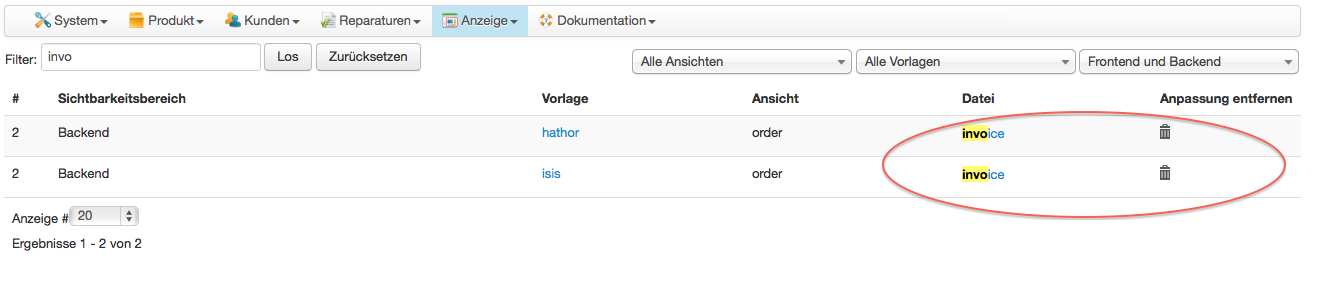
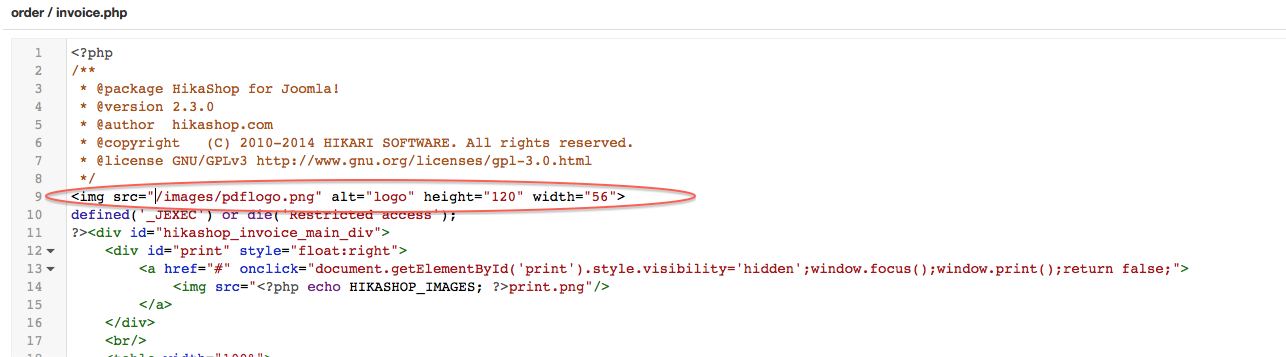
my french is not the best but the google translator helps me to translate. I can only modify for backend template in views .. but nothing change.
Please Log in or Create an account to join the conversation.

12 years 6 months ago #147108
by Jerome
Jerome - Obsidev.com
HikaMarket & HikaSerial developer / HikaShop core dev team.
Also helping the HikaShop support team when having some time or couldn't sleep.
By the way, do not send me private message, use the "contact us" form instead.
Replied by Jerome on topic Re: Automatic attaching invoices
Hi Zafer,
Please put your HTML content in the HTML part.
You put it into the PHP part and I guess that it will generate some errors.
Regards,
Please put your HTML content in the HTML part.
You put it into the PHP part and I guess that it will generate some errors.
Regards,
Jerome - Obsidev.com
HikaMarket & HikaSerial developer / HikaShop core dev team.
Also helping the HikaShop support team when having some time or couldn't sleep.
By the way, do not send me private message, use the "contact us" form instead.
Please Log in or Create an account to join the conversation.
Time to create page: 0.250 seconds