
- Posts: 100
- Thank you received: 1
Product File as attachment in order email
- paddyrolls
-
 Topic Author
- Offline
Less
More
14 years 2 months ago #61814
by paddyrolls
Product File as attachment in order email was created by paddyrolls
Hi
I have added a file to a product. Under System -> Configuration -> Email tab, I have set the Embed attachments to Yes. However when the Order Confirmation email is sent, the file is included as a link rather than an attachment. Is there another setting I am missing
Thanks
Patrick
I have added a file to a product. Under System -> Configuration -> Email tab, I have set the Embed attachments to Yes. However when the Order Confirmation email is sent, the file is included as a link rather than an attachment. Is there another setting I am missing
Thanks
Patrick
Please Log in or Create an account to join the conversation.

14 years 2 months ago #61826
by Eliot
Replied by Eliot on topic Re: Product File as attachment in order email
Hi,
There is no option for that currently but we may think about it in a future version.
There is no option for that currently but we may think about it in a future version.
Please Log in or Create an account to join the conversation.
- paddyrolls
-
Topic Author
- Offline
Less
More
- Posts: 100
- Thank you received: 1
14 years 2 months ago #61854
by paddyrolls
Replied by paddyrolls on topic Re: Product File as attachment in order email
HI Eliot
I am not sure what you mean.
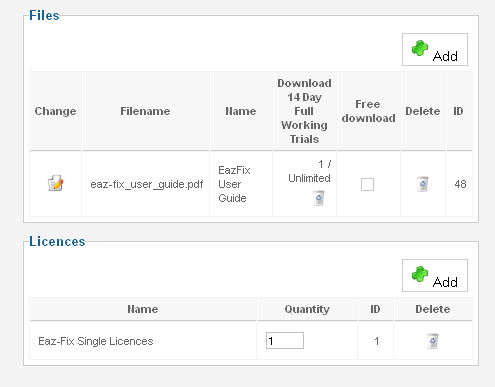
When I add a product, I am also able to attach a file to the product.
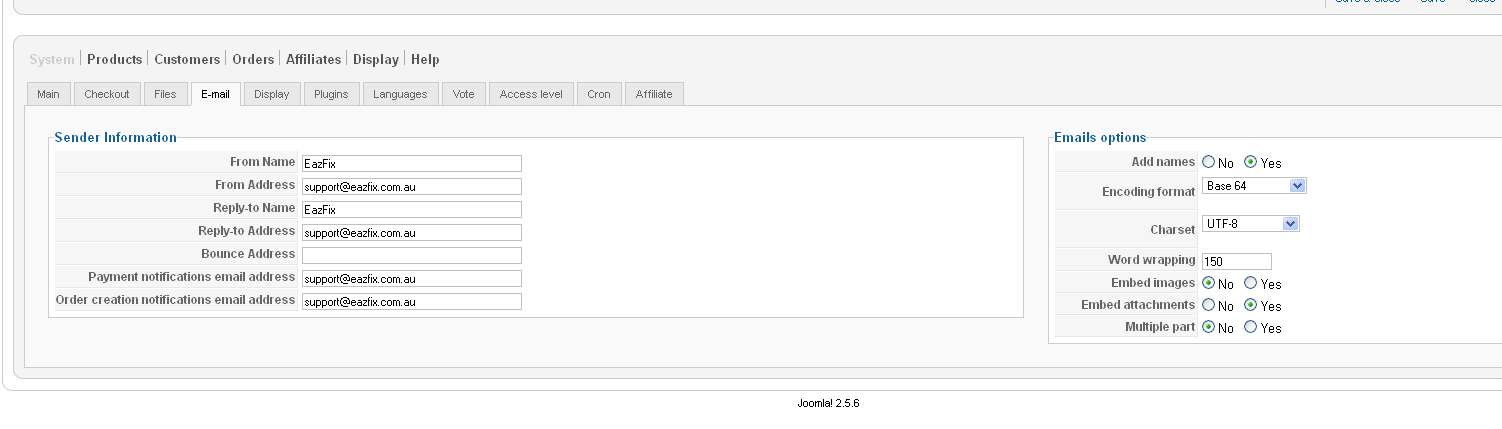
There is a setting in System -> Configuration -> Email tab called Embed attachments
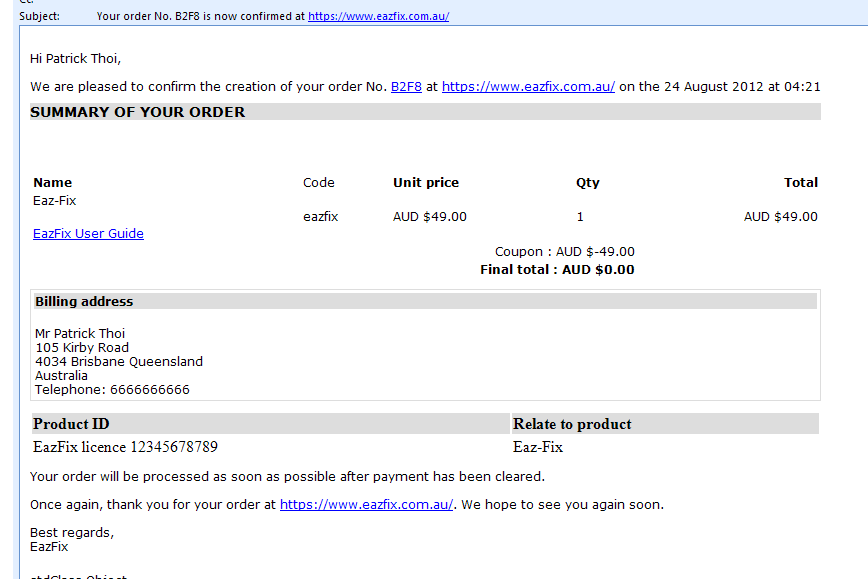
When an order is placed and paid for then in the order confirmation email that is sent to the customer, a link to the file added to the product.
However, reading the help files it says the following:
Embed Attachments : Should HikaShop embed your attachments inside the emails? If not, HikaShop will add a list of attachments with a link to your website in order to download it.
If you disable this option, the send process will be much faster as HikaShop won't send the attachment but a simple link.
I have set the embed attachment to Yes but it still creates a link to the file rather than embedding it in the email.
thanks
Patrick
I am not sure what you mean.
When I add a product, I am also able to attach a file to the product.
There is a setting in System -> Configuration -> Email tab called Embed attachments
When an order is placed and paid for then in the order confirmation email that is sent to the customer, a link to the file added to the product.
However, reading the help files it says the following:
Embed Attachments : Should HikaShop embed your attachments inside the emails? If not, HikaShop will add a list of attachments with a link to your website in order to download it.
If you disable this option, the send process will be much faster as HikaShop won't send the attachment but a simple link.
I have set the embed attachment to Yes but it still creates a link to the file rather than embedding it in the email.
thanks
Patrick
Please Log in or Create an account to join the conversation.

14 years 2 months ago #61861
by nicolas
Replied by nicolas on topic Re: Product File as attachment in order email
Hi,
That option is for attachments that you add in your emails when you edit them via the menu System->Emails in the Business edition.
There is no option to embedded product files in emails for now.
That option is for attachments that you add in your emails when you edit them via the menu System->Emails in the Business edition.
There is no option to embedded product files in emails for now.
Please Log in or Create an account to join the conversation.
- paddyrolls
-
Topic Author
- Offline
Less
More
- Posts: 100
- Thank you received: 1
14 years 2 months ago - 14 years 2 months ago #61866
by paddyrolls
Replied by paddyrolls on topic Re: Product File as attachment in order email
Hi Nicolas
Sorry if I was not clear about my question. I understand that the File option in product is to add attachment to email. However, when I set the embed attachment setting to yes, the file (not the product) is showing in the email as a link rather than an attachment.
I would like to know how to make the file an attachment in the email and not a link. The "eazfix User Guide" is a pdf document.
Thanks
Patrick
Sorry if I was not clear about my question. I understand that the File option in product is to add attachment to email. However, when I set the embed attachment setting to yes, the file (not the product) is showing in the email as a link rather than an attachment.
I would like to know how to make the file an attachment in the email and not a link. The "eazfix User Guide" is a pdf document.
Thanks
Patrick
Last edit: 14 years 2 months ago by paddyrolls.
Please Log in or Create an account to join the conversation.
14 years 2 months ago #61867
by nicolas
Replied by nicolas on topic Re: Product File as attachment in order email
The Files option in products is NOT to add attachments to email.
It's to enable users to download the files after the purchase.
Again, there is no option to embedded product files in emails for now.
It's to enable users to download the files after the purchase.
Again, there is no option to embedded product files in emails for now.
Please Log in or Create an account to join the conversation.
- paddyrolls
-
Topic Author
- Offline
Less
More
- Posts: 100
- Thank you received: 1
14 years 2 months ago #61871
by paddyrolls
Replied by paddyrolls on topic Re: Product File as attachment in order email
OK
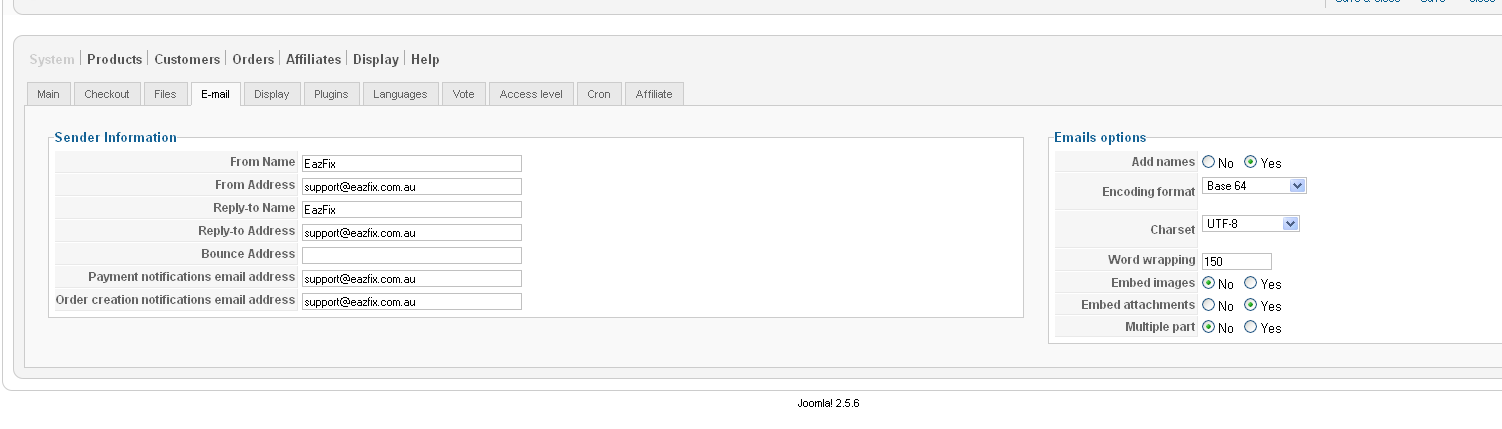
Thanks, but could you tell me what the embed attachments in system -> configuration - email tab is used for?
Thanks, but could you tell me what the embed attachments in system -> configuration - email tab is used for?
Please Log in or Create an account to join the conversation.
14 years 2 months ago #61971
by nicolas
Replied by nicolas on topic Re: Product File as attachment in order email
When you edit emails via the menu System>Emails, you can add attachments to them:
www.hikashop.com/en/support/documentatio...orm.html#attachments
These attachments will always be attached to the emails.
That option of the configuration allows you to have them as a link (like for product files) or embedded in the email.
www.hikashop.com/en/support/documentatio...orm.html#attachments
These attachments will always be attached to the emails.
That option of the configuration allows you to have them as a link (like for product files) or embedded in the email.
Please Log in or Create an account to join the conversation.
Time to create page: 0.125 seconds