

- Posts: 107
- Thank you received: 0
questions ?
15 years 7 months ago #7606
by seb
Replied by seb on topic Re: questions ?
It seems I'm up to date : "You have the latest stable version : 1.4.4"
Please Log in or Create an account to join the conversation.
15 years 7 months ago #7608
by seb
Replied by seb on topic Re: questions ?
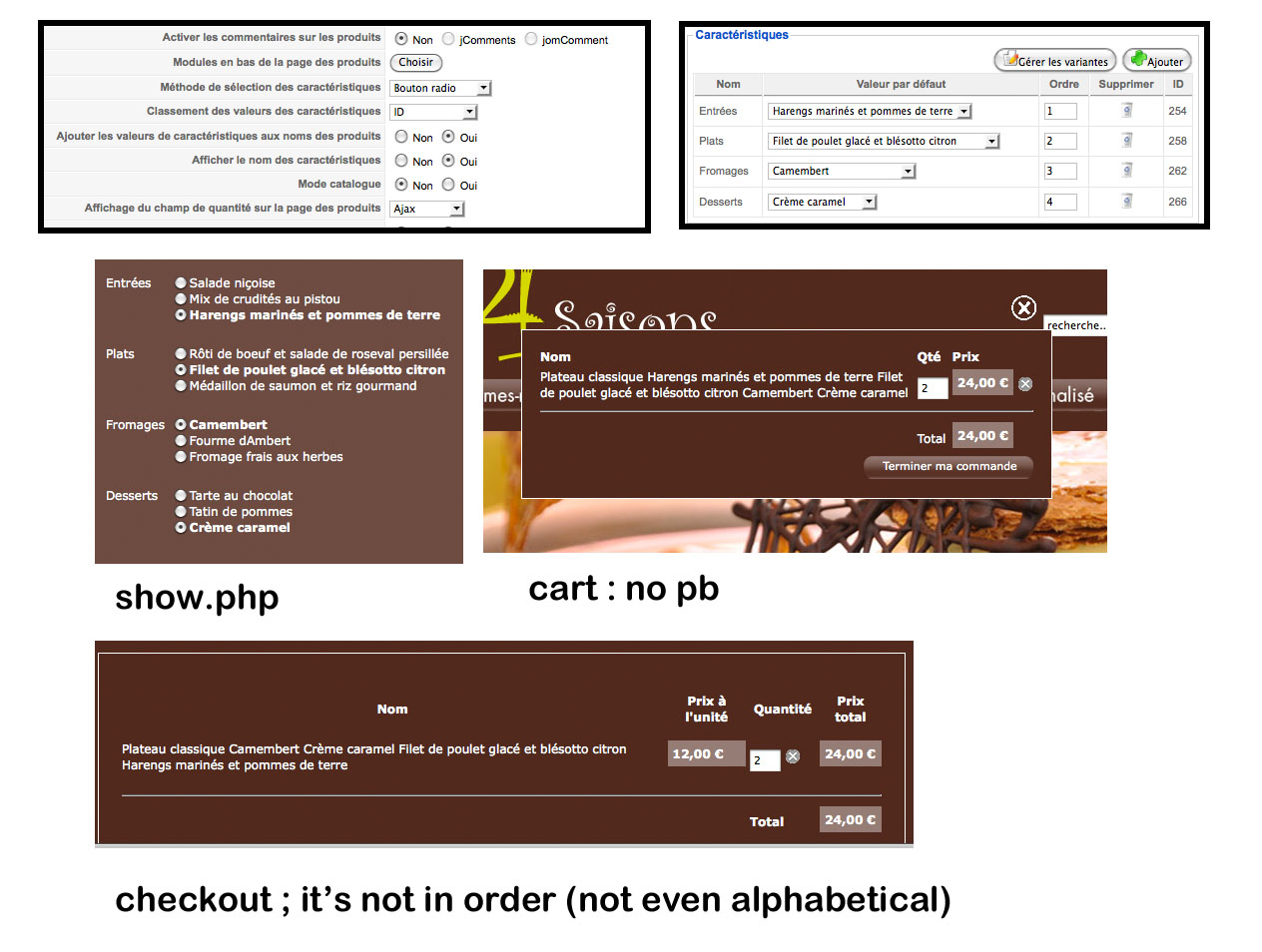
screenshots to explain myself :
back-end
> in the display view : order by id
> product view back end
front-end :
> show.php : it's ok
> cart : it's ok
> check-out : that's not okay anymore
back-end
> in the display view : order by id
> product view back end
front-end :
> show.php : it's ok
> cart : it's ok
> check-out : that's not okay anymore
Please Log in or Create an account to join the conversation.

15 years 7 months ago #7609
by nicolas
Replied by nicolas on topic Re: questions ?
The latest version is 1.4.5. Please download it from our website (in your order page if you have a commercial version). We didn't activate yet the new version because we want to wait a few days and get some feedback from users before. The file will indicate 1.4.4 but it's really the 1.4.5
Please Log in or Create an account to join the conversation.
15 years 7 months ago #7613
by seb
Replied by seb on topic Re: questions ?
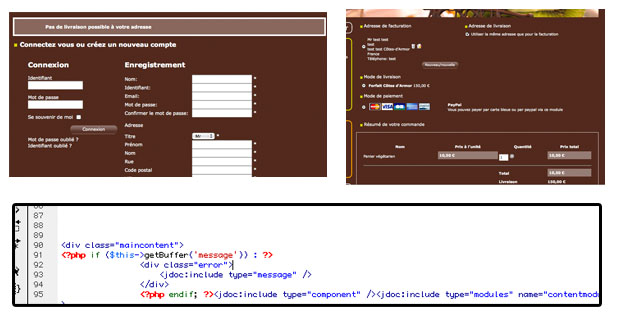
the message thing ... it's working for other alerts but not for this one
Please Log in or Create an account to join the conversation.
15 years 7 months ago #7615
by nicolas
Replied by nicolas on topic Re: questions ?
Could you give the link to your website so that we can see the problem?
Please Log in or Create an account to join the conversation.
15 years 7 months ago #7616
by seb
Replied by seb on topic Re: questions ?
Sure I send it to you by email ..
Please Log in or Create an account to join the conversation.
15 years 7 months ago #7618
by seb
Replied by seb on topic Re: questions ?
Just to let you know I updated ...
This is great to be able to change the popup time to continue on shopping ...
I sent you the email
This is great to be able to change the popup time to continue on shopping ...
I sent you the email
Please Log in or Create an account to join the conversation.
15 years 7 months ago #7622
by nicolas
Replied by nicolas on topic Re: questions ?
Correction: you will see a message only when you require activation for the user accounts. Since you don't, there is no message, it's normal.
You can't add a message without hacking in the core files of HikaShop and you'll loose your modifications when you update.
If you still want to do that, you can edit the file administrator/components/com_hikashop/classes/user.php in the function register.
You can't add a message without hacking in the core files of HikaShop and you'll loose your modifications when you update.
If you still want to do that, you can edit the file administrator/components/com_hikashop/classes/user.php in the function register.
Please Log in or Create an account to join the conversation.
15 years 7 months ago #7755
by seb
Replied by seb on topic Re: questions ?
else for the characteristics .. ?
Please Log in or Create an account to join the conversation.
15 years 7 months ago #7758
by nicolas
Replied by nicolas on topic Re: questions ?
Like I said in a previous post, if you download the latest version and update, that should be fixed.
Please Log in or Create an account to join the conversation.
15 years 7 months ago #8021
by seb
Replied by seb on topic Re: questions ?
I upadtes but it didn't change a thing in the cart is shows characteristics ordered alphabetically (for characteristics)
Please Log in or Create an account to join the conversation.
15 years 7 months ago #8031
by seb
Replied by seb on topic Re: questions ?
So I managed to implement my post code thing ... that wasn't so hard .. thanks for the help 
Please Log in or Create an account to join the conversation.
15 years 7 months ago #8065
by seb
Replied by seb on topic Re: questions ?
How I can change the code for + and minus buttons (html code)
i want to customize the button .. but I've got a few problems with only css
<a onclick="return hikashopQuantityChange('hikashop_product_quantity_field_1',1,0,1);" href="#" class="hikashop_product_quantity_field_change" id="hikashop_product_quantity_field_change_plus" style="width: 65px;">+</a>
i want to customize the button .. but I've got a few problems with only css
Please Log in or Create an account to join the conversation.
15 years 7 months ago #8069
by nicolas
Replied by nicolas on topic Re: questions ?
You need to create a file templates/YOUR_TEMPLATE/html/hikashop_button.php and put the code below in it :
<?php
function hikashop_quantity_render($html,$i,$max_quantity,$min_quantity){
return '
<table>
<tr>
<td rowspan="2">
<input id="hikashop_product_quantity_field_'.$i.'" type="text" value="'.JRequest::getInt('quantity',$min_quantity).'" class="hikashop_product_quantity_field" name="quantity" onchange="hikashopCheckQuantityChange(\'hikashop_product_quantity_field_'.$i.'\','.$max_quantity.','.$min_quantity.');" />
</td>
<td>
<a id="hikashop_product_quantity_field_change_plus" class="hikashop_product_quantity_field_change" href="#" onclick="return hikashopQuantityChange(\'hikashop_product_quantity_field_'.$i.'\',1,'.$max_quantity.','.$min_quantity.');">+</a>
</td>
<td rowspan="2">
'.$html.'
</td>
</tr>
<tr>
<td>
<a id="hikashop_product_quantity_field_change_minus" class="hikashop_product_quantity_field_change" href="#" onclick="return hikashopQuantityChange(\'hikashop_product_quantity_field_'.$i.'\',0,'.$max_quantity.','.$min_quantity.');">-</a>
</td>
</tr>
</table>
';
}
You can directly change the HTML code in that file and it will override the default code which is used to display the + and - buttons. That file is in your template and won't be removed when you update hikashop so you won't have any issue with it afterwards.
<?php
function hikashop_quantity_render($html,$i,$max_quantity,$min_quantity){
return '
<table>
<tr>
<td rowspan="2">
<input id="hikashop_product_quantity_field_'.$i.'" type="text" value="'.JRequest::getInt('quantity',$min_quantity).'" class="hikashop_product_quantity_field" name="quantity" onchange="hikashopCheckQuantityChange(\'hikashop_product_quantity_field_'.$i.'\','.$max_quantity.','.$min_quantity.');" />
</td>
<td>
<a id="hikashop_product_quantity_field_change_plus" class="hikashop_product_quantity_field_change" href="#" onclick="return hikashopQuantityChange(\'hikashop_product_quantity_field_'.$i.'\',1,'.$max_quantity.','.$min_quantity.');">+</a>
</td>
<td rowspan="2">
'.$html.'
</td>
</tr>
<tr>
<td>
<a id="hikashop_product_quantity_field_change_minus" class="hikashop_product_quantity_field_change" href="#" onclick="return hikashopQuantityChange(\'hikashop_product_quantity_field_'.$i.'\',0,'.$max_quantity.','.$min_quantity.');">-</a>
</td>
</tr>
</table>
';
}
You can directly change the HTML code in that file and it will override the default code which is used to display the + and - buttons. That file is in your template and won't be removed when you update hikashop so you won't have any issue with it afterwards.
Please Log in or Create an account to join the conversation.
15 years 7 months ago #8092
by seb
Replied by seb on topic Re: questions ?
And As i said .. for the checkout in the cart characteristics are ordered alphabetically ...
so nothing changed to before the update ... see screenshot ... that's the same thing ...
so nothing changed to before the update ... see screenshot ... that's the same thing ...
Please Log in or Create an account to join the conversation.
15 years 7 months ago #8105
by nicolas
Replied by nicolas on topic Re: questions ?
Would it be possible to have an FTP access to your website so that we debug the characteristics ordering thing ?
Please Log in or Create an account to join the conversation.
15 years 7 months ago #8109
by seb
Replied by seb on topic Re: questions ?
Sure ... email sent !
Please Log in or Create an account to join the conversation.
15 years 7 months ago #8119
by nicolas
Replied by nicolas on topic Re: questions ?
Thanks. We'll look at that tomorrow as we won't have the time today.
Please Log in or Create an account to join the conversation.
15 years 7 months ago #8147
by nicolas
Replied by nicolas on topic Re: questions ?
There was a variable name mistake. I changed the line:
$ordering = $element->characteristics[$characteristic->characteristic_parent_id]->ordering;
to:
$ordering = @$element->characteristics[$val->characteristic_parent_id]->ordering;
in the file amdinistrator/components/com_hikashop/classes/cart.php and that solved the problem.
We'll include that in next release of course.
$ordering = $element->characteristics[$characteristic->characteristic_parent_id]->ordering;
to:
$ordering = @$element->characteristics[$val->characteristic_parent_id]->ordering;
in the file amdinistrator/components/com_hikashop/classes/cart.php and that solved the problem.
We'll include that in next release of course.
Please Log in or Create an account to join the conversation.
15 years 7 months ago #8154
by seb
Replied by seb on topic Re: questions ?
Thanks a lot for that
Please Log in or Create an account to join the conversation.
Time to create page: 0.318 seconds