

- Posts: 40
- Thank you received: 0
Billing address correction
14 years 3 weeks ago - 14 years 3 weeks ago #69941
by margknox
Billing address correction was created by margknox
At the checkout, the billing address has postcode/city/state instead of city/state/postcode.
Where do I correct this please?
Where do I correct this please?
Last edit: 14 years 3 weeks ago by margknox. Reason: typo
Please Log in or Create an account to join the conversation.

14 years 3 weeks ago #70001
by Xavier
Replied by Xavier on topic Re: Billing address correction
Hi,
You can go in HikaShop > Display > Custom fields and change the order of the fields, don't forget to save the order by clicking on the save icon next to the "Order" title.
You can go in HikaShop > Display > Custom fields and change the order of the fields, don't forget to save the order by clicking on the save icon next to the "Order" title.
Please Log in or Create an account to join the conversation.
14 years 3 weeks ago #70010
by margknox
Replied by margknox on topic Re: Billing address correction
I changed to order of the fields in Display/Custom Fields and saved, but there is no change at the checkout.
Please Log in or Create an account to join the conversation.
14 years 3 weeks ago #70063
by Xavier
Replied by Xavier on topic Re: Billing address correction
Hi,
It's working fine on my end, do you have the latest version of HikaShop ?
Can you give me a screenshot of your configuration ?
It's working fine on my end, do you have the latest version of HikaShop ?
Can you give me a screenshot of your configuration ?
Please Log in or Create an account to join the conversation.
14 years 3 weeks ago - 14 years 3 weeks ago #70072
by margknox
Replied by margknox on topic Re: Billing address correction
My HikaShop version is 1.6.0, which I believe is the current version.
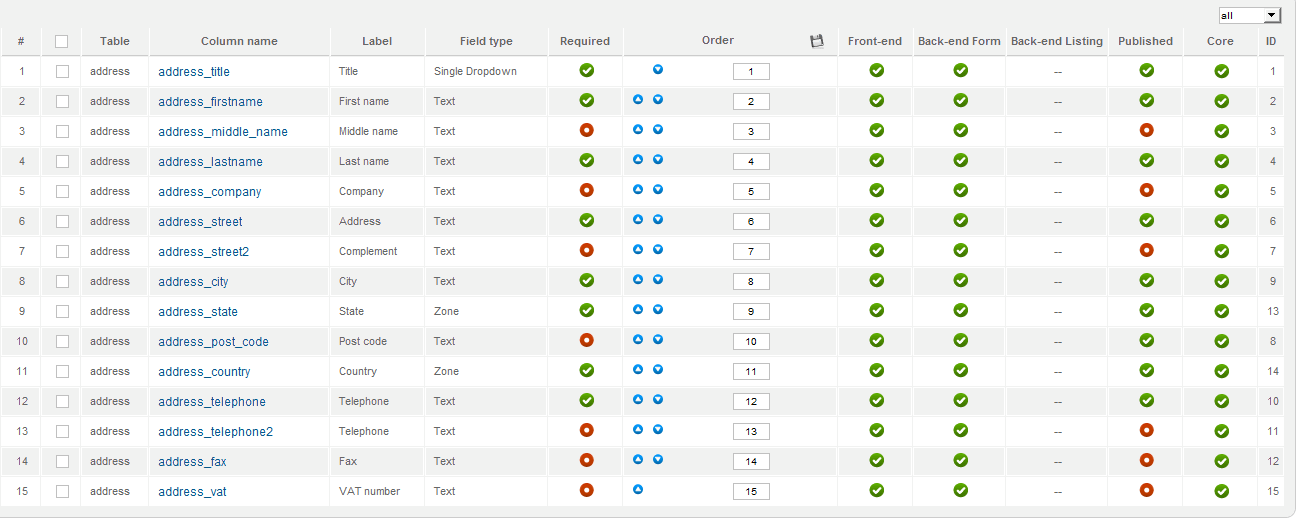
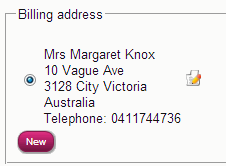
Last edit: 14 years 3 weeks ago by margknox.
Please Log in or Create an account to join the conversation.
14 years 3 weeks ago #70074
by Xavier
Replied by Xavier on topic Re: Billing address correction
To edit this view you have to edit the file "order / address_template" in HikaShop > Display > Views.
And change the order of the elements between the "{ ... }" tags.
And change the order of the elements between the "{ ... }" tags.
Please Log in or Create an account to join the conversation.
14 years 3 weeks ago #70077
by margknox
Replied by margknox on topic Re: Billing address correction
Great! All good now, thank you.
Please Log in or Create an account to join the conversation.
Time to create page: 0.097 seconds