
- Posts: 35
- Thank you received: 1
Values in filter options from custom field values
- curtisbollington
-
 Topic Author
- Offline
Less
More
13 years 10 months ago #74750
by curtisbollington
I'm working on a prospective site, and setting up filters using custom fields. Or trying to. I've not used this facility of Hikashop before.
Is it not possible for a filter's values to be automatically populated with the values from those entered for a particular custom field? Rather than having to copy them manually into the 'Values' field in 'Options' in the Filter?
To clarify, if I create a custom field for 'oil capacity (cc)', then create 6 products with various values for this (say 15,25,50,65,71,82), why are these values not automatically populated when I create a filter in a product category for 'oil capacity' using that custom field? It seems I have to go to each product in turn, and copy these into Values within Options on the filter admin.
If it can be done automatically, please let me know how.
Thanks
Curtis
Is it not possible for a filter's values to be automatically populated with the values from those entered for a particular custom field? Rather than having to copy them manually into the 'Values' field in 'Options' in the Filter?
To clarify, if I create a custom field for 'oil capacity (cc)', then create 6 products with various values for this (say 15,25,50,65,71,82), why are these values not automatically populated when I create a filter in a product category for 'oil capacity' using that custom field? It seems I have to go to each product in turn, and copy these into Values within Options on the filter admin.
If it can be done automatically, please let me know how.
Thanks
Curtis
Please Log in or Create an account to join the conversation.

13 years 10 months ago #74790
by Xavier
Replied by Xavier on topic Re: Values in filter options from custom field values
Hi,
It's already possible, when you create a custom field in the table "Product" with values, then you can create a filter on this custom field, don't fill the value for the filter.
And when the filter is displayed on the front page, you have the custom field values.
It's already possible, when you create a custom field in the table "Product" with values, then you can create a filter on this custom field, don't fill the value for the filter.
And when the filter is displayed on the front page, you have the custom field values.
Please Log in or Create an account to join the conversation.
- curtisbollington
-
Topic Author
- Offline
Less
More
- Posts: 35
- Thank you received: 1
13 years 10 months ago #74818
by curtisbollington
Replied by curtisbollington on topic Re: Values in filter options from custom field values
Hi, thanks for getting back to me. I've tried that, but don't get any options in the dropdowns, as you'll see on:
www.hydraulic-products.co.uk/index.php/h...gle-acting-cylinders
. Do you have any idea what might be going wrong?
I tried using the 'cursor' option, which seemed to work fine, but I couldn't get it to display neatly. I used five cursors, and had no problem setting the values, etc, but the only the top two had anything like the correct vertical spacing, the bottom three overlapped the labels, and ran out of the 'filter' box. I tried various options in the filter items menu, and configuration display menu, but nothing seemed to make a difference. It's a shame, because I like the 'cursor' option.
I tried using the 'cursor' option, which seemed to work fine, but I couldn't get it to display neatly. I used five cursors, and had no problem setting the values, etc, but the only the top two had anything like the correct vertical spacing, the bottom three overlapped the labels, and ran out of the 'filter' box. I tried various options in the filter items menu, and configuration display menu, but nothing seemed to make a difference. It's a shame, because I like the 'cursor' option.
Please Log in or Create an account to join the conversation.
13 years 10 months ago #75022
by Xavier
Replied by Xavier on topic Re: Values in filter options from custom field values
Hi,
In the link given, I don't see any filters.
For the cursors, have you set the same "Number of columns" for each cursors in the filters options ? Then, I think you can correct the problem with some css customizations.
In the link given, I don't see any filters.
For the cursors, have you set the same "Number of columns" for each cursors in the filters options ? Then, I think you can correct the problem with some css customizations.
Please Log in or Create an account to join the conversation.
- curtisbollington
-
Topic Author
- Offline
Less
More
- Posts: 35
- Thank you received: 1
13 years 10 months ago #75273
by curtisbollington
Replied by curtisbollington on topic Re: Values in filter options from custom field values
Aplogies, I must have sent the wrong link. Try:
www.hydraulic-products.co.uk/index.php/h...gle-acting-cylinders
Regards,
Curtis
www.hydraulic-products.co.uk/index.php/h...gle-acting-cylinders
Regards,
Curtis
Please Log in or Create an account to join the conversation.
13 years 10 months ago #75324
by Xavier
Replied by Xavier on topic Re: Values in filter options from custom field values
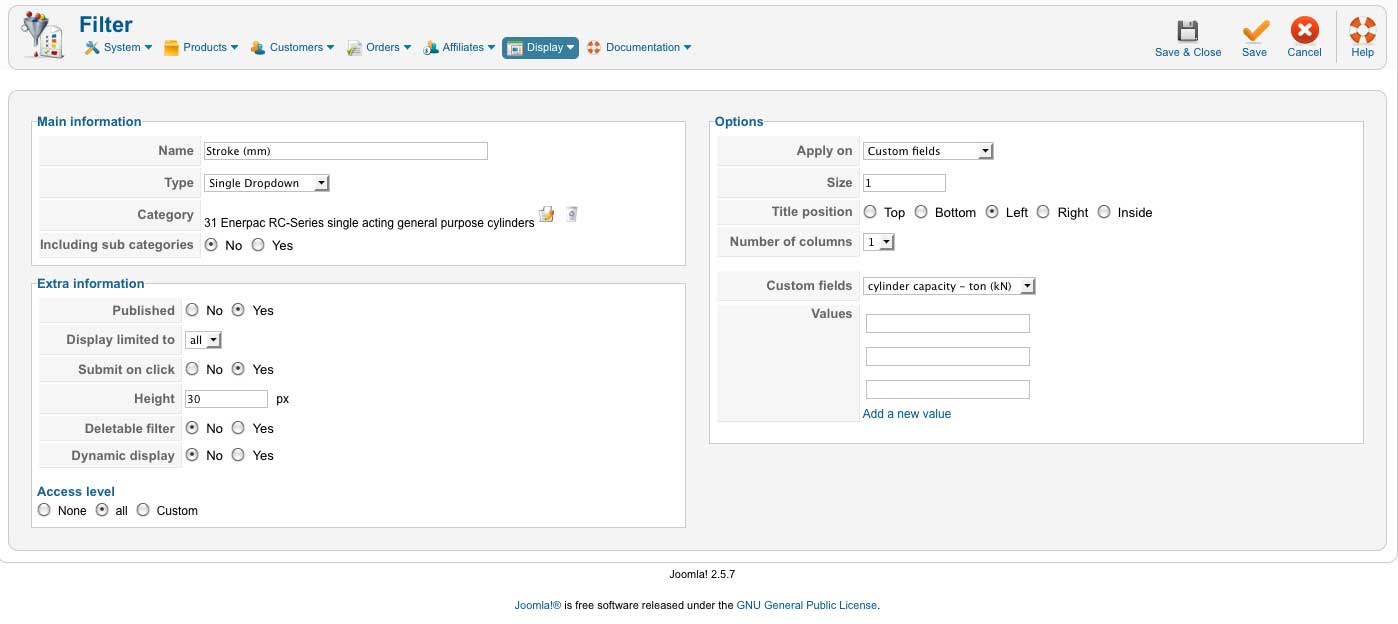
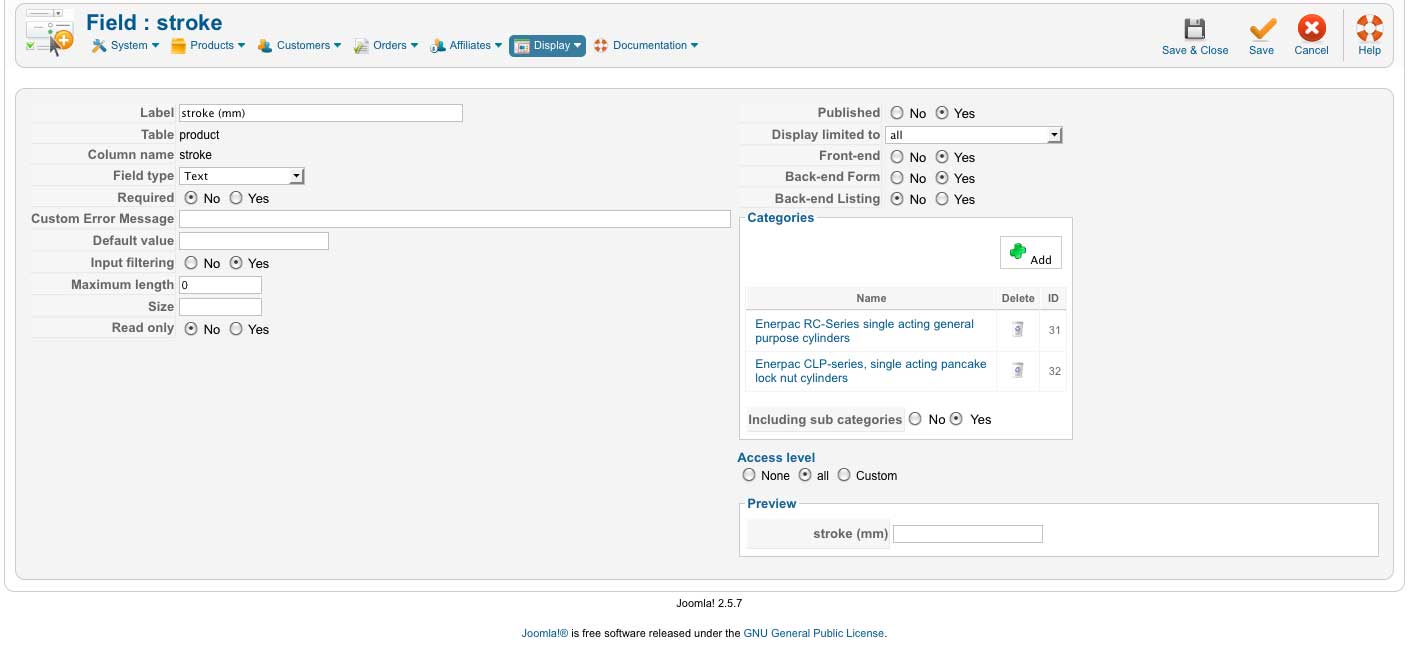
Could you give me screenshots of the Stroke custom field configuration and the Stroke filter configuration ?
Please Log in or Create an account to join the conversation.
- curtisbollington
-
Topic Author
- Offline
Less
More
- Posts: 35
- Thank you received: 1
13 years 10 months ago #75346
by curtisbollington
Replied by curtisbollington on topic Re: Values in filter options from custom field values
With pleasure, please find them attached:
Best regards,
Curtis
Best regards,
Curtis
Please Log in or Create an account to join the conversation.
13 years 10 months ago #75358
by Xavier
Replied by Xavier on topic Re: Values in filter options from custom field values
To have the value of the Stroke custom field, you need to set the Custom field value in your filter configuration on "Stroke".
In you custom field configuation, you must have another Field type to set values if you want these values in your filter.
For example a custom field with the type "Single Dropdown" and add values.
In you custom field configuation, you must have another Field type to set values if you want these values in your filter.
For example a custom field with the type "Single Dropdown" and add values.
Please Log in or Create an account to join the conversation.
- curtisbollington
-
Topic Author
- Offline
Less
More
- Posts: 35
- Thank you received: 1
13 years 10 months ago #75372
by curtisbollington
Replied by curtisbollington on topic Re: Values in filter options from custom field values
Hi Xavier,
Is the following not correct the: In the filter configuration, say for 'Stroke (mm)' (- the one I sent the screen image for):
Or am I completely wrong? (In which case I apologise for my stupidity).
Best regards,
Curtis
Is the following not correct the: In the filter configuration, say for 'Stroke (mm)' (- the one I sent the screen image for):
- In 'Main Information', I set 'Type' to 'Single Dropdown', because I want the user to select from values already entered for products in this custom field
- In 'Options', I select 'Apply on:' 'Custom fields', because I want to select which custom field I want those values to come from, in this case 'stroke (mm).
Or am I completely wrong? (In which case I apologise for my stupidity).
Best regards,
Curtis
Please Log in or Create an account to join the conversation.

13 years 10 months ago #75611
by nicolas
Replied by nicolas on topic Re: Values in filter options from custom field values
It would, but only if you select 'Stroke (mm)' in the "custom fields" option of your filter.
On your screenshot, we can clearly see that it's not the case and that you selected there the custom field "cylinder capacity -ton".
Change it to the custom field you want and that should be ok.
On your screenshot, we can clearly see that it's not the case and that you selected there the custom field "cylinder capacity -ton".
Change it to the custom field you want and that should be ok.
Please Log in or Create an account to join the conversation.
- curtisbollington
-
Topic Author
- Offline
Less
More
- Posts: 35
- Thank you received: 1
13 years 10 months ago #75887
by curtisbollington
Replied by curtisbollington on topic Re: Values in filter options from custom field values
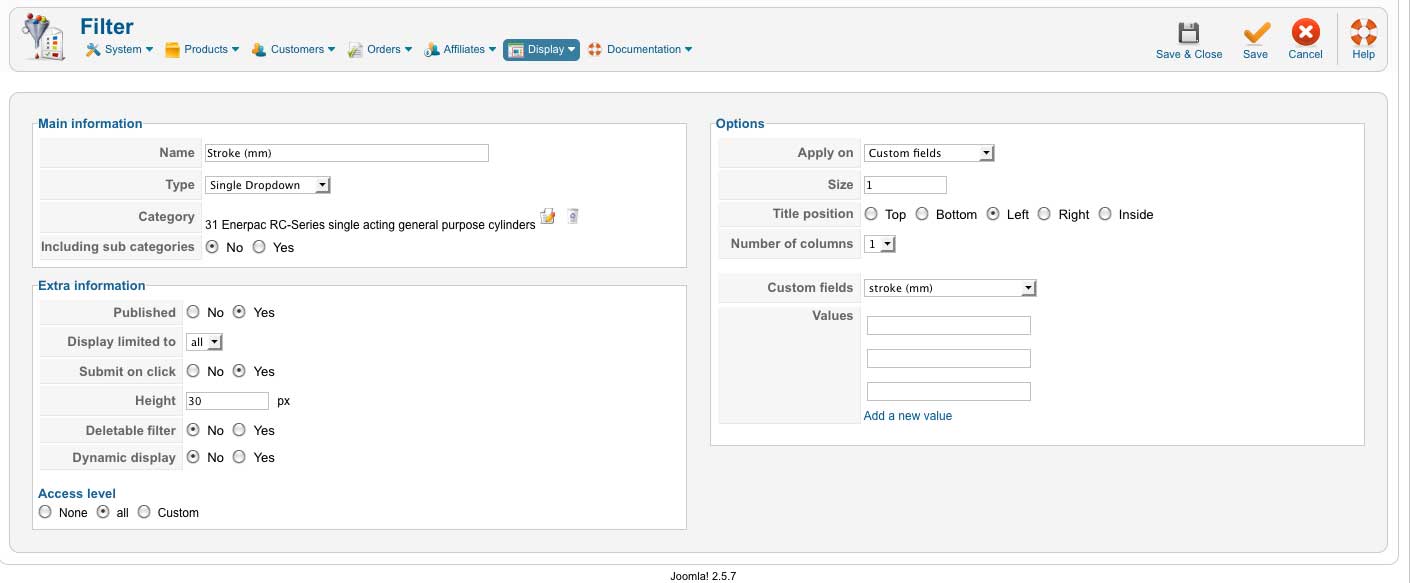
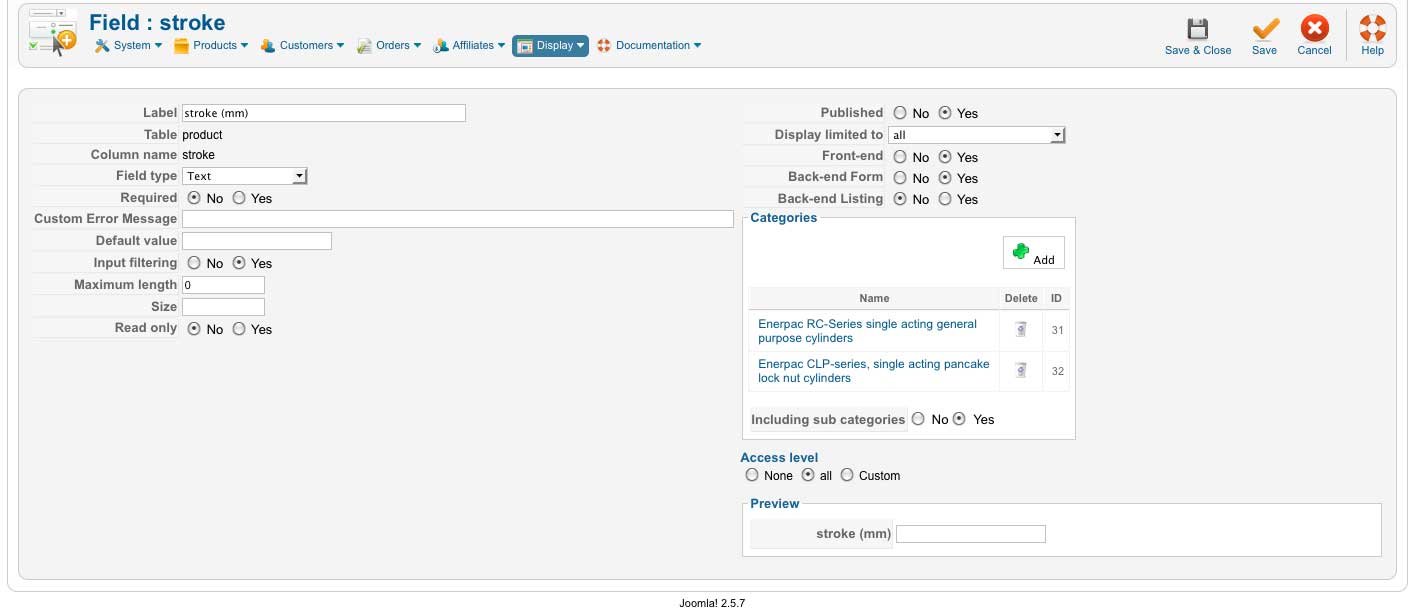
Hi, I sort of figured out that might be the case, but I've tried changing that, as you'll see from the attached screenshots. I'm probably being an idiot, and doing something wrong somewhere that I can't see. Any ideas? The fields are populated, by the way - if they were empty I could perhaps understand it.
Thanks again.
Curtis
the url for the catalogue display for this is: www.hydraulic-products.co.uk/index.php/h...gle-acting-cylinders
Thanks again.
Curtis
the url for the catalogue display for this is: www.hydraulic-products.co.uk/index.php/h...gle-acting-cylinders
Please Log in or Create an account to join the conversation.
13 years 10 months ago #76069
by Xavier
Replied by Xavier on topic Re: Values in filter options from custom field values
Hi,
To have the default value in the filter, you must have the Custom Field with the type "Single Dropdown" or "Multiple Dropdown" with values for this custom field.
Else it will no work.
To have the default value in the filter, you must have the Custom Field with the type "Single Dropdown" or "Multiple Dropdown" with values for this custom field.
Else it will no work.
Please Log in or Create an account to join the conversation.
- curtisbollington
-
Topic Author
- Offline
Less
More
- Posts: 35
- Thank you received: 1
13 years 9 months ago #80672
by curtisbollington
Replied by curtisbollington on topic Values in filter options from custom field values
I'm still struggling with these filters I'm afraid. I've tried all kinds of things but can't get it to work. I accept this is something I'm doing, rather than a glitch in HikaShop, but I'd be grateful if you could let me know what I'm doing wrong.
First of all, am I right in thinking that it is not possible to set up a filter to be automatically populated with the data entered in a particular custom field for each product? For example. I have a custom field 'cylinder capacity - ton (kN)' for which I have already entered values in the 'Products' menu, if in the Filter for 'Cylinder capacity - ton (kN)' I select: Apply on 'Custom fields', then select for 'Custom fields' 'cylinder capacity - ton (kN), it will not automatically populate the filter with the values entered in that field for each product?
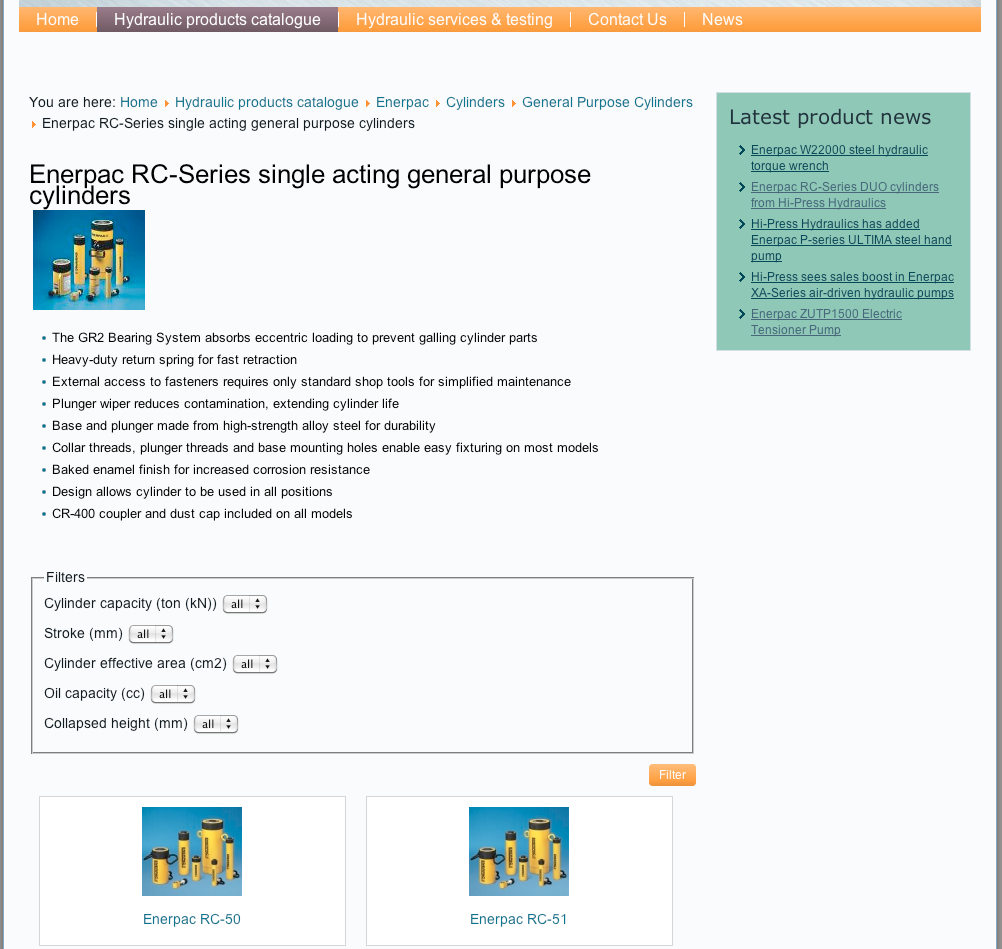
Secondly, I've attached a couple of screen grabs, so that you can see where I might be going wrong. I've selected 'single dropdown' in Field Type, and entered a selection of values, as you'll see. These values do display when I click on 'Cylinder capacity - ton (kN)' on the page (which is linked from here) , but I still can't seem to make it work.
Any help you can provide would be appreciated.
Best regards,
Curtis
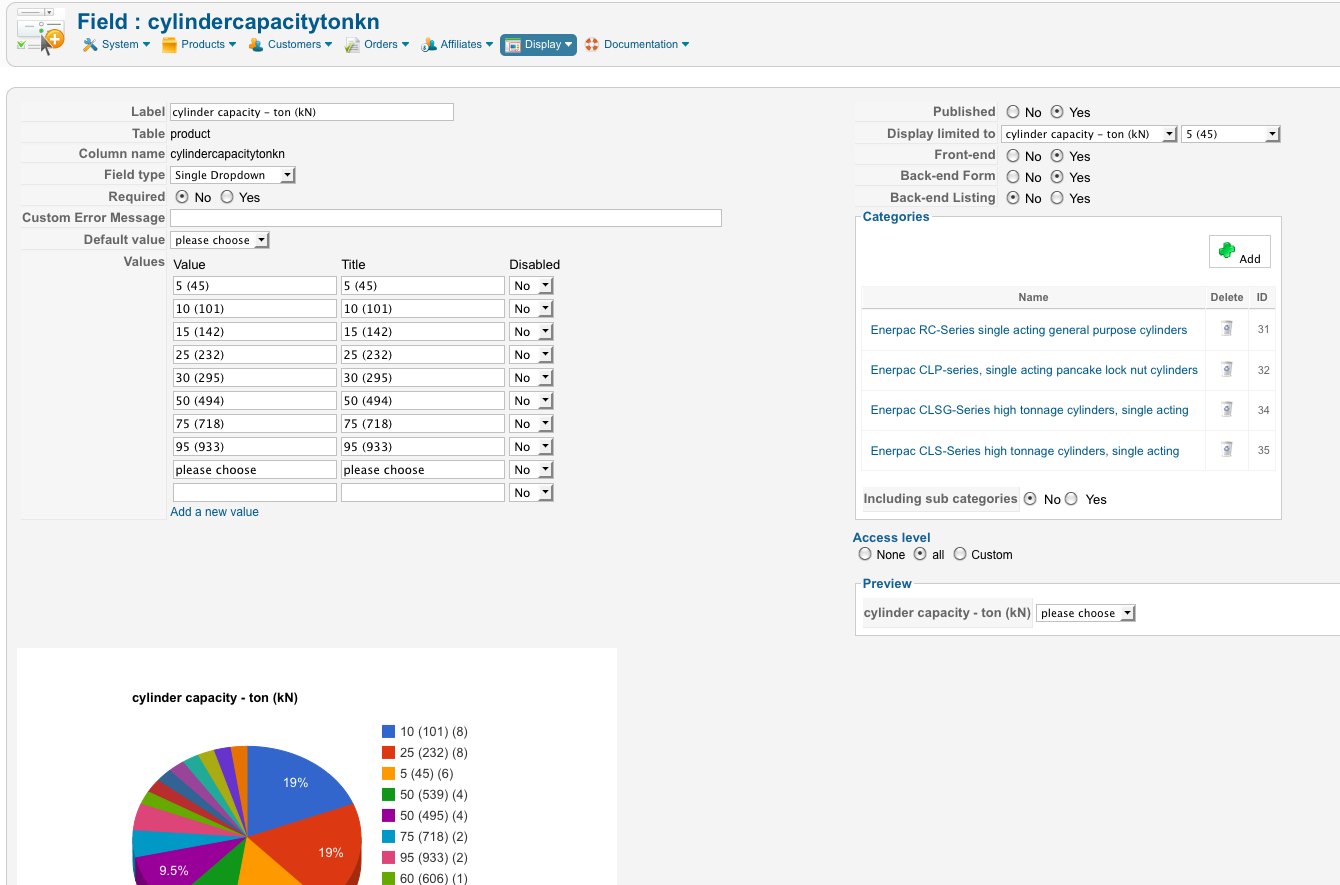
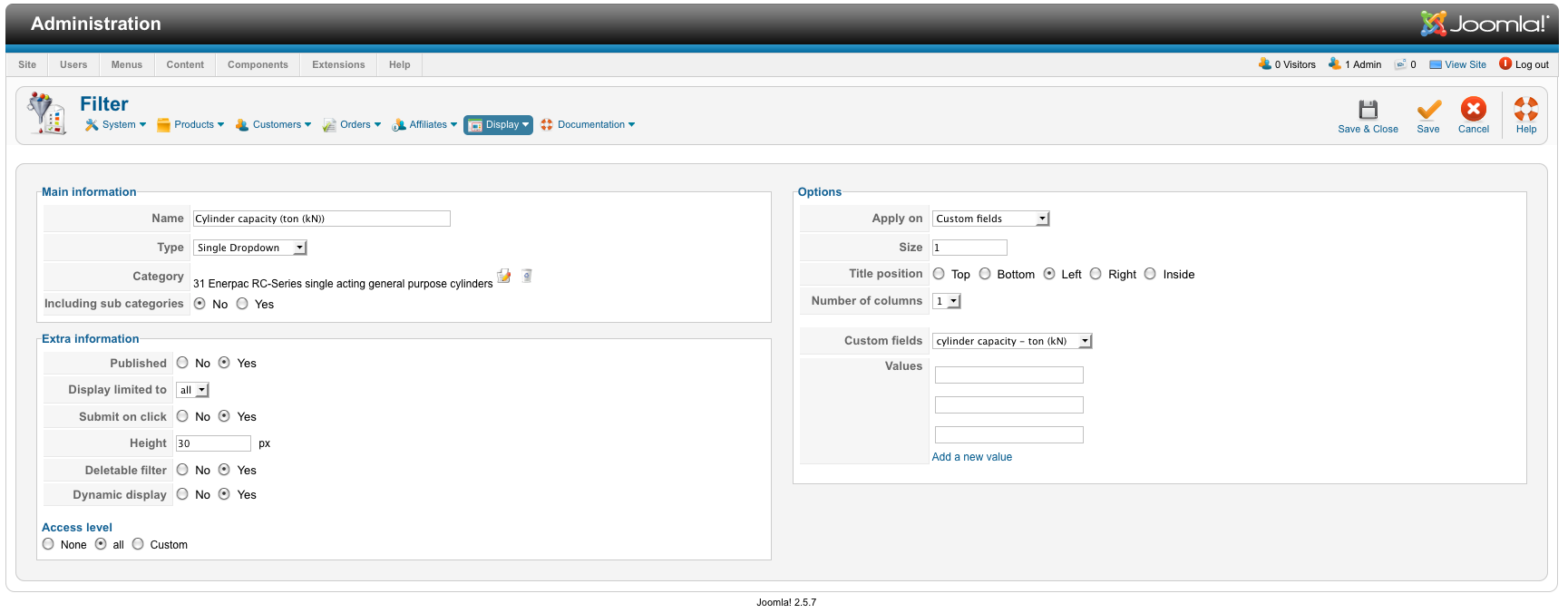
First of all, am I right in thinking that it is not possible to set up a filter to be automatically populated with the data entered in a particular custom field for each product? For example. I have a custom field 'cylinder capacity - ton (kN)' for which I have already entered values in the 'Products' menu, if in the Filter for 'Cylinder capacity - ton (kN)' I select: Apply on 'Custom fields', then select for 'Custom fields' 'cylinder capacity - ton (kN), it will not automatically populate the filter with the values entered in that field for each product?
Secondly, I've attached a couple of screen grabs, so that you can see where I might be going wrong. I've selected 'single dropdown' in Field Type, and entered a selection of values, as you'll see. These values do display when I click on 'Cylinder capacity - ton (kN)' on the page (which is linked from here) , but I still can't seem to make it work.
Any help you can provide would be appreciated.
Best regards,
Curtis
Please Log in or Create an account to join the conversation.
13 years 9 months ago #80796
by nicolas
Replied by nicolas on topic Values in filter options from custom field values
The system will take automatically the values of the custom field to populate the filter, but not the values that you would enter as text value for each product for the custom field.
The problem with your first filter is that the second filter has the same namekey for some reason. Please delete and recreate the second filter so that it has another namekey than the first one and it will work.
The problem with your first filter is that the second filter has the same namekey for some reason. Please delete and recreate the second filter so that it has another namekey than the first one and it will work.
Please Log in or Create an account to join the conversation.
Time to create page: 0.293 seconds