

- Posts: 107
- Thank you received: 1
[SOLVED] CSS problem with Checkout page
13 years 10 months ago - 13 years 10 months ago #79166
by tinachou
[SOLVED] CSS problem with Checkout page was created by tinachou
Dear ,
I realize the css styles of the product list page and the ckeckout page have some parts in common.
For example, the price text/font size are the same.
My problem is
1. How to make the price text size and color in the checkout page not the same as that in the product list page?
2. How to make the product thumbnail size in the checkout page not the same as that in the product list page?
Refer as the following picture:
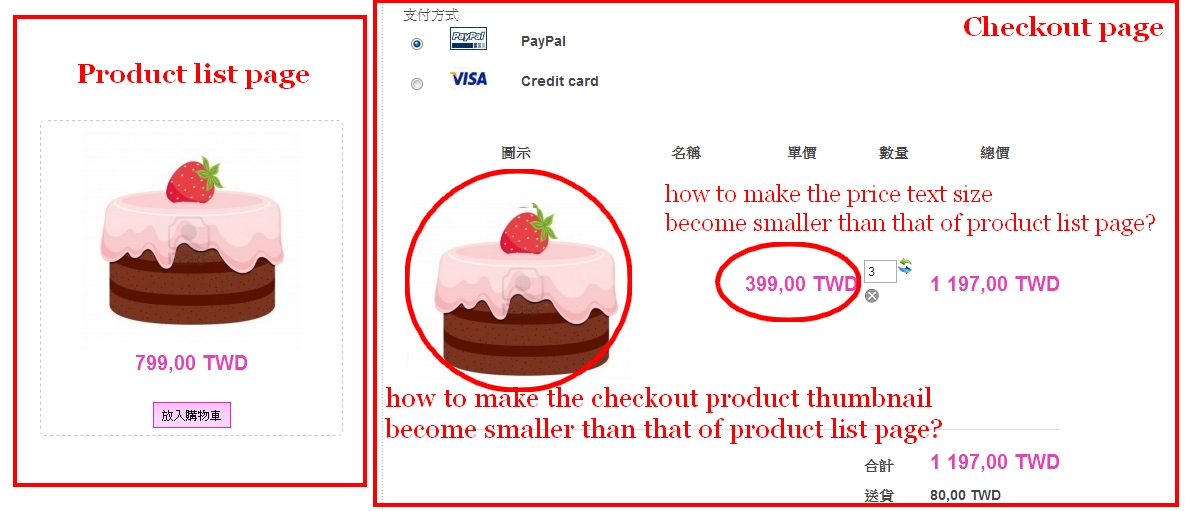
Really appreciate your insightful solution.
I realize the css styles of the product list page and the ckeckout page have some parts in common.
For example, the price text/font size are the same.
My problem is
1. How to make the price text size and color in the checkout page not the same as that in the product list page?
2. How to make the product thumbnail size in the checkout page not the same as that in the product list page?
Refer as the following picture:
Really appreciate your insightful solution.
Last edit: 13 years 10 months ago by tinachou.
Please Log in or Create an account to join the conversation.

13 years 10 months ago #79197
by Xavier
Replied by Xavier on topic CSS problem with Checkout page
Hi,
You have to set a more specificated css property.
For example:
You have to set a more specificated css property.
For example:
Code:
.hikashop_checkout_cart .hikashop_product_price{
color: ...;
size: ...;
}
Please Log in or Create an account to join the conversation.
13 years 10 months ago - 13 years 10 months ago #79306
by tinachou
Replied by tinachou on topic CSS problem with Checkout page
Hi, thank you so much for the reply.
I have added the following code to make a different font-size of product price.
However, I still don't figure out how to make the product image thumbnail to be different size?
Please help me.
I have added the following code to make a different font-size of product price.
Code:
#hikashop_checkout_cart .hikashop_product_price{
color:#F32D94;
font-size: 14px;
}
However, I still don't figure out how to make the product image thumbnail to be different size?
Please help me.
Last edit: 13 years 10 months ago by tinachou.
Please Log in or Create an account to join the conversation.

13 years 10 months ago - 13 years 10 months ago #79352
by Jerome
Jerome - Obsidev.com
HikaMarket & HikaSerial developer / HikaShop core dev team.
Replied by Jerome on topic CSS problem with Checkout page
Hi,
The checkout cart view use the options "thumbnail_x" and "thumbnail_y" for images size.
You have to override your view "checkout | cart" (for your front-end template) in order to change the value.
Just find
And set your new values.
Regards,
The checkout cart view use the options "thumbnail_x" and "thumbnail_y" for images size.
You have to override your view "checkout | cart" (for your front-end template) in order to change the value.
Just find
Code:
$width = $this->config->get('thumbnail_x');
$height = $this->config->get('thumbnail_y');
Regards,
Jerome - Obsidev.com
HikaMarket & HikaSerial developer / HikaShop core dev team.
Last edit: 13 years 10 months ago by Jerome.
The following user(s) said Thank You: tinachou
Please Log in or Create an account to join the conversation.
13 years 10 months ago #79557
by tinachou
Replied by tinachou on topic CSS problem with Checkout page
Thank you so much!
I have solved it.
I have solved it.
Please Log in or Create an account to join the conversation.
Time to create page: 0.239 seconds