

- Posts: 107
- Thank you received: 1
How to add a banner in the product page?
13 years 10 months ago - 13 years 10 months ago #79170
by tinachou
How to add a banner in the product page? was created by tinachou
Dear all ,
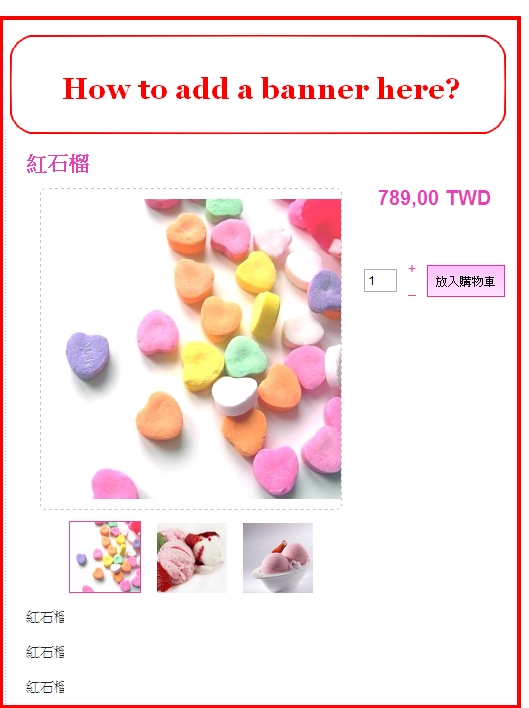
I wonder how can I add a banner in the product page besides the introduction text ? Please refer to the picture.
Thank you so much.
I wonder how can I add a banner in the product page besides the introduction text ? Please refer to the picture.
Thank you so much.
Last edit: 13 years 10 months ago by tinachou.
Please Log in or Create an account to join the conversation.

Less
More
- Posts: 12953
- Thank you received: 1778
13 years 10 months ago #79180
by Mohamed Thelji
Replied by Mohamed Thelji on topic How to add a banner in the product page?
Hi,
I think that you'll have to do it through your "show_default" file of the "product" view of your front-end template ("Hikashop->Display->Views"). And insert the HTML code in the right placeto display your banner.
Hope this will help you.
I think that you'll have to do it through your "show_default" file of the "product" view of your front-end template ("Hikashop->Display->Views"). And insert the HTML code in the right placeto display your banner.
Hope this will help you.
Please Log in or Create an account to join the conversation.
13 years 9 months ago #80426
by tinachou
Replied by tinachou on topic How to add a banner in the product page?
Hi,
thanks for the hint.
My problem is that how to match each product page with a corresponding banner. Each product has its own banner.
Which file should I edit?
And how can I point the banner picture to a certain product page...?
Thank you so much.
thanks for the hint.
My problem is that how to match each product page with a corresponding banner. Each product has its own banner.
Which file should I edit?
And how can I point the banner picture to a certain product page...?
Thank you so much.
Please Log in or Create an account to join the conversation.

13 years 9 months ago - 13 years 9 months ago #80473
by Xavier
Replied by Xavier on topic How to add a banner in the product page?
Hi,
Mohamed is right when he say that the file to edit is "show_default".
To match each product page with a banner, you just have to set a dynamic link in this view.
For example, <img src="yourFolderPath/image_<?php echo hikashop_getCID('product_id');?>" alt="banner_<?php echo hikashop_getCID('product_id');?>"/>
and name you banner image_+product id.
Mohamed is right when he say that the file to edit is "show_default".
To match each product page with a banner, you just have to set a dynamic link in this view.
For example, <img src="yourFolderPath/image_<?php echo hikashop_getCID('product_id');?>" alt="banner_<?php echo hikashop_getCID('product_id');?>"/>
and name you banner image_+product id.
Last edit: 13 years 9 months ago by Xavier.
Please Log in or Create an account to join the conversation.
13 years 9 months ago - 13 years 9 months ago #80618
by tinachou
Replied by tinachou on topic How to add a banner in the product page?
HI there,
I inserted the line into show_default.php.
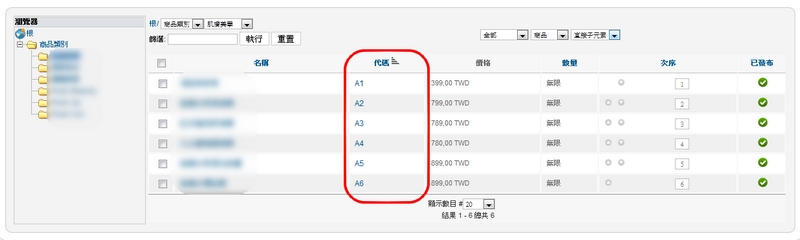
However, I wonder the product_id is the same as which I defined? Such as A1, A2, A3..in the following picture.
But after I tested, I found the product_id is something generated by system? Because when I name the banner as "PRODUCT_A1.jpg", the picture will not appear.
How can I define the product_id?
Thank you very much.
I inserted the line into show_default.php.
Code:
<img src="images/product/banner/PRODUCT_<?php echo hikashop_getCID('product_id');?>.jpg" alt="banner_<?php echo hikashop_getCID('product_id');?>"/>
However, I wonder the product_id is the same as which I defined? Such as A1, A2, A3..in the following picture.
But after I tested, I found the product_id is something generated by system? Because when I name the banner as "PRODUCT_A1.jpg", the picture will not appear.
How can I define the product_id?
Thank you very much.
Last edit: 13 years 9 months ago by tinachou.
Please Log in or Create an account to join the conversation.
13 years 9 months ago #80656
by Xavier
Replied by Xavier on topic How to add a banner in the product page?
Hi,
Yes the product_id is defined by system, but if you prefer you can use the product code.
instead of "<?php echo hikashop_getCID('product_id');?>" you can use "<?php echo $this->element->product_code; ?>"
Yes the product_id is defined by system, but if you prefer you can use the product code.
instead of "<?php echo hikashop_getCID('product_id');?>" you can use "<?php echo $this->element->product_code; ?>"
Please Log in or Create an account to join the conversation.
Time to create page: 0.250 seconds