

- Posts: 107
- Thank you received: 1
How to display two kinds of price for a product?
13 years 10 months ago #79173
by tinachou
How to display two kinds of price for a product? was created by tinachou
Hi there,
I am confused about how to display two kinds of prices for the same product.
One is " Original Price", the other is "Member Only Price".
Where Can I set up such setting and display the two prices in the product page.
The final charging price is "Member Only Price", of course.
Thank you very much.
I am confused about how to display two kinds of prices for the same product.
One is " Original Price", the other is "Member Only Price".
Where Can I set up such setting and display the two prices in the product page.
The final charging price is "Member Only Price", of course.
Thank you very much.
Please Log in or Create an account to join the conversation.

Less
More
- Posts: 12953
- Thank you received: 1778
13 years 10 months ago #79201
by Mohamed Thelji
Replied by Mohamed Thelji on topic How to display two kinds of price for a product?
Hi,
I think that you can :
- Set 2 price to your product through the tab price of your product page.
OR
- Create customfield and use it through your product view (this method would require some skill in PHP)
Hope this will help you.
I think that you can :
- Set 2 price to your product through the tab price of your product page.
OR
- Create customfield and use it through your product view (this method would require some skill in PHP)
Hope this will help you.
Please Log in or Create an account to join the conversation.
13 years 10 months ago #79252
by joomleb
Replied by joomleb on topic How to display two kinds of price for a product?
Why not use Seblod to do it?
Please Log in or Create an account to join the conversation.
13 years 9 months ago - 13 years 9 months ago #82527
by tinachou
Replied by tinachou on topic How to display two kinds of price for a product?
Hi there,
I use the first method to add another price in the product info setting.
And it turns out two prices showing in parallel as the following pictures.
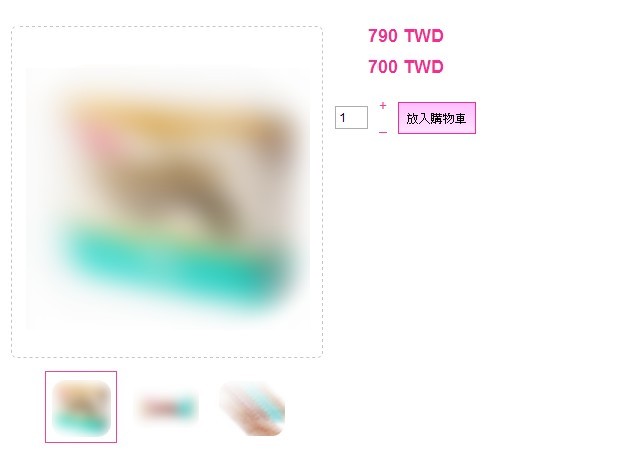
I hope to know:
(1) How to add some words above the two prices like:
original price
[strike]790 TWD[/strike]
Members-only price
700 TWD
But it raise another problem that how can I make the price has a strike sign?
(2) How to specify the "Members-only price" is the price being charged rather than the "orginal price"?
Thank you so much
I use the first method to add another price in the product info setting.
And it turns out two prices showing in parallel as the following pictures.
I hope to know:
(1) How to add some words above the two prices like:
original price
[strike]790 TWD[/strike]
Members-only price
700 TWD
But it raise another problem that how can I make the price has a strike sign?
(2) How to specify the "Members-only price" is the price being charged rather than the "orginal price"?
Thank you so much
Last edit: 13 years 9 months ago by tinachou.
Please Log in or Create an account to join the conversation.

13 years 9 months ago #82566
by Xavier
Replied by Xavier on topic How to display two kinds of price for a product?
Hi,
To add some text, you can edit the view "product / listing_price" in this view add the text before the concerned parts.
To make the price has a strike sign, you can add a class on the first displayed price and apply a css property on it to strike the text.
The lower price will be loaded by default. You can restrict this price to the "Members" group. By this way the other customer will have the default price and the members the lower one.
To add some text, you can edit the view "product / listing_price" in this view add the text before the concerned parts.
To make the price has a strike sign, you can add a class on the first displayed price and apply a css property on it to strike the text.
The lower price will be loaded by default. You can restrict this price to the "Members" group. By this way the other customer will have the default price and the members the lower one.
Please Log in or Create an account to join the conversation.
13 years 9 months ago #82626
by tinachou
Replied by tinachou on topic How to display two kinds of price for a product?
Dear,
Thanks for the quick reply. Your support is very helpful.
I tried to look at the php file of product/listing_price. I guess I need some hints.
Can you tell me which part should I adjust in order to show two kinds of text above the two prices?
I am very afraid to mess up the code.
Thank you so much.
Thanks for the quick reply. Your support is very helpful.
I tried to look at the php file of product/listing_price. I guess I need some hints.
Can you tell me which part should I adjust in order to show two kinds of text above the two prices?
I am very afraid to mess up the code.
Thank you so much.
Please Log in or Create an account to join the conversation.
13 years 9 months ago #82721
by Xavier
Replied by Xavier on topic How to display two kinds of price for a product?
Hi,
After seeing the code, I think that you just have to add two translations in the language file, HikaShop > Configuration > Languages.
Try to add two entries like:
PRICE_BEGINNING_0 = "original price"
PRICE_BEGINNING_1 = "Members-only price"
After seeing the code, I think that you just have to add two translations in the language file, HikaShop > Configuration > Languages.
Try to add two entries like:
PRICE_BEGINNING_0 = "original price"
PRICE_BEGINNING_1 = "Members-only price"
Please Log in or Create an account to join the conversation.
Time to create page: 0.190 seconds