
Options - visibility prices

13 years 9 months ago #79898
by jan2
Options - visibility prices was created by jan2
Hello,
I am using "options" with different prices (digressive prices)
Visitors can't see the different prices for options.
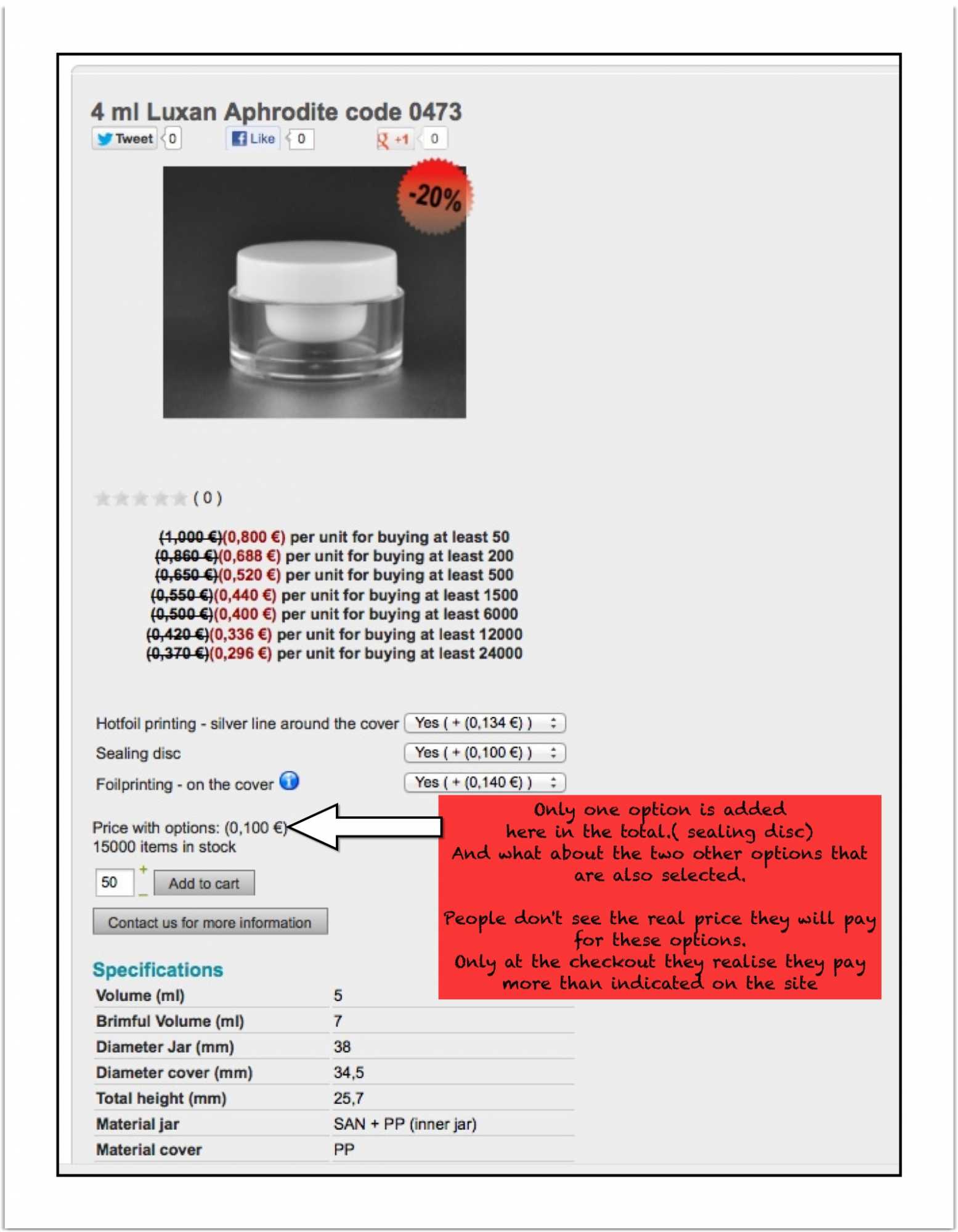
When a customer select an option he is seeing the cheapest price but on the checkout they see the most expensive price. I get a lot of negative reactions on this. I hope you have a solution for this.
second ... I would like to place a text under product prices, something like: "Please login to see the prices for bigger quantities"
where should I add this text ?
kind regards
Jan
I am using "options" with different prices (digressive prices)
Visitors can't see the different prices for options.
When a customer select an option he is seeing the cheapest price but on the checkout they see the most expensive price. I get a lot of negative reactions on this. I hope you have a solution for this.
second ... I would like to place a text under product prices, something like: "Please login to see the prices for bigger quantities"
where should I add this text ?
kind regards
Jan
Please Log in or Create an account to join the conversation.

Less
More
- Posts: 12953
- Thank you received: 1778
13 years 9 months ago #79939
by Mohamed Thelji
Replied by Mohamed Thelji on topic Options - visibility prices
Hi Jan,
1. I don't really understood so can you show me screenshots of what is happening and give me the link of your web site please ?
2. If you want to edit your products page, you'll just have to :
- Go to "Hikashop->Display->Views"
- Edit the "show_default" file of the "product" view of your front-end template
- Add this code at the right place :
Hope this will help you.
1. I don't really understood so can you show me screenshots of what is happening and give me the link of your web site please ?
2. If you want to edit your products page, you'll just have to :
- Go to "Hikashop->Display->Views"
- Edit the "show_default" file of the "product" view of your front-end template
- Add this code at the right place :
Code:
<?php echo"Please login to see the prices for bigger quantities"; ?>
Please Log in or Create an account to join the conversation.
13 years 9 months ago - 13 years 9 months ago #80045
by jan2
Replied by jan2 on topic Options - visibility prices
Hello,
Thank you for your reply !
1) see enclosed document.
2) how to arrange this for multiple languages ? (I am using also Falang)
3) another request : Is there a way to move the table with 'specifications' (see enclosed image) on the right side of the image (of the jar)
link to the site : www.thejarfactory.com
Br
JAN
Thank you for your reply !
1) see enclosed document.
2) how to arrange this for multiple languages ? (I am using also Falang)
3) another request : Is there a way to move the table with 'specifications' (see enclosed image) on the right side of the image (of the jar)
link to the site : www.thejarfactory.com
Br
JAN
Last edit: 13 years 9 months ago by jan2.
Please Log in or Create an account to join the conversation.
Less
More
- Posts: 12953
- Thank you received: 1778
13 years 9 months ago #80055
by Mohamed Thelji
Replied by Mohamed Thelji on topic Options - visibility prices
Hi,
1. Can you show me screenshots of how you configured your product page ?
2. My solution would be to :
- Add this code :
instead of this code :
- And then go to "Hikashop->Configuration->Languages->'Your translation file'"
- Add your translation word to the "override" section :
And do it for all translation file
3. I think that you'll just have to :
- Go to "Hikashop->Display->Views"
- Edit the "show-default" file of the "Product" view of your front-end template
- Move the code of your "specifications" after this line :
1. Can you show me screenshots of how you configured your product page ?
2. My solution would be to :
- Add this code :
Code:
<?php echo JText::_( 'LOGIN_FOR_BIGGER_QUANTITY' ); ?>
Code:
<?php echo"Please login to see the prices for bigger quantities"; ?>
- Add your translation word to the "override" section :
Code:
LOGIN_FOR_BIGGER_QUANTITY : "Please login to see the prices for bigger quantities"
And do it for all translation file
3. I think that you'll just have to :
- Go to "Hikashop->Display->Views"
- Edit the "show-default" file of the "Product" view of your front-end template
- Move the code of your "specifications" after this line :
Code:
<div id="hikashop_product_right_part" class="hikashop_product_right_part span6">
Please Log in or Create an account to join the conversation.
Time to create page: 0.154 seconds