

- Posts: 107
- Thank you received: 1
Checkout billing and shipping address consistency
13 years 9 months ago - 13 years 9 months ago #79922
by tinachou
Checkout billing and shipping address consistency was created by tinachou
Hi there,
I realized when I switch off the "address_country" in View->Custom Fields/Column of the Hikashop back end,
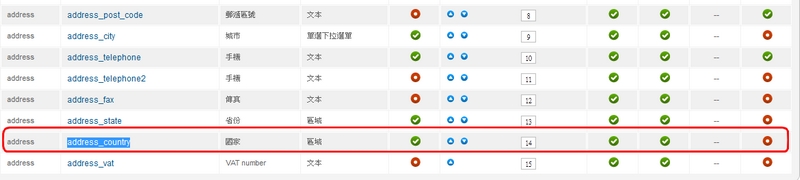
the resulting billing or shipping address format during checkout process will show an additional blank row as seen in the following:
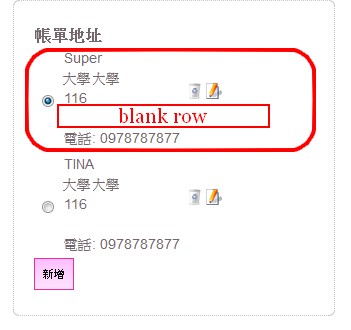
If I switch on the "address_country" again, the blank row will show the country name.
I wonder if there is a solution to make the blank row disappear if I switch off the country column.
Thank you very much.
I realized when I switch off the "address_country" in View->Custom Fields/Column of the Hikashop back end,
the resulting billing or shipping address format during checkout process will show an additional blank row as seen in the following:
If I switch on the "address_country" again, the blank row will show the country name.
I wonder if there is a solution to make the blank row disappear if I switch off the country column.
Thank you very much.
Last edit: 13 years 9 months ago by tinachou.
Please Log in or Create an account to join the conversation.

13 years 9 months ago #79985
by Xavier
Replied by Xavier on topic Checkout billing and shipping address consistency
Hi,
Try to edit the view "address / address_template" in HikaShop > Display > Views and remove the line "{address_country}".
Try to edit the view "address / address_template" in HikaShop > Display > Views and remove the line "{address_country}".
Please Log in or Create an account to join the conversation.
Time to create page: 0.196 seconds