

- Posts: 301
- Thank you received: 6
Force Charactistic Options of Product
13 years 10 months ago - 13 years 10 months ago #83321
by fan4chevy
Force Charactistic Options of Product was created by fan4chevy
I am currently using the free version. When a product has options (characteristics) how do I force them to choose them? Currently the customer can simply add to cart and the have not added the important option.
thank you,
Charles
thank you,
Charles
Last edit: 13 years 10 months ago by fan4chevy.
Please Log in or Create an account to join the conversation.

Less
More
- Posts: 12953
- Thank you received: 1778
13 years 10 months ago #83399
by Mohamed Thelji
Replied by Mohamed Thelji on topic Force Charactistic Options of Product
Hi Charles,
1. Generally when your customer press the "Add to cart" button without any option, the product with the default characteristic will be added.
2. Can you give me a link to your website please ?
1. Generally when your customer press the "Add to cart" button without any option, the product with the default characteristic will be added.
2. Can you give me a link to your website please ?
Please Log in or Create an account to join the conversation.
13 years 10 months ago #83470
by fan4chevy
Replied by fan4chevy on topic Force Charactistic Options of Product
Thank you for your reply.
I have it set up as an example like this:
select color
blue
red
brown
black
The default is select color as I want the customer to actually know to select. I think for a future version it would be good to have it where the customer actually has to select a characteristic to move to checkout if characteristics are present. Perhaps having a message 'please select option'.
Charles
I have it set up as an example like this:
select color
blue
red
brown
black
The default is select color as I want the customer to actually know to select. I think for a future version it would be good to have it where the customer actually has to select a characteristic to move to checkout if characteristics are present. Perhaps having a message 'please select option'.
Charles
Please Log in or Create an account to join the conversation.
Less
More
- Posts: 12953
- Thank you received: 1778
13 years 10 months ago #83516
by Mohamed Thelji
Replied by Mohamed Thelji on topic Force Charactistic Options of Product
Why not, but I think that you can do it by :
- Creating a default characteristic
- Setting the description to "Please select option"
- Creating a default characteristic
- Setting the description to "Please select option"
Please Log in or Create an account to join the conversation.
13 years 10 months ago #83570
by fan4chevy
Replied by fan4chevy on topic Force Charactistic Options of Product
I think that is what I did when I set it up like this:
Choose Color: Please Select
black
Silver
red
I still think it really needs an ability for a popup to occur if they do not select something when there are characteristic options. Even though I have Please Select, if they don't select it goes right to cart.
The problem is in many cases, you can't have a default selection as a customer MUST choose a color or option so that we send the correct product.
Thanks,
Charles
Choose Color: Please Select
black
Silver
red
I still think it really needs an ability for a popup to occur if they do not select something when there are characteristic options. Even though I have Please Select, if they don't select it goes right to cart.
The problem is in many cases, you can't have a default selection as a customer MUST choose a color or option so that we send the correct product.
Thanks,
Charles
Please Log in or Create an account to join the conversation.
13 years 9 months ago #84148
by utillis
Replied by utillis on topic Force Charactistic Options of Product
Having a "User select" as default option would be great. I've tried this method also, however I keep sending mails to customers asking what size they want because they didn't change from "Please select".
For products which have the pricing done through the characteristics it's even a bigger problem, because this way they think they will get their product for free.
Opt-in on this feature requests from me.
For products which have the pricing done through the characteristics it's even a bigger problem, because this way they think they will get their product for free.
Opt-in on this feature requests from me.
Please Log in or Create an account to join the conversation.

13 years 9 months ago #84510
by Xavier
Replied by Xavier on topic Force Charactistic Options of Product
Hi,
It's already possible, in you custom field options, set it as required for the first value add "Please select" disable it, then add the other values.
By this way, the user must choose another value than the "Please select" one.
It's already possible, in you custom field options, set it as required for the first value add "Please select" disable it, then add the other values.
By this way, the user must choose another value than the "Please select" one.
The following user(s) said Thank You: utillis
Please Log in or Create an account to join the conversation.
13 years 9 months ago #84576
by fan4chevy
Replied by fan4chevy on topic Force Charactistic Options of Product
Thank you for your response.
I am not understanding where I have the option to set as 'required'. Where is this located specifically?
Charles
I am not understanding where I have the option to set as 'required'. Where is this located specifically?
Charles
Please Log in or Create an account to join the conversation.
13 years 9 months ago #84706
by Xavier
Replied by Xavier on topic Force Charactistic Options of Product
Look at this screenshot:
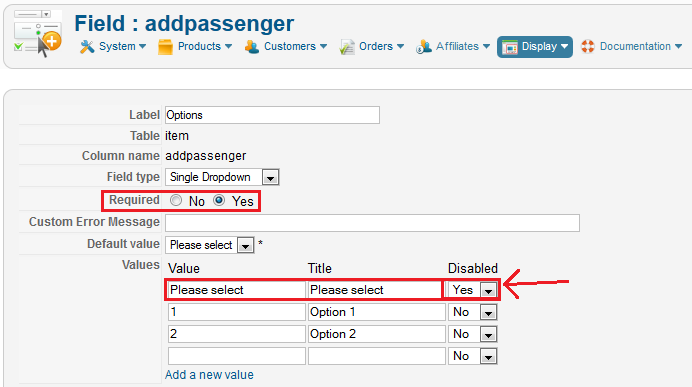
Hope this will help you.
Hope this will help you.
Please Log in or Create an account to join the conversation.
13 years 9 months ago #84740
by fan4chevy
Replied by fan4chevy on topic Force Charactistic Options of Product
Hi,
Are you saying to use this method for each Product characteristic instead of using 'Characteristics'?
Are you also showing to use it like this:
Please select Please Select Yes
1 Blue
2 Red
3 Yellow
Are you saying to use this method for each Product characteristic instead of using 'Characteristics'?
Are you also showing to use it like this:
Please select Please Select Yes
1 Blue
2 Red
3 Yellow
Please Log in or Create an account to join the conversation.
13 years 9 months ago #84813
by Xavier
Replied by Xavier on topic Force Charactistic Options of Product
If the price don't change and the images don't change too depending on the color, so it's the easiest solution.
Else some PHP modifications will be required.
Else some PHP modifications will be required.
Please Log in or Create an account to join the conversation.
13 years 9 months ago - 13 years 9 months ago #84931
by fan4chevy
Replied by fan4chevy on topic Force Charactistic Options of Product
Is this an option that you can do individually per product needs or is it the same for all products. I have so many products with different characteristic needs.
I am using free version, does this matter?
I still feel that this is something that you might consider to hardcode into the system as a default for future development. Customers need to be forced to pick an option if it is there.
Charles
I am using free version, does this matter?
I still feel that this is something that you might consider to hardcode into the system as a default for future development. Customers need to be forced to pick an option if it is there.
Charles
Last edit: 13 years 9 months ago by fan4chevy.
Please Log in or Create an account to join the conversation.
13 years 9 months ago #84992
by Xavier
Replied by Xavier on topic Force Charactistic Options of Product
It's the same for all products.
Using the characteristics system is the best way of doing that, the options are displayed by default. But if you absolutely need the "Please select" text instead of having a default value in the dropdown, you can add a characteristic like: "Choose Color" with the values "Please Select - black - Silver - red" and when you manage the variants, remove all the variants having the characteristic "Please select". And in the product edition page set the default variant as "Please select", by this way you should have the option "Please select displayed by default" but no product stock for this one, so the customer must select an other option.
Using the characteristics system is the best way of doing that, the options are displayed by default. But if you absolutely need the "Please select" text instead of having a default value in the dropdown, you can add a characteristic like: "Choose Color" with the values "Please Select - black - Silver - red" and when you manage the variants, remove all the variants having the characteristic "Please select". And in the product edition page set the default variant as "Please select", by this way you should have the option "Please select displayed by default" but no product stock for this one, so the customer must select an other option.
Please Log in or Create an account to join the conversation.
13 years 9 months ago #85091
by fan4chevy
Replied by fan4chevy on topic Force Charactistic Options of Product
Correct me if I am wrong, but I think I am doing what you are saying already but it never makes the customer select an option.
I have it like this on product page
Pants: Select Color
White
Black
Red
Green
The Select Color is set at default in the product page characteristics.
However, if they add to cart without selecting, it never makes them select.
Thank you,
Charles
I have it like this on product page
Pants: Select Color
White
Black
Red
Green
The Select Color is set at default in the product page characteristics.
However, if they add to cart without selecting, it never makes them select.
Thank you,
Charles
Please Log in or Create an account to join the conversation.

13 years 9 months ago #85222
by nicolas
Replied by nicolas on topic Force Charactistic Options of Product
Can you give a link to your product page so that we can see that ?
Please Log in or Create an account to join the conversation.
9 years 8 months ago - 9 years 8 months ago #262411
by lyran
Replied by lyran on topic Force Charactistic Options of Product
Hi Guys,
Do we still need to create new custom field in order to force the user to select a charactistic option?
HikaShop Starter: 2.6.4
Thank you
Do we still need to create new custom field in order to force the user to select a charactistic option?
HikaShop Starter: 2.6.4
Thank you
Last edit: 9 years 8 months ago by lyran.
Please Log in or Create an account to join the conversation.
Less
More
- Posts: 12953
- Thank you received: 1778
9 years 8 months ago #262418
by Mohamed Thelji
Replied by Mohamed Thelji on topic Force Charactistic Options of Product
Hello,
What Xavier said is still valid, your customer will always free be free to use the characteristic dropdown, but if you want to "force" him to click on it and choose a value, using an Item custom field dropdown will probably do the job.
If the price don't change and the images don't change too depending on the color, so it's the easiest solution.
Else some PHP modifications will be required.
What Xavier said is still valid, your customer will always free be free to use the characteristic dropdown, but if you want to "force" him to click on it and choose a value, using an Item custom field dropdown will probably do the job.
Please Log in or Create an account to join the conversation.
Less
More
- Posts: 37
- Thank you received: 3
7 years 4 months ago #308138
by patrick.chappuis
Replied by patrick.chappuis on topic Force Charactistic Options of Product
Hi,
Time goes by and the problem changes…
I use the 4.1 business version of Hikashop for a pizza delivery services.
I need a direct "Add to cart" button and a "Detail" button for people who want additional toppings (ham, egg, etc ...).
It's important to not have to go through the detail page for hurry people!
But the required field for options disappeared from settings of 4.x ! Why?
How can I do?
Time goes by and the problem changes…
I use the 4.1 business version of Hikashop for a pizza delivery services.
I need a direct "Add to cart" button and a "Detail" button for people who want additional toppings (ham, egg, etc ...).
It's important to not have to go through the detail page for hurry people!
But the required field for options disappeared from settings of 4.x ! Why?
How can I do?
Please Log in or Create an account to join the conversation.
7 years 4 months ago #308149
by nicolas
Replied by nicolas on topic Force Charactistic Options of Product
Hi,
Custom item fields still have a required setting. When you create/edit them via the menu Display>Custom fields, you'll find the required setting there.
Options (products added to other products as options) never had a "required" setting as they are always required (and always were).
Now, if you want to force the display of the add to cart button for products with options on the listings, you can edit the file "add_to_cart_ajax" via the menu Display>Views and change the line:
$has_options = !empty($this->row->has_options) || (!$display_fields && $has_required_fields);
to:
$has_options = false;
It should then work like you want.
Custom item fields still have a required setting. When you create/edit them via the menu Display>Custom fields, you'll find the required setting there.
Options (products added to other products as options) never had a "required" setting as they are always required (and always were).
Now, if you want to force the display of the add to cart button for products with options on the listings, you can edit the file "add_to_cart_ajax" via the menu Display>Views and change the line:
$has_options = !empty($this->row->has_options) || (!$display_fields && $has_required_fields);
to:
$has_options = false;
It should then work like you want.
The following user(s) said Thank You: patrick.chappuis
Please Log in or Create an account to join the conversation.
Less
More
- Posts: 37
- Thank you received: 3
7 years 4 months ago #308154
by patrick.chappuis
Replied by patrick.chappuis on topic Force Charactistic Options of Product
Thanks!
It works perfectly.
It works perfectly.
Please Log in or Create an account to join the conversation.
Time to create page: 0.178 seconds