
- Posts: 36
- Thank you received: 0
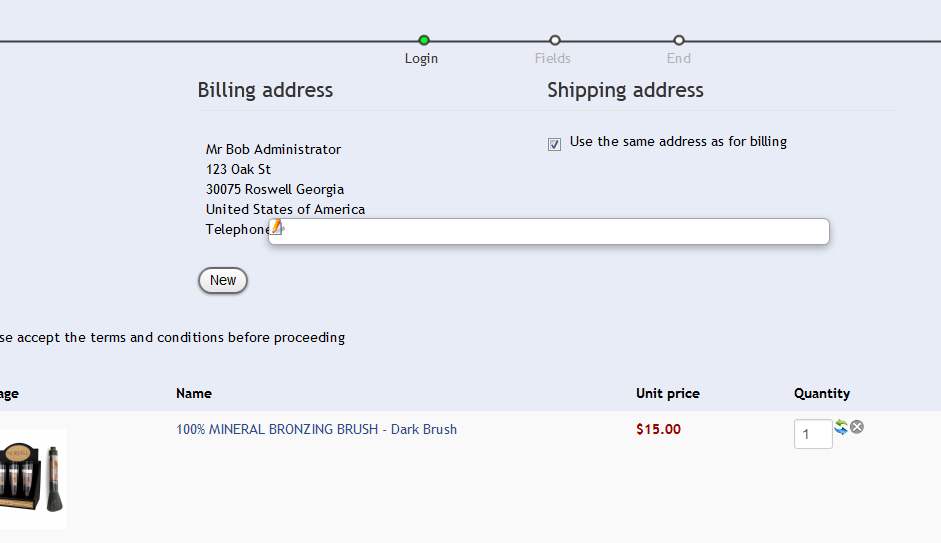
edit button in billing field
- photofixations
-
 Topic Author
- Offline
Less
More
13 years 10 months ago #83871
by photofixations
edit button in billing field was created by photofixations
I've attached a screen shot. The edit billing address button is very long and scrolls with the page. Is there a way to make this regular size and have it remain stationary with the billing address?
Please Log in or Create an account to join the conversation.

Less
More
- Posts: 12953
- Thank you received: 1778
13 years 10 months ago #84032
by Mohamed Thelji
Replied by Mohamed Thelji on topic edit button in billing field
Hi,
Can you send me a link to your website ? It would help me to understand were the problem is coming from ?
Thanks.
Can you send me a link to your website ? It would help me to understand were the problem is coming from ?
Thanks.
Please Log in or Create an account to join the conversation.
- photofixations
-
Topic Author
- Offline
Less
More
- Posts: 36
- Thank you received: 0
13 years 10 months ago #84060
by photofixations
Replied by photofixations on topic edit button in billing field
It is only on the checkout page. Here's an exaample:
www.aid1005.com/products/norvell/norvell...checkout/step/step-1
www.aid1005.com/products/norvell/norvell...checkout/step/step-1
Please Log in or Create an account to join the conversation.

13 years 10 months ago #84318
by Jerome
Jerome - Obsidev.com
HikaMarket & HikaSerial developer / HikaShop core dev team.
Replied by Jerome on topic edit button in billing field
Hi,
This problem is a template CSS problem.
The "edit" button has the class "modal" (like explain here: www.hikashop.com/en/forum/4-how-to/77125...-hover-js.html#84203 )
You should add a specific css rule for this button in order to remove the modal popup rules which should not be applied on a "a" but on a "div".
Regards,
This problem is a template CSS problem.
The "edit" button has the class "modal" (like explain here: www.hikashop.com/en/forum/4-how-to/77125...-hover-js.html#84203 )
You should add a specific css rule for this button in order to remove the modal popup rules which should not be applied on a "a" but on a "div".
Regards,
Jerome - Obsidev.com
HikaMarket & HikaSerial developer / HikaShop core dev team.
Please Log in or Create an account to join the conversation.
Time to create page: 0.065 seconds