

- Posts: 234
- Thank you received: 4
13 years 8 months ago #84809
by mad-q
The billing_address_info and shipping_address_info only show part of the address, on the checkout and on the e-mail only displays part of the address and not the full address. How can I change this so it shows the full address?
Thanks
Iain
Thanks
Iain
Please Log in or Create an account to join the conversation.

13 years 8 months ago #84863
by Xavier
We don't change the size of the address, we display them entire. Just some payment/shipping plugin can have a limitation.
But not for the checkout or the emails.
It can maybe come from your template which is not enough large to display the full address, and the next div is over the other one.
But not for the checkout or the emails.
It can maybe come from your template which is not enough large to display the full address, and the next div is over the other one.
Please Log in or Create an account to join the conversation.
13 years 8 months ago #84892
by mad-q
Looking at the email there is only 1 div. Even resetting the email back to standard it comes out like this
Billing address
Company
Mr FirstName LastName
Address2
POSTCODE Address3 Norfolk
United Kingdom
Telephone: 01986894798
Shipping address
Draganfly Motorcycles
Broad Street
BUNGAY
NR35 1EE
Whereas the shipping address, although incorrect since the test order is shipped to the same as billing address, is more in the format I would expect but also missing a couple of fields. All of the custom fields I have made are all in the address table. But not all of them show up on either the website in the checkout or the on e-mail, comes through. With only some of the information shown.
Billing address
Company
Mr FirstName LastName
Address2
POSTCODE Address3 Norfolk
United Kingdom
Telephone: 01986894798
Shipping address
Draganfly Motorcycles
Broad Street
BUNGAY
NR35 1EE
Whereas the shipping address, although incorrect since the test order is shipped to the same as billing address, is more in the format I would expect but also missing a couple of fields. All of the custom fields I have made are all in the address table. But not all of them show up on either the website in the checkout or the on e-mail, comes through. With only some of the information shown.
Please Log in or Create an account to join the conversation.
13 years 8 months ago #85037
by Xavier
As I can see, you are overriding the shipping address by your shop address. So edit the address of your shop to display all the informations.
If the customer should not pick up the product at your shop, change the setting in the shipping method configuration.
If the customer should not pick up the product at your shop, change the setting in the shipping method configuration.
Please Log in or Create an account to join the conversation.
13 years 8 months ago #85064
by mad-q
Hello,
I have all of the address shown Hika>System>Config>Main.
The issue is that it will not show all of the address table from Hika>Display>customfields
Please see attached screen shot to see what I mean. It isn't showing all of the fields. Neither are the e-mails. So to find out someones "Housenumber" (column name) you have to log onto the website. Also people think we are not getting their full address.
Thanks
Iain
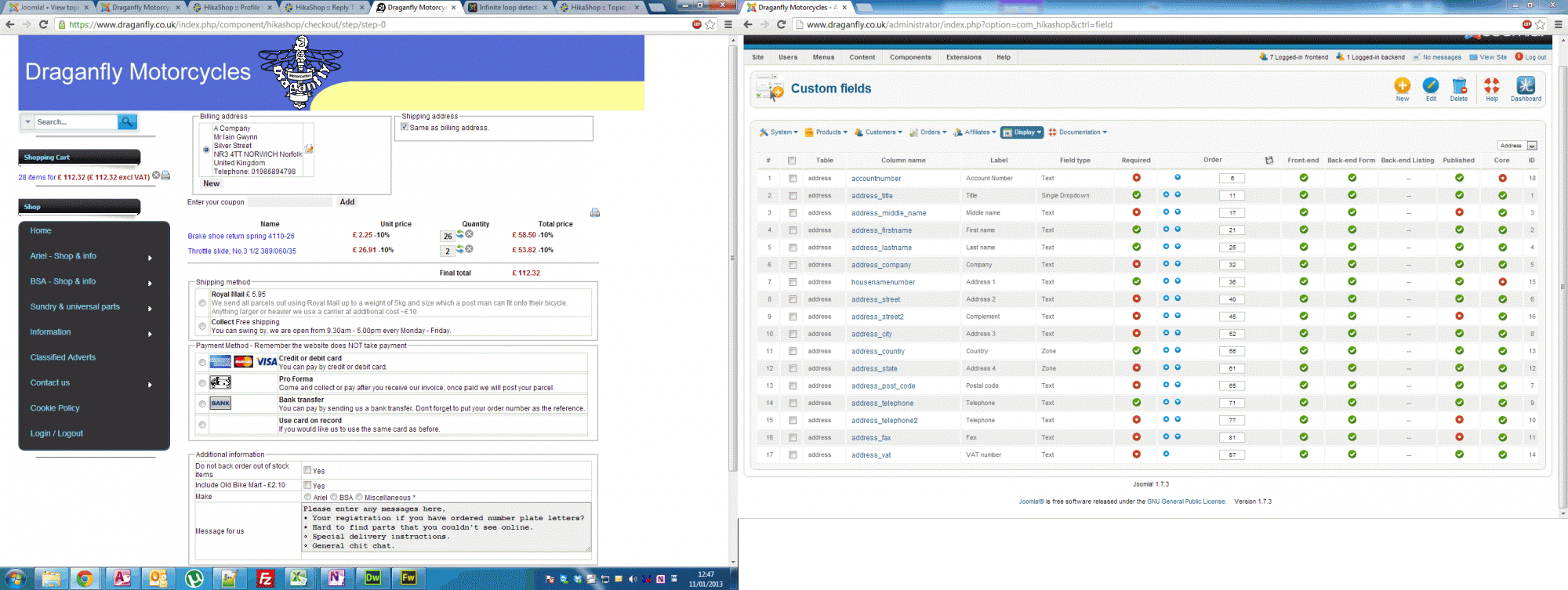
I have all of the address shown Hika>System>Config>Main.
The issue is that it will not show all of the address table from Hika>Display>customfields
Please see attached screen shot to see what I mean. It isn't showing all of the fields. Neither are the e-mails. So to find out someones "Housenumber" (column name) you have to log onto the website. Also people think we are not getting their full address.
Thanks
Iain
Please Log in or Create an account to join the conversation.


13 years 8 months ago #85209
by nicolas
HikaShop uses a templating system in order to display the addresses.
When you add custom address fields, you also need to add them to the address template so that they can be displayed where you want in the address.
To do that, you need to edit the files "address_template" via the menu Display>Views and add your custom fields tags there.
When you add custom address fields, you also need to add them to the address template so that they can be displayed where you want in the address.
To do that, you need to edit the files "address_template" via the menu Display>Views and add your custom fields tags there.
The following user(s) said Thank You: mad-q
Please Log in or Create an account to join the conversation.
Time to create page: 0.206 seconds