

- Posts: 90
- Thank you received: 1
Limiting options
13 years 9 months ago #85887
by btbjosh
 — Josh
Limiting options was created by btbjosh
Hi I'm trying to implement limits on my software purchase so that a user cannot add more than one instance of a software purchase to their cart. This works fine until they try to add a different option to the cart.
For example:
With Empty Cart> Software with OPTION 1 > Add to cart > DONE
With Software+ O1 in Cart> Choose Software with OPTION 1 > Add to cart > Limit Reached (As expected)
With Software+O1 in Cart> Choose Software with OPTION 2 > Add to cart > Adds both product and option to cart!
So I end up with Two instances of the product and two different options in the cart.
This is odd behavior considering I have the limit set on the product level.
Any thoughts or help would be appreciated!
Thanks!
For example:
With Empty Cart> Software with OPTION 1 > Add to cart > DONE
With Software+ O1 in Cart> Choose Software with OPTION 1 > Add to cart > Limit Reached (As expected)
With Software+O1 in Cart> Choose Software with OPTION 2 > Add to cart > Adds both product and option to cart!
So I end up with Two instances of the product and two different options in the cart.
This is odd behavior considering I have the limit set on the product level.
Any thoughts or help would be appreciated!
Thanks!
— Josh
Please Log in or Create an account to join the conversation.

13 years 9 months ago #85929
by Xavier
Replied by Xavier on topic Limiting options
Hi,
How do you have set the limit ? Can you give us a screenshot ?
Try to set the limit on the software category only and not on the product.
How do you have set the limit ? Can you give us a screenshot ?
Try to set the limit on the software category only and not on the product.
Please Log in or Create an account to join the conversation.
13 years 9 months ago #85973
by btbjosh
— Josh
Replied by btbjosh on topic Limiting options
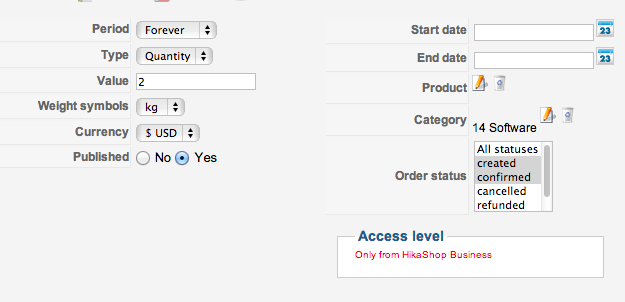
I misspoke, I did actually set the limit on the category. It still functions the same way. Change the option to a different option and the limit doesn't apply.
— Josh
Please Log in or Create an account to join the conversation.

13 years 9 months ago #86036
by nicolas
Replied by nicolas on topic Limiting options
So you're saying that whether the limit is set on the category, or on the product itself, you get the same behavior ?
Is the software category directly linked to your product ? If not, could you try to do it with the direct category of the product ?
Is the software category directly linked to your product ? If not, could you try to do it with the direct category of the product ?
Please Log in or Create an account to join the conversation.
13 years 9 months ago #86039
by btbjosh
Please Log in or Create an account to join the conversation.
13 years 9 months ago - 13 years 9 months ago #86051
by btbjosh
— Josh
Replied by btbjosh on topic Limiting options
What's even more odd is that I can add the option "product" to have its own limit. And the functionality works for the options.
It won't let me add two options no matter if it's the same option or a different option. But if I change the option to a different one it will add the base product to the cart.
So it is working like this:
B = BaseProduct, O= option
STEP 1: B + O1 (Add to cart) = B + O1
STEP 2: B + O1 (Add to cart) = B + O1 + "YOU HAVE REACHED THE LIMIT FOR B & O1"
Works great...
Now if I switch the option...
STEP 1: B + O1 (Add to cart) = B + O1
STEP 2: B + O2 (Add to cart) = B + B + O1 + "YOU HAVE REACHED THE LIMIT FOR O2"
So I end up with two base products...
On top of this I was also wondering why when I remove the base product from the cart that the option does not go with it? It should be impossible for people to buy an option without an product.
Thanks for the help.
It won't let me add two options no matter if it's the same option or a different option. But if I change the option to a different one it will add the base product to the cart.
So it is working like this:
B = BaseProduct, O= option
STEP 1: B + O1 (Add to cart) = B + O1
STEP 2: B + O1 (Add to cart) = B + O1 + "YOU HAVE REACHED THE LIMIT FOR B & O1"
Works great...
Now if I switch the option...
STEP 1: B + O1 (Add to cart) = B + O1
STEP 2: B + O2 (Add to cart) = B + B + O1 + "YOU HAVE REACHED THE LIMIT FOR O2"
So I end up with two base products...
On top of this I was also wondering why when I remove the base product from the cart that the option does not go with it? It should be impossible for people to buy an option without an product.
Thanks for the help.
— Josh
Last edit: 13 years 9 months ago by btbjosh.
Please Log in or Create an account to join the conversation.
13 years 9 months ago #86132
by nicolas
Replied by nicolas on topic Limiting options
Hi,
We found the problem. Please try to replace the file administrator/components/com_hikashop/classes/cart.php with the one in the archive enclosed. That fixes the issues with the limits and options in such case.
We found the problem. Please try to replace the file administrator/components/com_hikashop/classes/cart.php with the one in the archive enclosed. That fixes the issues with the limits and options in such case.
Please Log in or Create an account to join the conversation.
13 years 8 months ago - 13 years 8 months ago #89046
by btbjosh
— Josh
Replied by btbjosh on topic Limiting options
Thank you for posting this.
The limits now seem to work great!
Thanks again!
The limits now seem to work great!
Thanks again!
— Josh
Last edit: 13 years 8 months ago by btbjosh.
Please Log in or Create an account to join the conversation.
Time to create page: 0.080 seconds