
- Posts: 515
- Thank you received: 22
Payment method in combination with shipment method
- jouwnaambord.nl
-
 Topic Author
- Offline
Less
More
13 years 9 months ago #87105
by jouwnaambord.nl
Hi,
Just another little problem I came across.
I have a shipmentmethod called "PostNL rembours", wich means that the order will be paid to the postman. When a client chooses this methed the only payingmethod possible shoud be "onder rembours". To accomplish that I selected only the shipmentmethod "PostNL rembours" in the paymentmethod "onder rembours" (used the HikaShop collect on delivery payment plugin for this). I have the autosubmit option set to NO. When you choose the option "PostNL rembours" and hit the NEXT button, the page is not refreshed and the paymentoption is not automaticcaly choosen. You will be directed to the next step with the wrong paymentmethod. If you choose the other shipmentmethod "PostNL" the right paymentmethods are shown correctly. I don't get this right. What am I doing wrong?
www.michelpouliwebshops.nl
B.R.
Michel
Just another little problem I came across.
I have a shipmentmethod called "PostNL rembours", wich means that the order will be paid to the postman. When a client chooses this methed the only payingmethod possible shoud be "onder rembours". To accomplish that I selected only the shipmentmethod "PostNL rembours" in the paymentmethod "onder rembours" (used the HikaShop collect on delivery payment plugin for this). I have the autosubmit option set to NO. When you choose the option "PostNL rembours" and hit the NEXT button, the page is not refreshed and the paymentoption is not automaticcaly choosen. You will be directed to the next step with the wrong paymentmethod. If you choose the other shipmentmethod "PostNL" the right paymentmethods are shown correctly. I don't get this right. What am I doing wrong?
www.michelpouliwebshops.nl
B.R.
Michel
Please Log in or Create an account to join the conversation.

Less
More
- Posts: 12953
- Thank you received: 1778
13 years 9 months ago #87145
by Mohamed Thelji
Replied by Mohamed Thelji on topic Payment method in combination with shipment method
Hi Michel,
I think that setting the "Auto submit shipping and payment methods selection" option to YES will maybe solve your problem.
I think that setting the "Auto submit shipping and payment methods selection" option to YES will maybe solve your problem.
Please Log in or Create an account to join the conversation.
- jouwnaambord.nl
-
Topic Author
- Offline
Less
More
- Posts: 515
- Thank you received: 22
13 years 9 months ago #87147
by jouwnaambord.nl
Replied by jouwnaambord.nl on topic Payment method in combination with shipment method
Hi Mohamed,
I'm afraid that didn't work too. I tried both options already.
Michel
I'm afraid that didn't work too. I tried both options already.
Michel
Please Log in or Create an account to join the conversation.
Less
More
- Posts: 12953
- Thank you received: 1778
13 years 9 months ago #87162
by Mohamed Thelji
Replied by Mohamed Thelji on topic Payment method in combination with shipment method
Ok, Can I have a temporary access to your back-end for testing purpose and to find from where the problem is coming ?
Thanks.
Thanks.
Please Log in or Create an account to join the conversation.
- jouwnaambord.nl
-
Topic Author
- Offline
Less
More
- Posts: 515
- Thank you received: 22
13 years 9 months ago - 13 years 9 months ago #88049
by jouwnaambord.nl
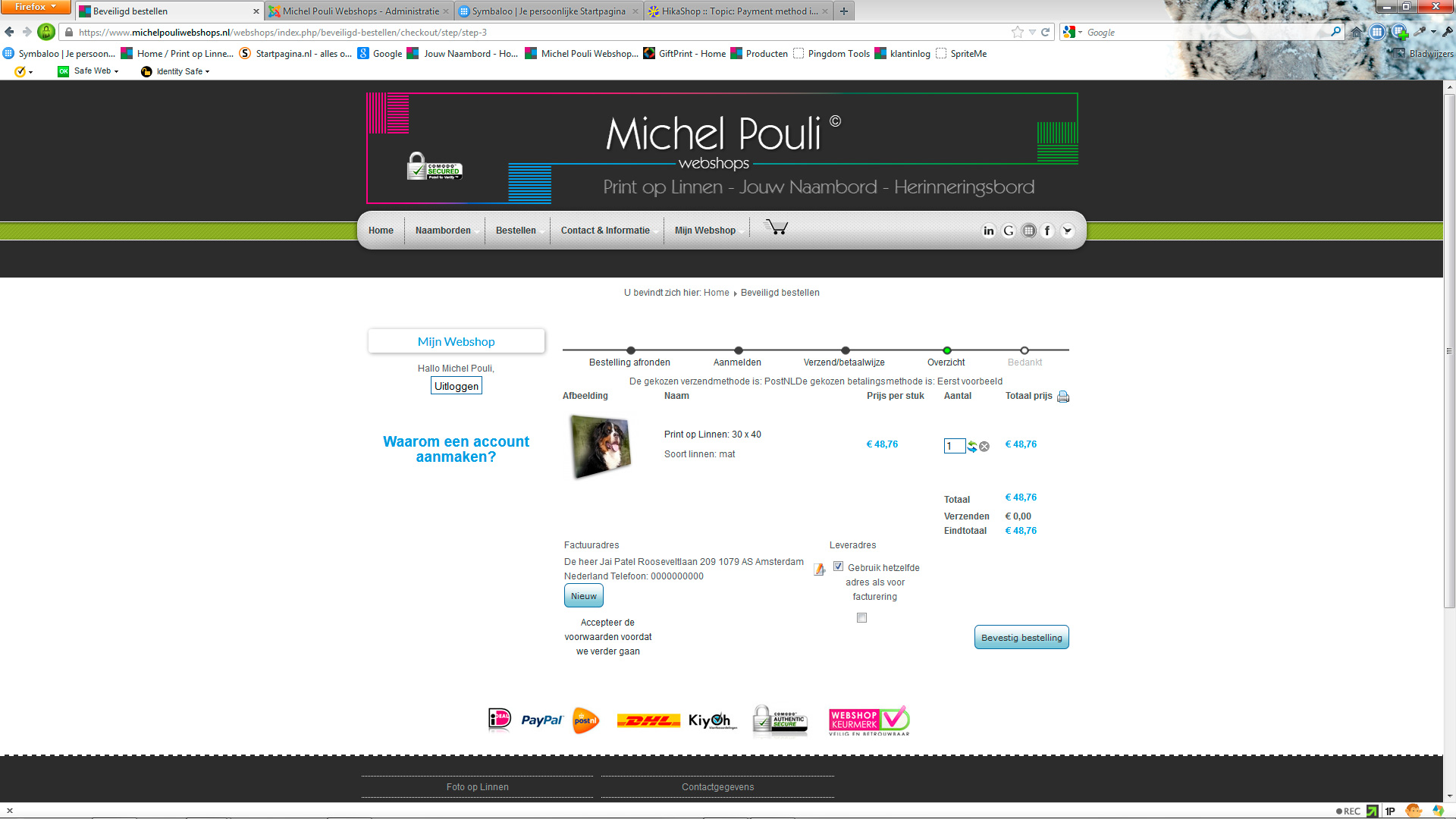
Mohamed,
HELP! Something has happened to my site, the taxes in the last step in the orderproces has disapeared! The price is not right anymore. Help ASAP please!!!
The layout looks very strange too....
Replied by jouwnaambord.nl on topic Payment method in combination with shipment method
Mohamed,
HELP! Something has happened to my site, the taxes in the last step in the orderproces has disapeared! The price is not right anymore. Help ASAP please!!!
The layout looks very strange too....
Last edit: 13 years 9 months ago by jouwnaambord.nl.
Please Log in or Create an account to join the conversation.
- jouwnaambord.nl
-
Topic Author
- Offline
Less
More
- Posts: 515
- Thank you received: 22
13 years 9 months ago - 13 years 9 months ago #88064
by jouwnaambord.nl
Replied by jouwnaambord.nl on topic Payment method in combination with shipment method
Found the solution. changed the backendlanguage twice and it works again. strange?
problem back
problem back
Last edit: 13 years 9 months ago by jouwnaambord.nl. Reason: problem is back
Please Log in or Create an account to join the conversation.
Less
More
- Posts: 12953
- Thank you received: 1778
13 years 9 months ago - 13 years 9 months ago #88080
by Mohamed Thelji
Replied by Mohamed Thelji on topic Payment method in combination with shipment method
Hi Michel,
[strike]I took a look at your back-end and the problem is that, you can't force/allow a payment method regarding the shipping method that your customer as selected, but you can allow shipping methods through the "shipping method" option of your payment method page.[/strike]
[strike]I took a look at your back-end and the problem is that, you can't force/allow a payment method regarding the shipping method that your customer as selected, but you can allow shipping methods through the "shipping method" option of your payment method page.[/strike]
Last edit: 13 years 9 months ago by Mohamed Thelji.
Please Log in or Create an account to join the conversation.
- jouwnaambord.nl
-
Topic Author
- Offline
Less
More
- Posts: 515
- Thank you received: 22
13 years 9 months ago #88099
by jouwnaambord.nl
Replied by jouwnaambord.nl on topic Payment method in combination with shipment method
Hi Mohamed,
First of all, thanks again for your great support. I really appriciate it.
I do think stiil this should be possible. When I check the shipmentmethod "PostNL Rembours" and hit the next button, the paymentmethod is not displayd and the next page is shown. But when I go 1 step back in the orderproces, you will see the right payment method (not checked, but indeed shown, see screenshot 1). Then when I choose the shipment method "PostNL" and hit the next button, the page refreshes and this time do show the corresponding paymentmethods! (screenshot 2). So why doesn't this happen when I choose the "PostNL Rembours"??
Michel
First of all, thanks again for your great support. I really appriciate it.
I do think stiil this should be possible. When I check the shipmentmethod "PostNL Rembours" and hit the next button, the paymentmethod is not displayd and the next page is shown. But when I go 1 step back in the orderproces, you will see the right payment method (not checked, but indeed shown, see screenshot 1). Then when I choose the shipment method "PostNL" and hit the next button, the page refreshes and this time do show the corresponding paymentmethods! (screenshot 2). So why doesn't this happen when I choose the "PostNL Rembours"??
Michel
Please Log in or Create an account to join the conversation.
Less
More
- Posts: 12953
- Thank you received: 1778
13 years 9 months ago - 13 years 9 months ago #88118
by Mohamed Thelji
Replied by Mohamed Thelji on topic Payment method in combination with shipment method
Sorry you were right about the shipping method option of the payment method configuration page, I turned up the Auto submit shipping and payment methods selection through "Hikashop->System->Configuration->Checkout" And your payment methods seems to be updating well.
Last edit: 13 years 9 months ago by Mohamed Thelji.
Please Log in or Create an account to join the conversation.
- jouwnaambord.nl
-
Topic Author
- Offline
Less
More
- Posts: 515
- Thank you received: 22
13 years 9 months ago #88127
by jouwnaambord.nl
Replied by jouwnaambord.nl on topic Payment method in combination with shipment method
I turned that off because I want the client to have a chance to change the option before he's forwarded to the next page automaticaly.
Please Log in or Create an account to join the conversation.

13 years 9 months ago #88326
by nicolas
Replied by nicolas on topic Payment method in combination with shipment method
Can you try to change the code
to
in the file components/com_hikashop/controllers/checkout.php and see if that helps ?
Code:
if(($old_shipping_id!=$shipping_id || $old_shipping_method!=$shipping) && strpos($this->checkout_workflow,'payment')!==false){
$this->initCart(true);
$this->before_payment(true);
}
Code:
if(($old_shipping_id!=$shipping_id || $old_shipping_method!=$shipping) && strpos($this->checkout_workflow,'payment')!==false){
$this->cart_update=true;
$this->initCart(true);
$this->before_payment(true);
}
Please Log in or Create an account to join the conversation.
- jouwnaambord.nl
-
Topic Author
- Offline
Less
More
- Posts: 515
- Thank you received: 22
13 years 8 months ago #89090
by jouwnaambord.nl
Replied by jouwnaambord.nl on topic Payment method in combination with shipment method
Hi Nicolas,
Well, partially it did. But when you choose a shippingmethod, a warning "fill in your payment details" is displayed before you can actually choose a paymentmethod.
Michel.
Well, partially it did. But when you choose a shippingmethod, a warning "fill in your payment details" is displayed before you can actually choose a paymentmethod.
Michel.
Please Log in or Create an account to join the conversation.
13 years 8 months ago #89297
by nicolas
Replied by nicolas on topic Payment method in combination with shipment method
Hi,
Could you give an FTP access so that we can trace the problem directly on your website ?
Could you give an FTP access so that we can trace the problem directly on your website ?
Please Log in or Create an account to join the conversation.
- jouwnaambord.nl
-
Topic Author
- Offline
Less
More
- Posts: 515
- Thank you received: 22
13 years 8 months ago #89370
by jouwnaambord.nl
Replied by jouwnaambord.nl on topic Payment method in combination with shipment method
Hi Nicolas,
Sure, details are sended in a PM.
Best,
M
Sure, details are sended in a PM.
Best,
M
Please Log in or Create an account to join the conversation.
Time to create page: 0.101 seconds