

- Posts: 5
- Thank you received: 0
Notice: Undefined index: (checkout only)
13 years 9 months ago - 13 years 9 months ago #87520
by tcuellar
Notice: Undefined index: (checkout only) was created by tcuellar
First off - Great extension!!
Just one hiccup:
on the second step of checkout, I get this message at the top of my screen:
Notice: Undefined index: option in /var/www/centerranch/templates/theme1002/index.php on line 39
and
Notice: Undefined index: option in /var/www/centerranch/templates/theme1002/html/layouts/body_mainbody.php on line 33
in the content window....
I figure it has to be something with my cart's interaction with my template, but I haven't enough scripting experience to feel comfortable making modifications to my php files...
I welcome any feedback!
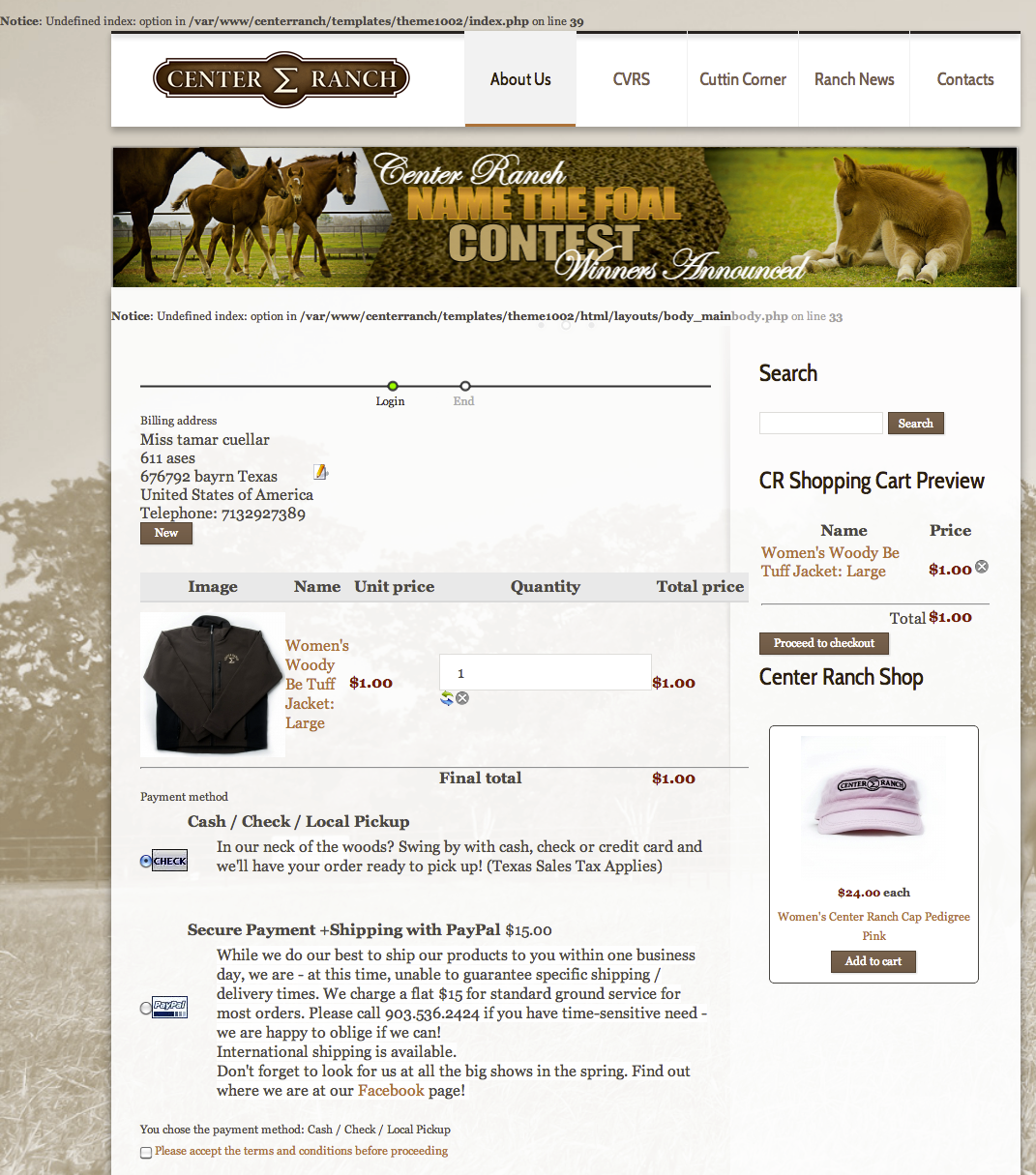
Just one hiccup:
on the second step of checkout, I get this message at the top of my screen:
Notice: Undefined index: option in /var/www/centerranch/templates/theme1002/index.php on line 39
and
Notice: Undefined index: option in /var/www/centerranch/templates/theme1002/html/layouts/body_mainbody.php on line 33
in the content window....
I figure it has to be something with my cart's interaction with my template, but I haven't enough scripting experience to feel comfortable making modifications to my php files...
I welcome any feedback!
Last edit: 13 years 9 months ago by tcuellar. Reason: clarification
Please Log in or Create an account to join the conversation.

13 years 9 months ago #87568
by Xavier
Replied by Xavier on topic Notice: Undefined index: (checkout only)
Hi,
Does it happen only on the checkout page ?
Try to "Force a menu on checkout" in the checkout options of HikaShop. It will force to use the same module as the selected menu and could maybe remove the notice.
Does it happen only on the checkout page ?
Try to "Force a menu on checkout" in the checkout options of HikaShop. It will force to use the same module as the selected menu and could maybe remove the notice.
Please Log in or Create an account to join the conversation.
13 years 9 months ago #87622
by tcuellar
Replied by tcuellar on topic Notice: Undefined index: (checkout only)
yes, it only happens in the checkout page. step 1.
I'm happy to send admin credentials to have you poke around and see what I could do differently.
Currently I have two payment options: local pickup and paypal.
I see where there is an option to force a menu, but am unsure which one (i have a bunch to choose from) to use.. I'm trying all on them in the meantime without much luck
I'm happy to send admin credentials to have you poke around and see what I could do differently.
Currently I have two payment options: local pickup and paypal.
I see where there is an option to force a menu, but am unsure which one (i have a bunch to choose from) to use.. I'm trying all on them in the meantime without much luck
Please Log in or Create an account to join the conversation.

13 years 9 months ago #87636
by Eliot
Replied by Eliot on topic Notice: Undefined index: (checkout only)
Hi there,
Xavier gave you one solution which could have work but it's definitely a template issue.
You should contact your template provider, as you can the problem come from one of his files.
Xavier gave you one solution which could have work but it's definitely a template issue.
You should contact your template provider, as you can the problem come from one of his files.
Please Log in or Create an account to join the conversation.
13 years 9 months ago #87651
by tcuellar
Replied by tcuellar on topic Notice: Undefined index: (checkout only)
I appreciate you looking into this, but am still having trouble figuring out where to go from here. Templatemonster doesn't support third party carts. Can I ask that someone login and see if there is setting that I am missing? I think its a quick fix and I'm sooo close! Please help me. Again, I'm happy to provide admin credentials.... I feel really stuck between template vendor and hikashop.
Please Log in or Create an account to join the conversation.

13 years 9 months ago #87730
by nicolas
Replied by nicolas on topic Notice: Undefined index: (checkout only)
In the joomla configuration set the "error reporting" option to "none" and you won't see these messages of your template anymore.
Please Log in or Create an account to join the conversation.
Time to create page: 0.133 seconds