
- Posts: 84
- Thank you received: 0
Documentation for product template
- davideventurini
-
 Topic Author
- Offline
Less
More
13 years 8 months ago #89919
by davideventurini
Documentation for product template was created by davideventurini
Hello, there is a detailed documentation to complete modify the product page template?
Please Log in or Create an account to join the conversation.

13 years 8 months ago #89977
by Xavier
Replied by Xavier on topic Documentation for product template
Hi,
Actually the documentation is:
www.hikashop.com/fr/support/documentation/faq.html#layout
We know that we have to improve it.
Actually the documentation is:
www.hikashop.com/fr/support/documentation/faq.html#layout
We know that we have to improve it.
Please Log in or Create an account to join the conversation.
- davideventurini
-
Topic Author
- Offline
Less
More
- Posts: 84
- Thank you received: 0
13 years 8 months ago #89988
by davideventurini
Replied by davideventurini on topic Documentation for product template
Well, I read that documentation but is not helping me too much.
I need to change a lot in the product layout for example moving charateristic block, moving title,moving add button ecc...but I did not find the corresponding code in the views.
For example, the table you create for charateristics, how can I modify the position?
Thank you
I need to change a lot in the product layout for example moving charateristic block, moving title,moving add button ecc...but I did not find the corresponding code in the views.
For example, the table you create for charateristics, how can I modify the position?
Thank you
Please Log in or Create an account to join the conversation.
13 years 8 months ago #90021
by Xavier
Replied by Xavier on topic Documentation for product template
You can see that there is comments for each part of the product page, for example for characteristics the is the comment: //LAYOUT show_block_charasteristic
So the part to move is:
So the part to move is:
Code:
<?php
//LAYOUT show_block_charasteristic
$this->setLayout('show_block_characteristic');
echo $this->loadTemplate();
?>
Please Log in or Create an account to join the conversation.
- davideventurini
-
Topic Author
- Offline
Less
More
- Posts: 84
- Thank you received: 0
13 years 8 months ago #90092
by davideventurini
Replied by davideventurini on topic Documentation for product template
Yes, I understand how to move the full section of charaterics.
But I need to move the charateristics inside the module.
So the layout show_block_charasteristic is
Where I have to change the layout for caracteristic block?
I mean, in this link goo.gl/DmgtF I need the form "Taglia" just next to "Colore" on the same line.
Thank you
But I need to move the charateristics inside the module.
So the layout show_block_charasteristic is
Code:
<?php
if (!empty ($this->element->characteristics)) {
?><div id="hikashop_product_characteristics" class="hikashop_product_characteristics"><?php
echo $this->characteristic->displayFE($this->element, $this->params);
?></div><?php
}
?>
Where I have to change the layout for caracteristic block?
I mean, in this link goo.gl/DmgtF I need the form "Taglia" just next to "Colore" on the same line.
Thank you
Please Log in or Create an account to join the conversation.
13 years 8 months ago #90143
by Xavier
Replied by Xavier on topic Documentation for product template
You have to edit "administrator/components/com_hikashop/types/characteristic.php" and edit the format of the case "dropdown".
Be careful it's HikaShop core file, so it's better to copy the original file, and at each update of HikaShop you will have to do these modifications.
It require php knowldege.
Be careful it's HikaShop core file, so it's better to copy the original file, and at each update of HikaShop you will have to do these modifications.
It require php knowldege.
Please Log in or Create an account to join the conversation.
- davideventurini
-
Topic Author
- Offline
Less
More
- Posts: 84
- Thank you received: 0
13 years 8 months ago #90177
by davideventurini
Replied by davideventurini on topic Documentation for product template
Sorry, for doing an hack like the picture, I have to edit the core of hikashop and doing again the same hack every time I update the software?!
I suppose there is another common way to do it, am I right?
Thank you
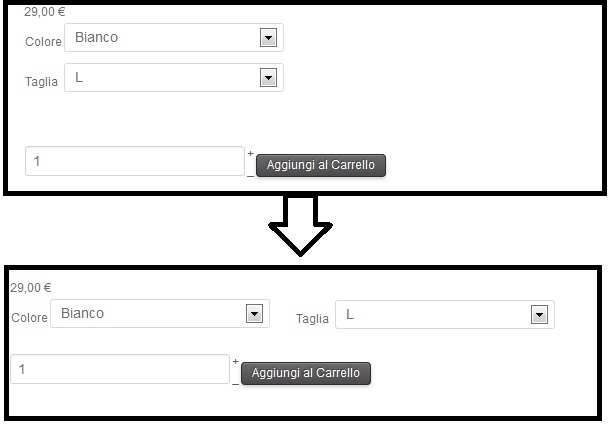
I suppose there is another common way to do it, am I right?
Thank you
Please Log in or Create an account to join the conversation.

13 years 8 months ago #90379
by nicolas
Replied by nicolas on topic Documentation for product template
Instead of changing the code directly in that file, you can use a characteristic display override whereby you basically copy the code displaying the characteristics in an external PHP function where you can change it and which won't be overwritten each time you update.
It's a bit more difficult than changing directly the code in the file though. Here is more information on such overrides:
www.hikashop.com/en/support/documentatio...tation.html#override
However, I don't think that you need to edit any code to do that change. You shoule be able to change the positioning of the characteristics simply with CSS...
For that, you need to set a display:block on the tbody tag, and a display: block;float:left; on the tr tags of the tbody of the characteristic table.
It's a bit more difficult than changing directly the code in the file though. Here is more information on such overrides:
www.hikashop.com/en/support/documentatio...tation.html#override
However, I don't think that you need to edit any code to do that change. You shoule be able to change the positioning of the characteristics simply with CSS...
For that, you need to set a display:block on the tbody tag, and a display: block;float:left; on the tr tags of the tbody of the characteristic table.
The following user(s) said Thank You: davideventurini
Please Log in or Create an account to join the conversation.
- davideventurini
-
Topic Author
- Offline
Less
More
- Posts: 84
- Thank you received: 0
13 years 8 months ago #90633
by davideventurini
Replied by davideventurini on topic Documentation for product template
Thank you so much, I did your suggestion with success, thank you again.
Please Log in or Create an account to join the conversation.
Time to create page: 0.096 seconds