

- Posts: 59
- Thank you received: 1
How Do I Get Rid Of This Slider Thingy?
13 years 8 months ago - 13 years 8 months ago #91787
by G9Cap
How Do I Get Rid Of This Slider Thingy? was created by G9Cap
Hi,
I'm sure it is something simple but I can't find the answer.
All of my products and in the check out area etc. I have this (see image)
I want to get rid of this "use horizontal slider" stuff
How do i do it?
Thanks so much.
I am currently using the free version.
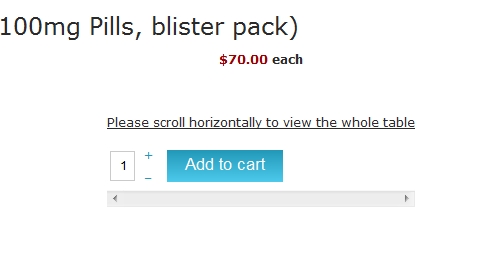
I'm sure it is something simple but I can't find the answer.
All of my products and in the check out area etc. I have this (see image)
I want to get rid of this "use horizontal slider" stuff
How do i do it?
Thanks so much.
I am currently using the free version.
Last edit: 13 years 8 months ago by G9Cap. Reason: forgot to add what version i am using
Please Log in or Create an account to join the conversation.

13 years 8 months ago #91886
by Eliot
Replied by Eliot on topic How Do I Get Rid Of This Slider Thingy?
Hi there,
Could you please give us a link to your website?
It looks like a css issue, did you edited your css in any way? Or it may come from your template.
Could you please give us a link to your website?
It looks like a css issue, did you edited your css in any way? Or it may come from your template.
Please Log in or Create an account to join the conversation.
13 years 8 months ago #92013
by G9Cap
Replied by G9Cap on topic How Do I Get Rid Of This Slider Thingy?
Thank you.
You can see the issue on multiple pages and in the check-out area etc.
I have NOT touched any CSS so I have no idea what might be causing this.
www.genericsformen.com
You can see the issue on multiple pages and in the check-out area etc.
I have NOT touched any CSS so I have no idea what might be causing this.
www.genericsformen.com
Please Log in or Create an account to join the conversation.
13 years 8 months ago #92126
by Eliot
Replied by Eliot on topic How Do I Get Rid Of This Slider Thingy?
Hi there,
Could you please send us the access info so we can take a look?
Could you please send us the access info so we can take a look?
Please Log in or Create an account to join the conversation.
13 years 8 months ago #93132
by G9Cap
Replied by G9Cap on topic How Do I Get Rid Of This Slider Thingy?
Sent login info. but no assistance yet, I'd really appreciate some help.
Thanks so much.
Thanks so much.
Please Log in or Create an account to join the conversation.

Less
More
- Posts: 12953
- Thank you received: 1778
13 years 8 months ago #93141
by Mohamed Thelji
Replied by Mohamed Thelji on topic How Do I Get Rid Of This Slider Thingy?
Hi,
Seems like we didn't received your back-end access, can you send it to me through Private message ?
Ps: can you also send me the page where you're having your problem ?
Thank you.
Seems like we didn't received your back-end access, can you send it to me through Private message ?
Ps: can you also send me the page where you're having your problem ?
Thank you
. Please Log in or Create an account to join the conversation.
13 years 8 months ago #93147
by G9Cap
Replied by G9Cap on topic How Do I Get Rid Of This Slider Thingy?
Sent, thank you very much.
Please Log in or Create an account to join the conversation.
13 years 7 months ago #93278
by G9Cap
Replied by G9Cap on topic How Do I Get Rid Of This Slider Thingy?
No news?
Please Log in or Create an account to join the conversation.

13 years 7 months ago #93359
by Jerome
Jerome - Obsidev.com
HikaMarket & HikaSerial developer / HikaShop core dev team.
Replied by Jerome on topic How Do I Get Rid Of This Slider Thingy?
Hi,
It is not something which is done by HikaShop but by your template.
There is two special CSS rules in responsive mode which are:
These rules add the horizontal scrollbar and the text in the table.
Because the HikaShop "add to cart" is made with a table (in order to have the "-" and "+" aligned), your responsive CSS file make this unwanted display.
Regards,
It is not something which is done by HikaShop but by your template.
There is two special CSS rules in responsive mode which are:
Code:
table:before {
content: "Please scroll horizontally to view the whole table";
display: block;
margin-bottom: 10px;
width: 100%;
text-decoration: underline;
}
table {
position: relative;
width: auto;
overflow-x:scroll;
display: block;
}
Because the HikaShop "add to cart" is made with a table (in order to have the "-" and "+" aligned), your responsive CSS file make this unwanted display.
Regards,
Jerome - Obsidev.com
HikaMarket & HikaSerial developer / HikaShop core dev team.
Please Log in or Create an account to join the conversation.
13 years 7 months ago #93368
by G9Cap
Replied by G9Cap on topic How Do I Get Rid Of This Slider Thingy?
Thank You.
So can I just remove what you put above?
So can I just remove what you put above?
Please Log in or Create an account to join the conversation.

13 years 7 months ago #93388
by nicolas
Replied by nicolas on topic How Do I Get Rid Of This Slider Thingy?
Yes.
Please Log in or Create an account to join the conversation.
13 years 7 months ago #93423
by G9Cap
Replied by G9Cap on topic How Do I Get Rid Of This Slider Thingy?
Thanks again.
Hmm, sorry, when I remove that exactly as above nothing happens.
I am removing from template/css/responsive_css.php, would it just be there?
Hmm, sorry, when I remove that exactly as above nothing happens.
I am removing from template/css/responsive_css.php, would it just be there?
Please Log in or Create an account to join the conversation.
13 years 7 months ago #93431
by Jerome
Jerome - Obsidev.com
HikaMarket & HikaSerial developer / HikaShop core dev team.
Replied by Jerome on topic How Do I Get Rid Of This Slider Thingy?
Hi,
I think so.
In the front-end, we could just see "cache/tpl-jm-business-marketing/responsive_f955c717a32ce24f966626f93e331c41.css" which is a cache css file.
Regards,
I think so.
In the front-end, we could just see "cache/tpl-jm-business-marketing/responsive_f955c717a32ce24f966626f93e331c41.css" which is a cache css file.
Regards,
Jerome - Obsidev.com
HikaMarket & HikaSerial developer / HikaShop core dev team.
Please Log in or Create an account to join the conversation.
13 years 7 months ago #93438
by G9Cap
Replied by G9Cap on topic How Do I Get Rid Of This Slider Thingy?
Oh, I had sent login details to a couple of Hikashop people, I thought you were looking in the back. Can I just delete that cache file?
Please Log in or Create an account to join the conversation.
13 years 7 months ago #93441
by nicolas
Replied by nicolas on topic How Do I Get Rid Of This Slider Thingy?
You should turn off the cache option of your template while you're customizing the display of your website and also delete the cache yes.
Please Log in or Create an account to join the conversation.
13 years 7 months ago #93443
by G9Cap
Replied by G9Cap on topic How Do I Get Rid Of This Slider Thingy?
DONE! Thanks so much!
I took that code out of those 2 places and all seems well
Thanks again, I very much appreciate your time.
I took that code out of those 2 places and all seems well
Thanks again, I very much appreciate your time.
Please Log in or Create an account to join the conversation.
Time to create page: 0.140 seconds