

- Posts: 4
- Thank you received: 0
Associated category is failing
13 years 8 months ago #92220
by Bassem
Associated category is failing was created by Bassem
Hello there
When am trying to add an Associated category it's by default adding my first category and when I delete it and select another it's not taking it.
When am trying to add an Associated category it's by default adding my first category and when I delete it and select another it's not taking it.
Please Log in or Create an account to join the conversation.

13 years 8 months ago #92313
by Xavier
Replied by Xavier on topic Associated category is failing
Hi,
Can you enable the debug mode of Joomla, and set the error reporting to maximum. (in joomla config)
And tell us if any error is displayed ?
What are you calling "Associated category" ? A parent category in the category page ?
Or a category in the product page ?
Can you enable the debug mode of Joomla, and set the error reporting to maximum. (in joomla config)
And tell us if any error is displayed ?
What are you calling "Associated category" ? A parent category in the category page ?
Or a category in the product page ?
Please Log in or Create an account to join the conversation.
13 years 8 months ago #92642
by Bassem
Replied by Bassem on topic Associated category is failing
Hi,
I have enabled the debug mode of Joomla, but I don't know how to set the error reporting to maximum.
there is no error displayed.
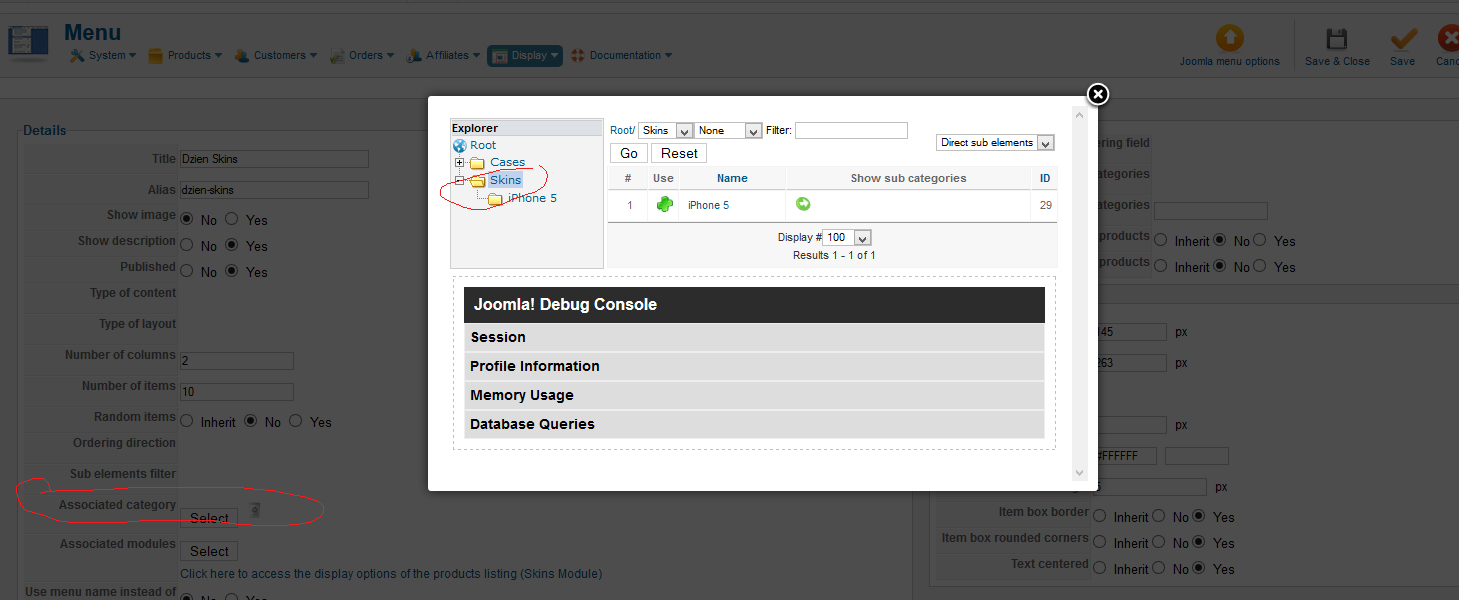
Am calling "Associated category" that the one shown in the image attached when you use the HikaShop Options in menu options.
My problem is : I created the first menu item assigned to the first category then I have created a second one and tried to create a menu item for it , am unable to link it with the 2nd category I created and it's not giving me the option to even select it, it either redirect to the first category or do nothing.
I have enabled the debug mode of Joomla, but I don't know how to set the error reporting to maximum.
there is no error displayed.
Am calling "Associated category" that the one shown in the image attached when you use the HikaShop Options in menu options.
My problem is : I created the first menu item assigned to the first category then I have created a second one and tried to create a menu item for it , am unable to link it with the 2nd category I created and it's not giving me the option to even select it, it either redirect to the first category or do nothing.
Please Log in or Create an account to join the conversation.
13 years 7 months ago #92798
by Bassem
Replied by Bassem on topic Associated category is failing
Any response please?
Please Log in or Create an account to join the conversation.
13 years 7 months ago #92800
by Xavier
Replied by Xavier on topic Associated category is failing
Hi,
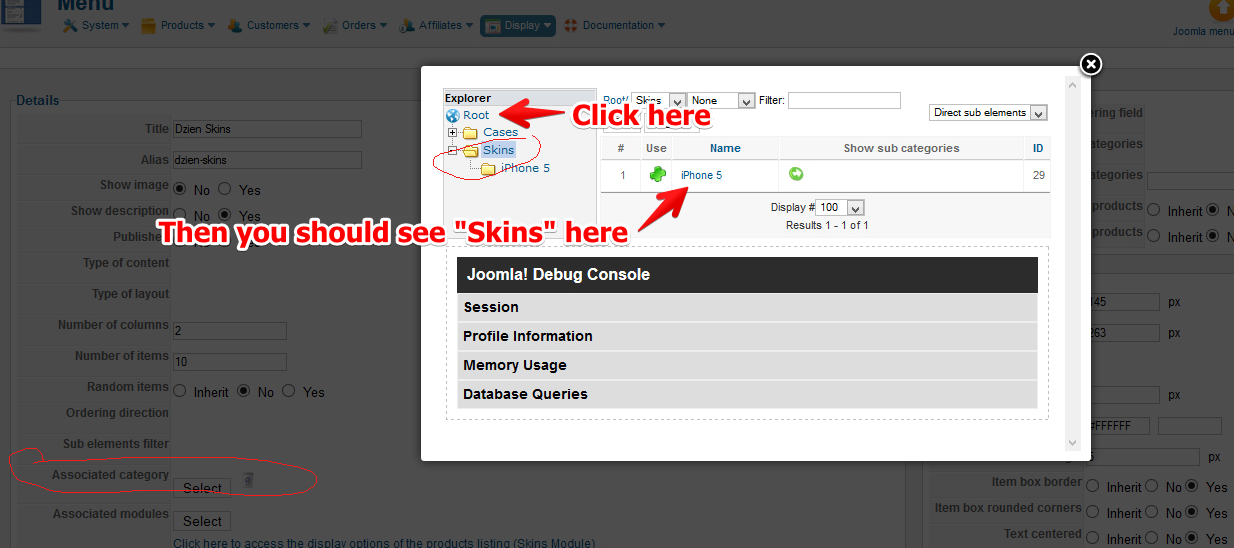
You want to add the "Skins" category to your menu ?
If it is, click on "Root" up the Skins category in the explorer, then click on the "+" next to the "Skins" category.
You want to add the "Skins" category to your menu ?
If it is, click on "Root" up the Skins category in the explorer, then click on the "+" next to the "Skins" category.
Please Log in or Create an account to join the conversation.
13 years 7 months ago #92811
by Bassem
Replied by Bassem on topic Associated category is failing
I can only find that on the categories under skins but not the skins category
Please Log in or Create an account to join the conversation.
13 years 7 months ago #92883
by Xavier
Replied by Xavier on topic Associated category is failing
The following user(s) said Thank You: Bassem
Please Log in or Create an account to join the conversation.
Time to create page: 0.093 seconds