

- Posts: 55
- Thank you received: 0
Site map, xmap...
Less
More
15 years 2 months ago #21943
by skatercorpse
Replied by skatercorpse on topic Re: Site map, xmap...
I cannot install the plugin in joomla 1.7...is it right? Or it should run?
Translating the error from Italian to English is something like that:
Written in red "Impossible to find the file manifest"
Written in blue "Installation error COM_INSTALLER_TYPE_TYPE_xmap_ext"
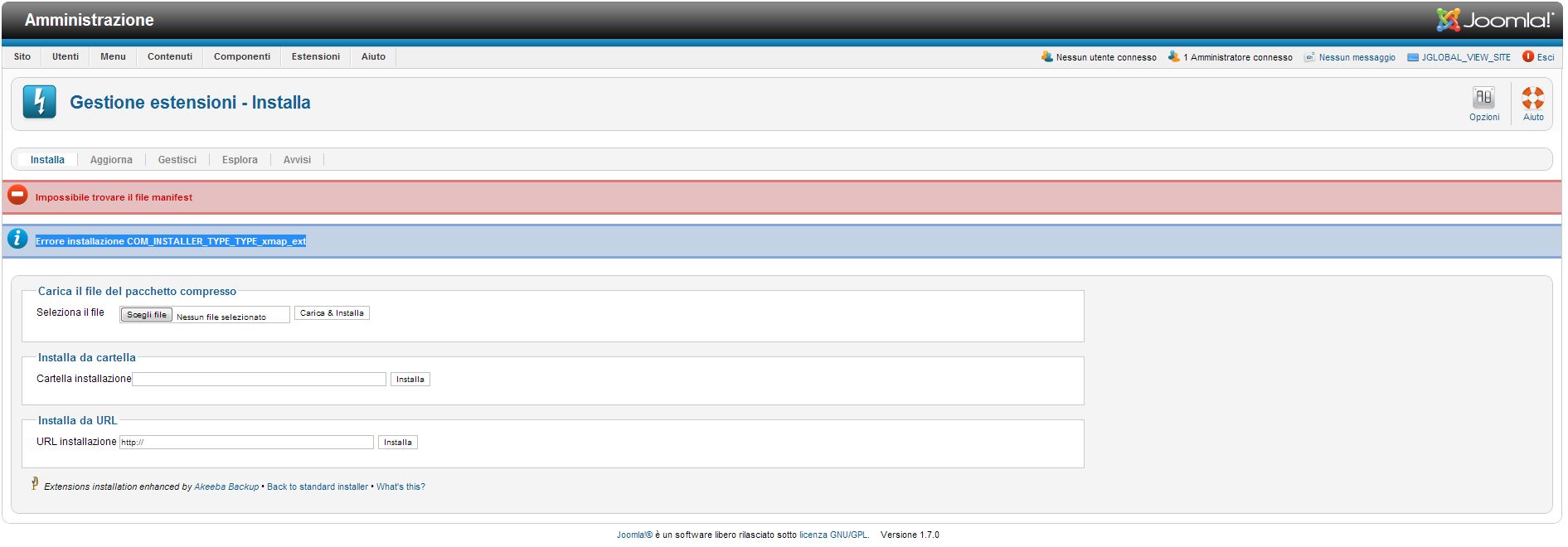
Translating the error from Italian to English is something like that:
Written in red "Impossible to find the file manifest"
Written in blue "Installation error COM_INSTALLER_TYPE_TYPE_xmap_ext"
Please Log in or Create an account to join the conversation.

15 years 2 months ago #21952
by Eliot
Replied by Eliot on topic Re: Site map, xmap...
As you can see in the
XMAP Documentation
, you have to install this plugin with the XMAP installer. (Components -> XMAP -> Extensions)
Please Log in or Create an account to join the conversation.
Less
More
- Posts: 55
- Thank you received: 0
15 years 2 months ago #21986
by skatercorpse
Replied by skatercorpse on topic Re: Site map, xmap...
Hi Nicolas!
Thank you for your reply!
Actually from Component->Xmap->Extensions I don't see a way to intall the hikashop plugin...
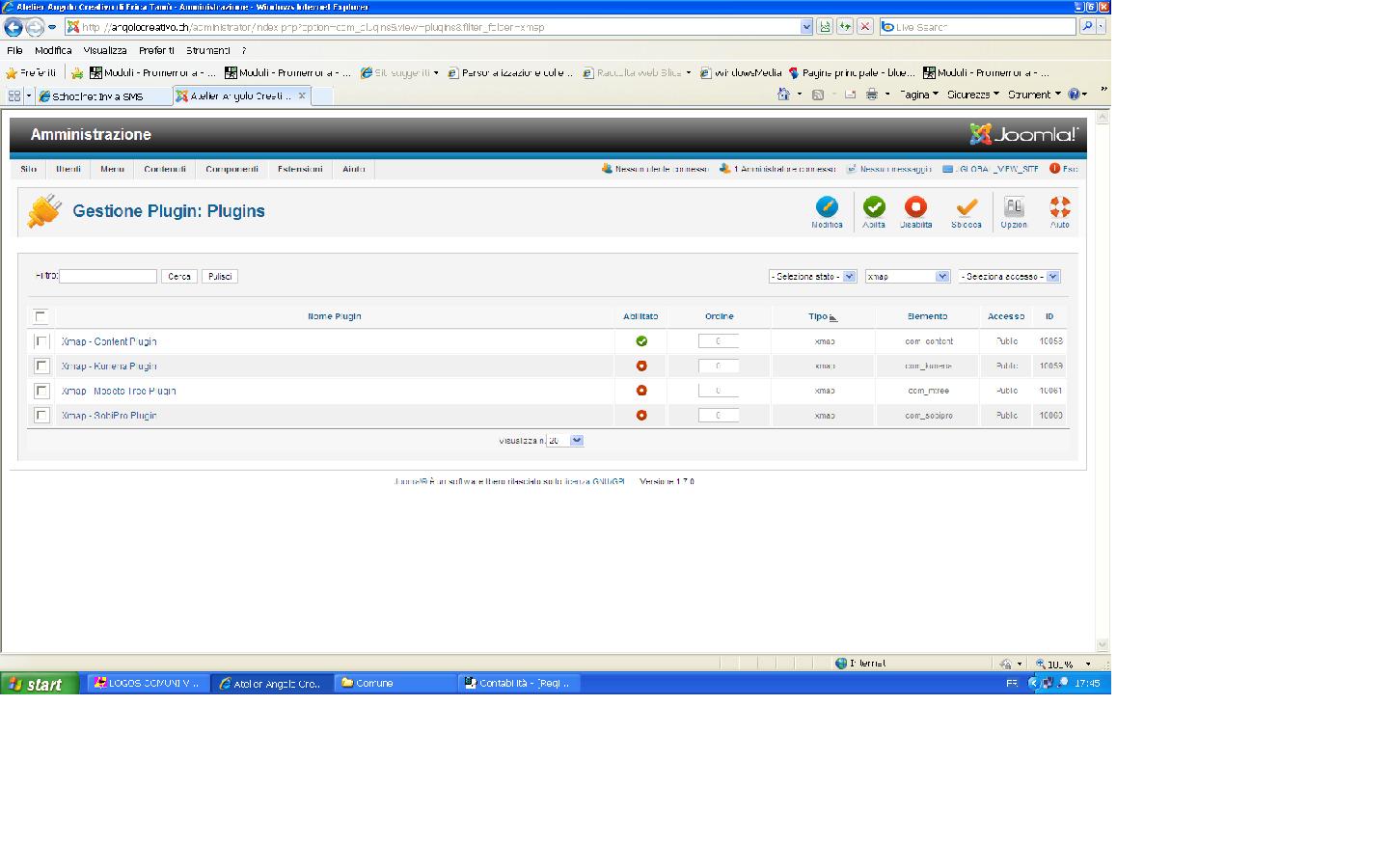
Thank you for your reply!
Actually from Component->Xmap->Extensions I don't see a way to intall the hikashop plugin...
Please Log in or Create an account to join the conversation.
15 years 2 months ago #21987
by Eliot
Replied by Eliot on topic Re: Site map, xmap...
You're in the wrong menu, on your screenshot you are in Extensions -> plugin manager.
You have to click on Component->Xmap, then you will have a tab named "Extensions". You should be able to install the hikashop plugin here.
You have to click on Component->Xmap, then you will have a tab named "Extensions". You should be able to install the hikashop plugin here.
Please Log in or Create an account to join the conversation.
Less
More
- Posts: 55
- Thank you received: 0
15 years 2 months ago #22014
by skatercorpse
Replied by skatercorpse on topic Re: Site map, xmap...
I got used to Nicolas! Sorry Eliot!
Anyway thank you for your reply!
Yes you are right, from the screenshot I'm in Extensions -> plugin manager. I have already noticed that...
But it is where I get redirected when I click on Component->Xmap->Extensions tab... :S
I tried several times and is always like that...
I'm on Joomla 1.7 with Xmap 2...
Anyway thank you for your reply!
Yes you are right, from the screenshot I'm in Extensions -> plugin manager. I have already noticed that...
But it is where I get redirected when I click on Component->Xmap->Extensions tab... :S
I tried several times and is always like that...
I'm on Joomla 1.7 with Xmap 2...
Please Log in or Create an account to join the conversation.
Less
More
- Posts: 55
- Thank you received: 0
15 years 2 months ago #22019
by skatercorpse
Replied by skatercorpse on topic Re: Site map, xmap...
Here we go:
joomla.vargas.co.cr/en/news/4-xmap/105-xmap-2
joomla.vargas.co.cr/en/documentation/57-...installation?start=1
I think you could ask them to include your plugin in their release...
joomla.vargas.co.cr/en/news/4-xmap/105-xmap-2
joomla.vargas.co.cr/en/documentation/57-...installation?start=1
I think you could ask them to include your plugin in their release...
Please Log in or Create an account to join the conversation.
15 years 2 months ago #22025
by Eliot
Replied by Eliot on topic Re: Site map, xmap...
It seems that XMAP 2 is now using the joomla installer, it was not the case with XMAP 1.x.
So we made a new plugin for XMAP 2 and install it from Extensions > Extension Manager.
This attachment is hidden for guests.
So we made a new plugin for XMAP 2 and install it from Extensions > Extension Manager.
This attachment is hidden for guests.
Please log in or register to see it.
Please Log in or Create an account to join the conversation.
Less
More
- Posts: 55
- Thank you received: 0
15 years 2 months ago #22032
by skatercorpse
Replied by skatercorpse on topic Re: Site map, xmap...
Already ok?
Great!!
Thank you so much!
Great!!
Thank you so much!
Please Log in or Create an account to join the conversation.

15 years 3 weeks ago #25027
by Bugger101
Replied by Bugger101 on topic Re: Site map, xmap...
G'day,
Is this plugin for 1.5 too? I get this: Error! Could not find a Joomla! XML setup file in the package.
Xmap used to work with HS without the plugin I'm sure, or is my memory failing?
Thanks
Is this plugin for 1.5 too? I get this: Error! Could not find a Joomla! XML setup file in the package.
Xmap used to work with HS without the plugin I'm sure, or is my memory failing?
Thanks
Please Log in or Create an account to join the conversation.

15 years 3 weeks ago #25030
by nicolas
Replied by nicolas on topic Re: Site map, xmap...
There are two plugins now for xmap:
www.hikashop.com/en/support/documentatio...ation-with-xmap.html
One for 1.x and one for 2.x
That error means that you're trying to install it via joomla and not via the xmap installer. You should follow the installation instruction on that page.
One for 1.x and one for 2.x
That error means that you're trying to install it via joomla and not via the xmap installer. You should follow the installation instruction on that page.
Please Log in or Create an account to join the conversation.
15 years 3 weeks ago #25092
by Bugger101
Replied by Bugger101 on topic Re: Site map, xmap...
Thanks Nicolas, was trying to use incompatible versions also! 
Please Log in or Create an account to join the conversation.
Less
More
- Posts: 3
- Thank you received: 0
13 years 7 months ago #91046
by Socrates Mechanicos
Replied by Socrates Mechanicos on topic Multiple URLs for same product
Xmap Sitemap plugin for hikashop generates two different URLs for the same product, I only want to keep one of it.
Deleting URL's from the Xmap Sitemap OR disable those URLs
For example: www.emiliarossi.com.au/index.php?option=...&tmpl=component&id=5
shows
www.emiliarossi.com.au/product-category/...chalcedony-ring-22ct
AND
www.emiliarossi.com.au/blue-chalcedony-ring-22ct .
These are both the same page.
www.emiliarossi.com.au/blue-chalcedony-ring-22ct is the one I want included so I would like to delete/disable the cause that generate this www.emiliarossi.com.au/product-category/...chalcedony-ring-22ct from this sitemap.
How do I do this? How can I delete any of the unwanted URLs from the sitemap, is there any easy go for that, OR otherwise disable that which create URLs from '/product-category/' section...
Please let me know, if my question is clear enough for you guys to answer
Deleting URL's from the Xmap Sitemap OR disable those URLs
For example: www.emiliarossi.com.au/index.php?option=...&tmpl=component&id=5
shows
www.emiliarossi.com.au/product-category/...chalcedony-ring-22ct
AND
www.emiliarossi.com.au/blue-chalcedony-ring-22ct .
These are both the same page.
www.emiliarossi.com.au/blue-chalcedony-ring-22ct is the one I want included so I would like to delete/disable the cause that generate this www.emiliarossi.com.au/product-category/...chalcedony-ring-22ct from this sitemap.
How do I do this? How can I delete any of the unwanted URLs from the sitemap, is there any easy go for that, OR otherwise disable that which create URLs from '/product-category/' section...
Please let me know, if my question is clear enough for you guys to answer
Please Log in or Create an account to join the conversation.
13 years 7 months ago #91124
by Eliot
Replied by Eliot on topic Multiple URLs for same product
Hi there,
These two url exist because there are link to them in your website.
I may come from a direct link to the product on some page and another link in a category listing.
The last version of Hikashop is giving some improve about this and avoid the multiplication of url for one product so if you don't have the last version, try to update.
Anyway, if as I said, you have two links existing (including a direct link) we can't pass over this.
These two url exist because there are link to them in your website.
I may come from a direct link to the product on some page and another link in a category listing.
The last version of Hikashop is giving some improve about this and avoid the multiplication of url for one product so if you don't have the last version, try to update.
Anyway, if as I said, you have two links existing (including a direct link) we can't pass over this.
Please Log in or Create an account to join the conversation.
13 years 3 weeks ago #121765
by scisteffan
Replied by scisteffan on topic Multiple URLs for same product
May I suggest you post this on the JED at
extensions.joomla.org/extensions/extensi...ific/xmap-extensions
Please Log in or Create an account to join the conversation.
Time to create page: 0.296 seconds