

- Posts: 6
- Thank you received: 0
Custom Field display in Filter
13 years 7 months ago #94765
by woochild
Custom Field display in Filter was created by woochild
i have a set of filters based on custom fields that work perfectly. Problem is, none of them are required, but when I create a product, that product is automatically associated with every custom field's default value, when I don't want it associated at all, hence "not required". I created a "n/a" value and set it to disabled hoping that would work, but it shows up on the front end as an option in the filter. I need to make it so products that do not require the custom field do not need to be associated with it, or make a designated "N/A" value not show up in the filter. I can't define it by category because the custom fields vary per product within a given category. help would be appreciated.
Please Log in or Create an account to join the conversation.

13 years 7 months ago #94827
by nicolas
Replied by nicolas on topic Custom Field display in Filter
Hi,
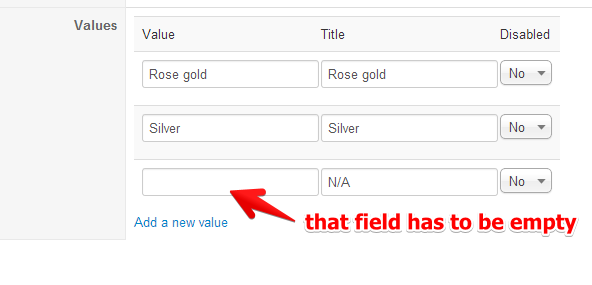
You should have a default value with a "value" empty and the title "N/A". That way it won't display on the frontend.
Note that you can have custom fields associated to one product. Simply create an unpublished category specially for that custom field, add it in the custom field and in each product which need that custom field, add the unpublished category of the field as second (or third, etc) category.
You should have a default value with a "value" empty and the title "N/A". That way it won't display on the frontend.
Note that you can have custom fields associated to one product. Simply create an unpublished category specially for that custom field, add it in the custom field and in each product which need that custom field, add the unpublished category of the field as second (or third, etc) category.
Please Log in or Create an account to join the conversation.
13 years 7 months ago #94839
by woochild
Replied by woochild on topic Custom Field display in Filter
that's the problem, there is no default value that is empty with N/A, unless I create it and when I create it, it shows up on the frontend. if there was an empty default, that would be simple to employ and exactly what I need.
I can't assign it to one product because the entire category needs to use the same custom fields so the filter will work properly on the frontend.
the fact that you said there should be and empty field and there isn't, lets me know something is going wrong that needs to be fixed. we need to figure out what needs to be fixed.
I can't assign it to one product because the entire category needs to use the same custom fields so the filter will work properly on the frontend.
the fact that you said there should be and empty field and there isn't, lets me know something is going wrong that needs to be fixed. we need to figure out what needs to be fixed.
Please Log in or Create an account to join the conversation.
13 years 7 months ago #95002
by nicolas
Replied by nicolas on topic Custom Field display in Filter
There is nothing to fix.
I'm guessing that you didn't understand what I said.
You need to change the n/a value of your custom field. It shouldn't be configured like you did but like that:
I'm guessing that you didn't understand what I said.
You need to change the n/a value of your custom field. It shouldn't be configured like you did but like that:
Please Log in or Create an account to join the conversation.
13 years 7 months ago #95005
by woochild
Replied by woochild on topic Custom Field display in Filter
ahhhh...understood.
thanks.
thanks.
Please Log in or Create an account to join the conversation.
13 years 7 months ago #95540
by woochild
Replied by woochild on topic Custom Field display in Filter
okay, i did what you said and it is still showing up on the front page in the filters. I don't want an n/a option on the front end.
Please Log in or Create an account to join the conversation.
13 years 7 months ago #95608
by nicolas
Replied by nicolas on topic Custom Field display in Filter
If the filter's dynamic display option is turned on and that you're on a products listing where no products have that n/a value, it won't display that option.
Otherwise, it will.
To really remove the value from the filter all the time, you would have to change the line:
$field->field_value[$key]=array($temp[0],$temp[1]);
to:
if(!empty($temp[0])) $field->field_value[$key]=array($temp[0],$temp[1]);
in the file administrator/components/com_hikashop/class/filter.php
Otherwise, it will.
To really remove the value from the filter all the time, you would have to change the line:
$field->field_value[$key]=array($temp[0],$temp[1]);
to:
if(!empty($temp[0])) $field->field_value[$key]=array($temp[0],$temp[1]);
in the file administrator/components/com_hikashop/class/filter.php
Please Log in or Create an account to join the conversation.
Time to create page: 0.069 seconds