

- Posts: 98
- Thank you received: 2
Filter's mechanics
13 years 6 months ago #97527
by Shulha
Filter's mechanics was created by Shulha
Hello. My topic concerns filters' mechanics. If you apply a filter to some parameter, and then click, for example, on the other Main Menu item and then comeback to the Catalogue where the filtering was made, you will still have the filters working. I find it incredibly unusable. I mean that logically, when you click again on the catalogue, you expect that no filter will be applied, that you will the the whole catalogue.
So, I hired a web-developer, he applied some features to the website, but when I asked him to make this - You apply a filter in the "Catalogue" menu, then go to another and when you comeback, you have no filter applied. He told me that its impossible because of the info about the applied filters is stored in cookies.
Well. So I ask you as developers, is there ANY way to do something like this? This is incredibly urgent. I mean auto-resetting when you click on the Menu Item where you applied this filter. If there any, could you please descrcibe it more precisely, so as the developer could get it? And plus, the Basket items should not be lost.
Thanks a lot.
So, I hired a web-developer, he applied some features to the website, but when I asked him to make this - You apply a filter in the "Catalogue" menu, then go to another and when you comeback, you have no filter applied. He told me that its impossible because of the info about the applied filters is stored in cookies.
Well. So I ask you as developers, is there ANY way to do something like this? This is incredibly urgent. I mean auto-resetting when you click on the Menu Item where you applied this filter. If there any, could you please descrcibe it more precisely, so as the developer could get it? And plus, the Basket items should not be lost.
Thanks a lot.
Please Log in or Create an account to join the conversation.

13 years 6 months ago #97752
by Xavier
Replied by Xavier on topic Filter's mechanics
Hi,
You have to edit the file "administrator/components/com_hikashop/classes/filter.php" and in the function "addFilter()" replace the line:
By:
The filters are not stored in cookies but in session.
You have to edit the file "administrator/components/com_hikashop/classes/filter.php" and in the function "addFilter()" replace the line:
Code:
$infoGet = $app->getUserStateFromRequest( 'com_hikashop.'.$cid .'_filter_'.$filter->filter_namekey.$completion, 'filter_'.$filter->filter_namekey.$completion, $infoGet, 'array' );
Code:
$infoGet = JRequest::getString('filter_'.$filter->filter_namekey.$completion);
The filters are not stored in cookies but in session.
Please Log in or Create an account to join the conversation.

Less
More
- Posts: 640
- Thank you received: 16
13 years 6 months ago #98009
by PeterChain
Replied by PeterChain on topic Filter's mechanics
Could somebody confirm this is a realistic way of making an "ALL AT ONCE FILTER RESET" ?
This is a MUST function which without it makes browsing the catalog an unacceptable experience for most clients.
This is a MUST function which without it makes browsing the catalog an unacceptable experience for most clients.
Please Log in or Create an account to join the conversation.
13 years 6 months ago #98149
by Xavier
Replied by Xavier on topic Filter's mechanics
Hi,
By this way the filters are not taken from the session but from the "POST".
So when going to another page, the filters values are lost, so reset.
You just have to try
By this way the filters are not taken from the session but from the "POST".
So when going to another page, the filters values are lost, so reset.
You just have to try
The following user(s) said Thank You: PeterChain
Please Log in or Create an account to join the conversation.
Less
More
- Posts: 640
- Thank you received: 16
13 years 6 months ago #98156
by PeterChain
Replied by PeterChain on topic Filter's mechanics
GREAT! This brings some light to the filtering issue! I'll try as soon as possible.
Please Log in or Create an account to join the conversation.
13 years 6 months ago #98232
by Shulha
What if i dont have this line in addFilter function in filter.php :
??
Replied by Shulha on topic Filter's mechanics
Xavier wrote: Hi,
By this way the filters are not taken from the session but from the "POST".
So when going to another page, the filters values are lost, so reset.
You just have to try
What if i dont have this line in addFilter function in filter.php :
Code:
$infoGet = $app->getUserStateFromRequest( 'com_hikashop.'.$cid .'_filter_'.$filter->filter_namekey.$completion, 'filter_'.$filter->filter_namekey.$completion, $infoGet, 'array' );[
??
Please Log in or Create an account to join the conversation.
Less
More
- Posts: 640
- Thank you received: 16
13 years 6 months ago #98280
by PeterChain
Replied by PeterChain on topic Filter's mechanics
I TRIED AND IT WORKS.
Shulha, if you don't find the required string you might be editing a wrong filter.php file. Make sure you are editing the one in the 'classes' folder.
Anyway this is not still the right solution as you may get reseted filter but the Filter controls remain with the X sign to get them cancelled even they are already cancelled.
Suggestions will be welcom on how to refresh the Filters controls to initial status.
Shulha, if you don't find the required string you might be editing a wrong filter.php file. Make sure you are editing the one in the 'classes' folder.
Anyway this is not still the right solution as you may get reseted filter but the Filter controls remain with the X sign to get them cancelled even they are already cancelled.
Suggestions will be welcom on how to refresh the Filters controls to initial status.
Please Log in or Create an account to join the conversation.
Less
More
- Posts: 640
- Thank you received: 16
13 years 6 months ago - 13 years 6 months ago #98998
by PeterChain
Replied by PeterChain on topic Filter's mechanics
Is this "Code Tweak" still valid for 2.1.2 ?
Looks like this file and the way to call its functions experienced a large amount of changes since 2.1.0
Looks like this file and the way to call its functions experienced a large amount of changes since 2.1.0
Last edit: 13 years 6 months ago by PeterChain.
Please Log in or Create an account to join the conversation.
13 years 6 months ago #99143
by Xavier
Replied by Xavier on topic Filter's mechanics
Hi,
The way the filters are working don't changed.
The "code tweak" is still valid.
The way the filters are working don't changed.
The "code tweak" is still valid.
Please Log in or Create an account to join the conversation.
Less
More
- Posts: 640
- Thank you received: 16
13 years 4 months ago - 13 years 4 months ago #108378
by PeterChain
Replied by PeterChain on topic Filter's mechanics
NOTE TO USERS WANTING TO TAKE ADVANTAGE FROM THIS:
For HikaShop 2.1.3 you have to find this string
For HikaShop 2.1.3 you have to find this string
$infoGet = $app->getUserStateFromRequest( 'com_hikashop.'.$cid .'_filter_'.$filter->filter_namekey, 'filter_'.$filter->filter_namekey, $infoGet, 'array' );
Last edit: 13 years 4 months ago by PeterChain.
The following user(s) said Thank You: Xavier
Please Log in or Create an account to join the conversation.

13 years 3 months ago #113864
by alikon1
Yes. Filter module shows that filter is applied, but all products from category are listed. How to reset selection in module too? It confuses the site visitors.
Replied by alikon1 on topic Filter's mechanics
PeterChain wrote: Anyway this is not still the right solution as you may get reseted filter but the Filter controls remain with the X sign to get them cancelled even they are already cancelled.
Yes. Filter module shows that filter is applied, but all products from category are listed. How to reset selection in module too? It confuses the site visitors.
Please Log in or Create an account to join the conversation.

13 years 3 months ago #113899
by Eliot
Replied by Eliot on topic Filter's mechanics
Hi there,
The last Hikashop version includes the possibility to display a reset button.
You can find this option in System>Configuration>Features>Filters
The last Hikashop version includes the possibility to display a reset button.
You can find this option in System>Configuration>Features>Filters
Please Log in or Create an account to join the conversation.
13 years 3 months ago #113903
by alikon1
I want clear filter after change category without pressing any buttons. Just open category and there is no any filter applied...
Replied by alikon1 on topic Filter's mechanics
Eliot wrote: Hi there,
The last Hikashop version includes the possibility to display a reset button.
You can find this option in System>Configuration>Features>Filters
I want clear filter after change category without pressing any buttons. Just open category and there is no any filter applied...
Please Log in or Create an account to join the conversation.
- mariussport
-

- Offline
- Test fase
13 years 3 months ago #113921
by mariussport
Replied by mariussport on topic Filter's mechanics
Thanks,
we had the same question about the filter function.
regards, Marius
we had the same question about the filter function.
regards, Marius
Please Log in or Create an account to join the conversation.
13 years 3 months ago #114053
by Eliot
Replied by Eliot on topic Filter's mechanics
Hi there,
Actually this is the current behavior of the filters, it's reseted for each category.
Could you please give me a link to your website so I can test it?
Actually this is the current behavior of the filters, it's reseted for each category.
Could you please give me a link to your website so I can test it?
Please Log in or Create an account to join the conversation.
- mariussport
-
- Offline
- Test fase
13 years 3 months ago #114059
by mariussport
Replied by mariussport on topic Filter's mechanics
Hi Eliot,
Thank you. After the update to 2.20 the reset button in the configuration and the filter module is activated.
Seems to work much better now, only one thing, after reset the "Search text" doesn't dissapear in combination of the menu "Article List"
You can test it on the website. [url=http://] www.lebasport.nl [/url]
best regards,
Marius
Thank you. After the update to 2.20 the reset button in the configuration and the filter module is activated.
Seems to work much better now, only one thing, after reset the "Search text" doesn't dissapear in combination of the menu "Article List"
You can test it on the website. [url=http://] www.lebasport.nl [/url]
best regards,
Marius
Please Log in or Create an account to join the conversation.
13 years 3 months ago #114061
by alikon1
When I use filter, it works and show for example 2 products from category
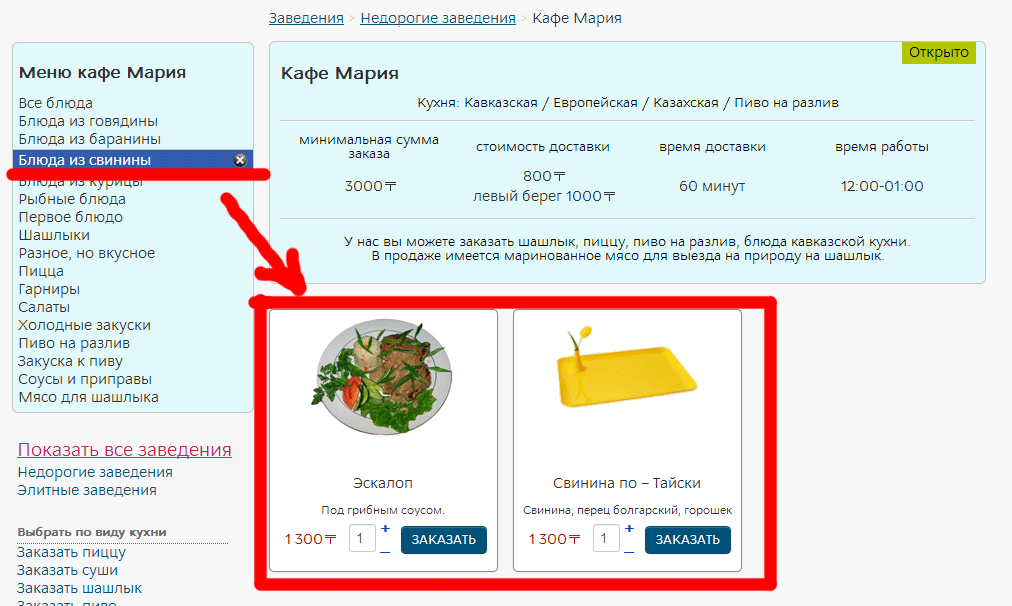
But when I change category and then return here again, there will be listed all products, but filter module shows like filter is still applied. But really no filter is applied.
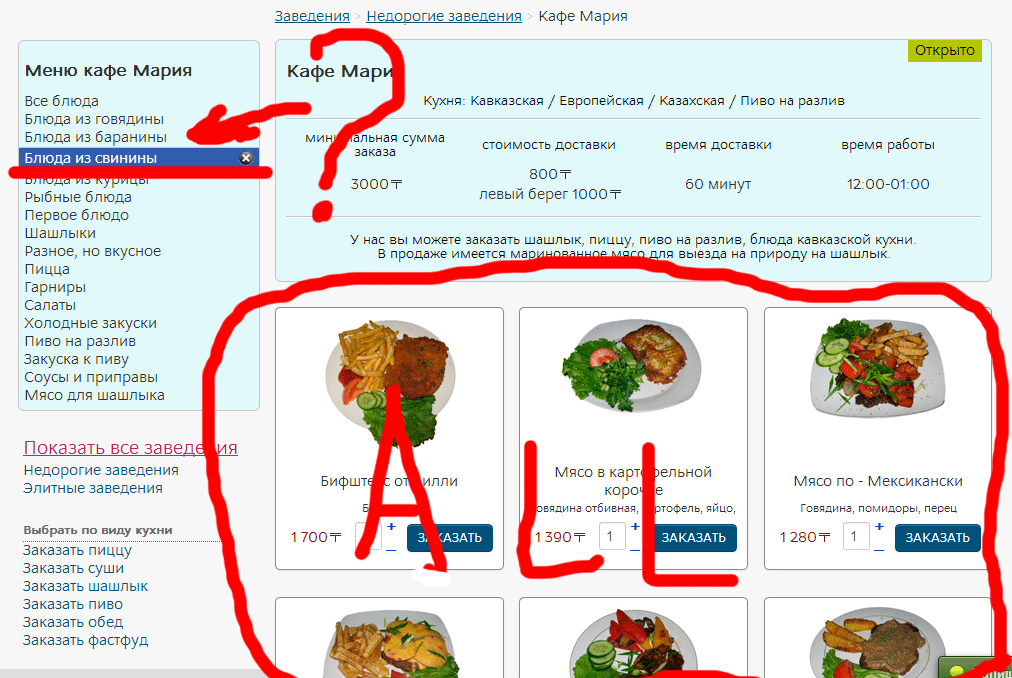
Replied by alikon1 on topic Filter's mechanics
It's in russian. I think you don't understend anything on this site.Eliot wrote: Hi there,
Actually this is the current behavior of the filters, it's reseted for each category.
Could you please give me a link to your website so I can test it?
When I use filter, it works and show for example 2 products from category
But when I change category and then return here again, there will be listed all products, but filter module shows like filter is still applied. But really no filter is applied.
Please Log in or Create an account to join the conversation.
13 years 3 months ago - 13 years 3 months ago #114062
by Eliot
Replied by Eliot on topic Filter's mechanics
@Marius: Could you send me a PM with a backend access and a FTP access as well as a link to this topic?
I reproduced the bug so I'll try to fix it.
@alikon1: Do you have the last Hikashop version? And a link to your website could also help me
I reproduced the bug so I'll try to fix it.
@alikon1: Do you have the last Hikashop version? And a link to your website could also help me
Last edit: 13 years 3 months ago by Eliot.
Please Log in or Create an account to join the conversation.
13 years 3 months ago #114087
by Eliot
Replied by Eliot on topic Filter's mechanics
Hi Marius,
I found the source of the issue, it's because you activated the joomla's cache.
That's why the filter is working but not displaying the right informations, the page is cached.
So you ahve to disable the joomla's cache and if you really want to have a cache you must find an extension to specify the pages you want to cache (not the Hikashop ones)
I found the source of the issue, it's because you activated the joomla's cache.
That's why the filter is working but not displaying the right informations, the page is cached.
So you ahve to disable the joomla's cache and if you really want to have a cache you must find an extension to specify the pages you want to cache (not the Hikashop ones)
Please Log in or Create an account to join the conversation.
- mariussport
-
- Offline
- Test fase
13 years 3 months ago #114089
by mariussport
Replied by mariussport on topic Filter's mechanics
Hi Eliot,
Thank you for your work and that you have found the issue. Good luck,
Marius
Thank you for your work and that you have found the issue. Good luck,
Marius
Please Log in or Create an account to join the conversation.
Time to create page: 0.202 seconds