
- Posts: 640
- Thank you received: 16
Unexpected behaviour of one single filter in group
- PeterChain
-
 Topic Author
- Offline
Less
More
13 years 6 months ago #98674
by PeterChain
Unexpected behaviour of one single filter in group was created by PeterChain
I have a setup of 5 filters in a module, all work as expected when selected showing the X icon bring them back, but there is one that just shows the filter title without giving the chance to delete it.
I tried all possible combinations in the filter setup with no lick, so I might be missing some HikaShop fundamental concept or (unlikely) there is a bug.
this is the problem

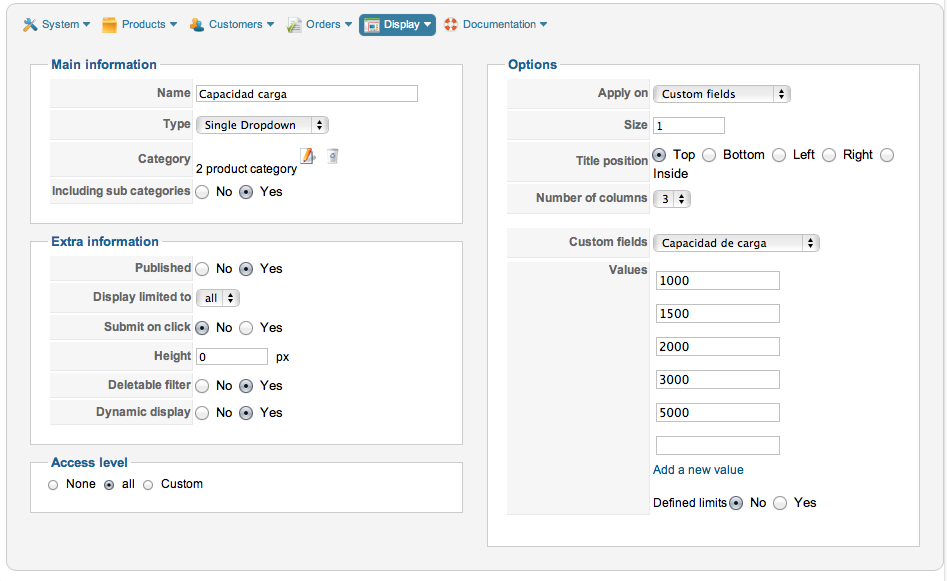
and this is the actual setup (even I changed most of all switches in all kind of combinations)
I tried all possible combinations in the filter setup with no lick, so I might be missing some HikaShop fundamental concept or (unlikely) there is a bug.
this is the problem
and this is the actual setup (even I changed most of all switches in all kind of combinations)
Please Log in or Create an account to join the conversation.

13 years 6 months ago #98758
by Xavier
Replied by Xavier on topic Unexpected behaviour of one single filter in group
Is this filter using the same parameters as the other one ?
Can you try to disable "dynamic display", and "deletable filter" ?
Can you try to disable "dynamic display", and "deletable filter" ?
Please Log in or Create an account to join the conversation.
- PeterChain
-
Topic Author
- Offline
Less
More
- Posts: 640
- Thank you received: 16
13 years 6 months ago #98769
by PeterChain
Replied by PeterChain on topic Unexpected behaviour of one single filter in group
If I disable both the content stays on screen, but it doesn't make sense as I want it deletable as all other filters in the module.
Once I enable deletable the problem comes back.
Yesterday I sent you login data through your Contact form in the HikaShop website.
This is the code I get for the filter
<div class="hikashop_filter_Carga"><span class="hikashop_filter_title">Capacidad carga</span> <br></div>
which is quite different from the other filters containing the extre code to Delete it,
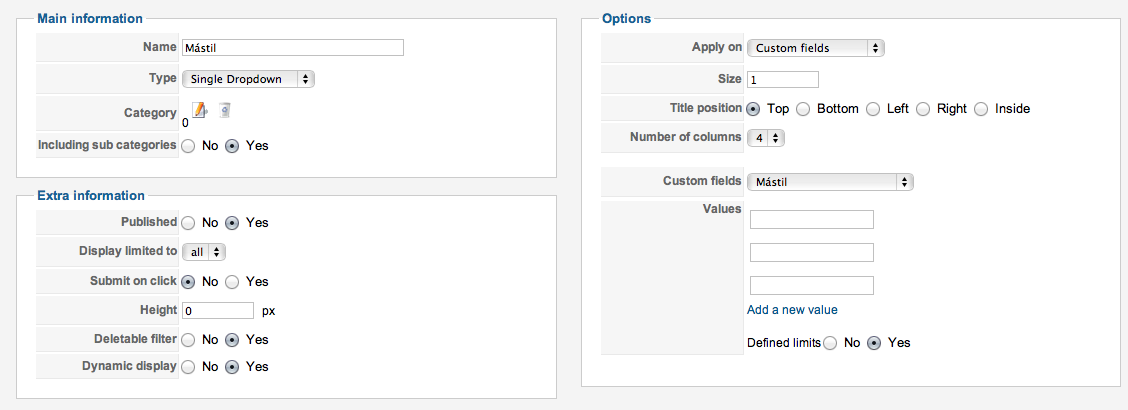
The difference in the Filter setup with other filter units is that this one has its values entered in the filter itself while other filters take it form a category, this is the only difference I can see, so maybe there's a bug during the construction of the filter depending of where it comes from?
Once I enable deletable the problem comes back.
Yesterday I sent you login data through your Contact form in the HikaShop website.
This is the code I get for the filter
<div class="hikashop_filter_Carga"><span class="hikashop_filter_title">Capacidad carga</span> <br></div>
which is quite different from the other filters containing the extre code to Delete it,
The difference in the Filter setup with other filter units is that this one has its values entered in the filter itself while other filters take it form a category, this is the only difference I can see, so maybe there's a bug during the construction of the filter depending of where it comes from?
Please Log in or Create an account to join the conversation.

13 years 6 months ago #98929
by nicolas
Replied by nicolas on topic Unexpected behaviour of one single filter in group
That a bug which we fixed in the latest version of HikaShop (2.1.2), please update to the latest version and try again.
The following user(s) said Thank You: PeterChain
Please Log in or Create an account to join the conversation.
- PeterChain
-
Topic Author
- Offline
Less
More
- Posts: 640
- Thank you received: 16
13 years 6 months ago - 13 years 6 months ago #98931
by PeterChain
Replied by PeterChain on topic Unexpected behaviour of one single filter in group
Thank you, haven't realized of such a small (in sequence number) update. I'm just at 2.1.0
When upgrading, will my teaked Views be respected?
I'm afraid of loosing many small customizations I made to views and the filter area.
When upgrading, will my teaked Views be respected?
I'm afraid of loosing many small customizations I made to views and the filter area.
Last edit: 13 years 6 months ago by PeterChain.
Please Log in or Create an account to join the conversation.
- PeterChain
-
Topic Author
- Offline
Less
More
- Posts: 640
- Thank you received: 16
13 years 6 months ago #98934
by PeterChain
Replied by PeterChain on topic Unexpected behaviour of one single filter in group
Having updated to 2.1.2 as far as I checked everything looks stable including the code tweaks I've been making, I guess I'm lucky that thos files weren't affected by the update.
NOW THE FAULTY FILTER Delete Buttons is working fine, BUT I get the word "Array" instead of the values I selected once the filter is activated.

This is the HTML code that gets generated for this piece Filter Module:
<div class="hikashop_filter_Carga">
<span class="hikashop_filter_title">Capacidad carga</span> <br>> <a class="hikashop_filter_list_selected" style="font-weight:bold">Array</a>
<input type="hidden" name="filter_Carga[]" id="filter_Carga_module_111" value="1500::2000">
<a href="#" style="cursor:pointer; text-decoration:none" onclick="document.getElementById('filter_Carga_module_111').value=' '; document.forms.submit();return false;"><img src="/activacions/media/com_hikashop/images/delete2.png"></a>
<br>
</div>
NOW THE FAULTY FILTER Delete Buttons is working fine, BUT I get the word "Array" instead of the values I selected once the filter is activated.
This is the HTML code that gets generated for this piece Filter Module:
<div class="hikashop_filter_Carga">
<span class="hikashop_filter_title">Capacidad carga</span> <br>> <a class="hikashop_filter_list_selected" style="font-weight:bold">Array</a>
<input type="hidden" name="filter_Carga[]" id="filter_Carga_module_111" value="1500::2000">
<a href="#" style="cursor:pointer; text-decoration:none" onclick="document.getElementById('filter_Carga_module_111').value=' '; document.forms.submit();return false;"><img src="/activacions/media/com_hikashop/images/delete2.png"></a>
<br>
</div>
Please Log in or Create an account to join the conversation.
- PeterChain
-
Topic Author
- Offline
Less
More
- Posts: 640
- Thank you received: 16
13 years 6 months ago #98935
by PeterChain
Replied by PeterChain on topic Unexpected behaviour of one single filter in group
Please If you develop the fix I would appreciate to get it as soon as possible, even as a single file if you won't release a new update only for this.
Thank you!
Thank you!
Please Log in or Create an account to join the conversation.
13 years 6 months ago #99082
by nicolas
Replied by nicolas on topic Unexpected behaviour of one single filter in group
Hi,
Could you provide a FTP access to your website via our contact form so that we can trace the problem and directly fix it for you ?
Could you provide a FTP access to your website via our contact form so that we can trace the problem and directly fix it for you ?
Please Log in or Create an account to join the conversation.
- PeterChain
-
Topic Author
- Offline
Less
More
- Posts: 640
- Thank you received: 16
13 years 6 months ago #99128
by PeterChain
Replied by PeterChain on topic Unexpected behaviour of one single filter in group
Ok, will be in the afternoon after uploading the newest version of the site with the updates.
Thank you.
Thank you.
Please Log in or Create an account to join the conversation.
13 years 6 months ago #99680
by nicolas
Replied by nicolas on topic Unexpected behaviour of one single filter in group
Hi,
We found the issue and corrected it.
Thank you for the access.
We found the issue and corrected it.
Thank you for the access.
Please Log in or Create an account to join the conversation.
- PeterChain
-
Topic Author
- Offline
Less
More
- Posts: 640
- Thank you received: 16
13 years 6 months ago - 13 years 6 months ago #99685
by PeterChain
Replied by PeterChain on topic Unexpected behaviour of one single filter in group
Thank you.
Last edit: 13 years 6 months ago by nicolas. Reason: I already provided the modification via email
Please Log in or Create an account to join the conversation.
Time to create page: 0.100 seconds