

- Posts: 301
- Thank you received: 11
[SOLVED] reCaptcha Box above Registration Form
13 years 6 months ago - 13 years 6 months ago #100086
by MSTACE
[SOLVED] reCaptcha Box above Registration Form was created by MSTACE
Joomla 2.59
Hikashop Business 2.1.2
I have had to invoke reCaptcha on this site as we have been receiving many, many false (bot) registrations.
But the reCaptcha box is placed well above Registration Form -- it is even above the article component -- making it really unusable.
(see attached screenshot)
Website: www.stacecosmetics.com
Hikashop Business 2.1.2
I have had to invoke reCaptcha on this site as we have been receiving many, many false (bot) registrations.
But the reCaptcha box is placed well above Registration Form -- it is even above the article component -- making it really unusable.
(see attached screenshot)
Website: www.stacecosmetics.com
Last edit: 13 years 6 months ago by MSTACE.
Please Log in or Create an account to join the conversation.

13 years 6 months ago #100132
by nicolas
Replied by nicolas on topic reCaptcha Box placed well above Registration Form
Hi,
I tried to look at that page but I didn't see any ReCaptcha field on the registration page of HikaShop so I can't say much.
Actually no one reported such issue with our Recpatcha plugin.
Are you sure that you're using the Recpatcha plugin that we provide on our website and not another one like the one that is installed by default in Joomla ?
It could also come from your template, so if you could try to switch temporarily your template and see if you still have the issue in order to confirm that theory.
I tried to look at that page but I didn't see any ReCaptcha field on the registration page of HikaShop so I can't say much.
Actually no one reported such issue with our Recpatcha plugin.
Are you sure that you're using the Recpatcha plugin that we provide on our website and not another one like the one that is installed by default in Joomla ?
It could also come from your template, so if you could try to switch temporarily your template and see if you still have the issue in order to confirm that theory.
Please Log in or Create an account to join the conversation.
13 years 6 months ago - 13 years 6 months ago #100157
by MSTACE
Replied by MSTACE on topic reCaptcha Box placed well above Registration Form
The plug-in was downloaded from your Documentation page.
I had turned it off because it made the site unusable.
Yes, it does seem to be the template.
The plug-in is on now, take a look.
I had turned it off because it made the site unusable.
Yes, it does seem to be the template.
The plug-in is on now, take a look.
Last edit: 13 years 6 months ago by MSTACE.
Please Log in or Create an account to join the conversation.
13 years 6 months ago #100211
by nicolas
Replied by nicolas on topic reCaptcha Box placed well above Registration Form
Hi,
I'm still not seeing it.
I'm still not seeing it.
Please Log in or Create an account to join the conversation.
13 years 6 months ago #100219
by MSTACE
Replied by MSTACE on topic reCaptcha Box placed well above Registration Form
Add something to the cart and try to check out.
It is there.
See attached screenshot.
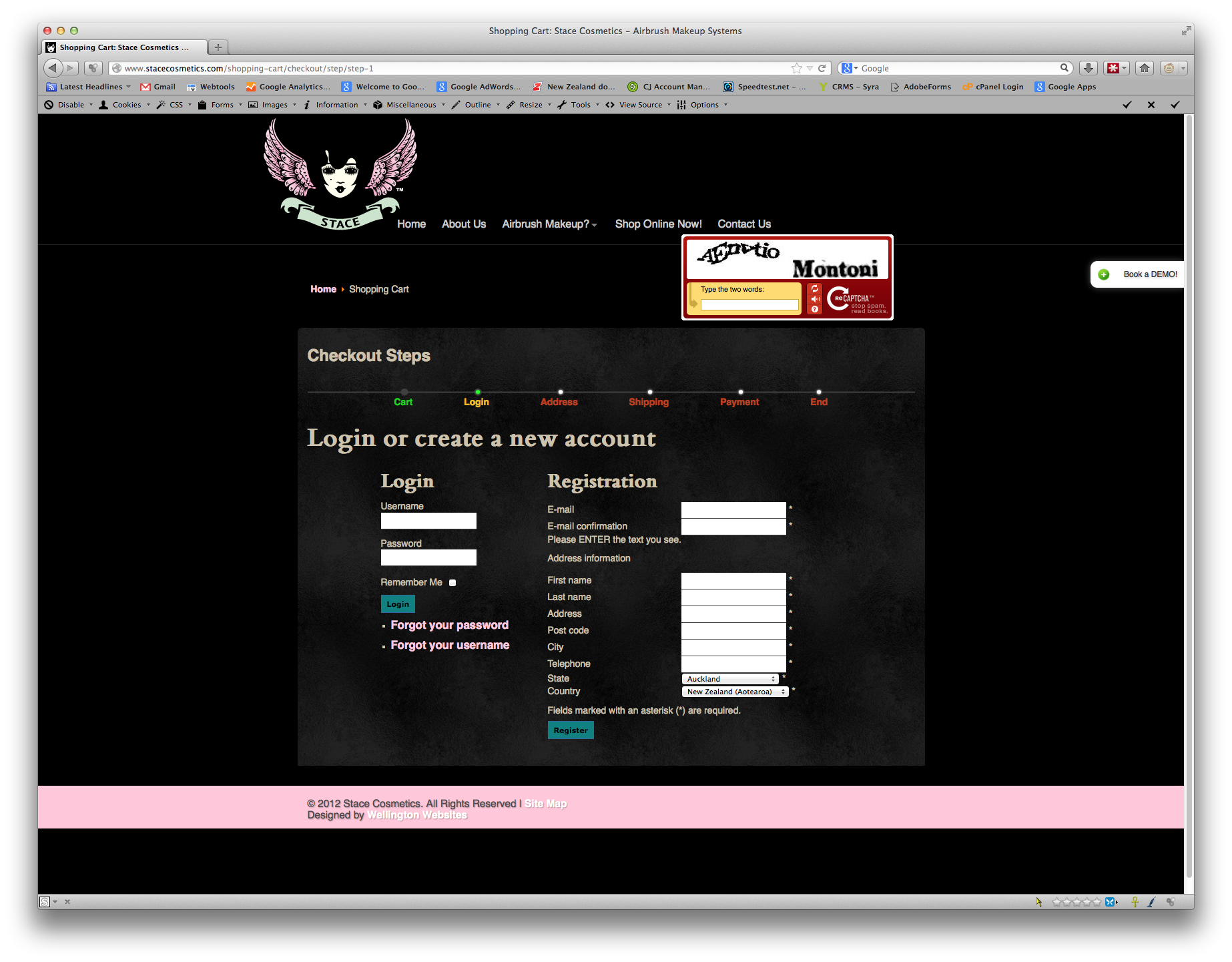
It is there.
See attached screenshot.
Please Log in or Create an account to join the conversation.
13 years 6 months ago #100287
by nicolas
Replied by nicolas on topic reCaptcha Box placed well above Registration Form
Hi,
I can see it now. I couldn't yesterday.
It comes from your template's CSS:
#recaptcha_widget_div {
position: absolute;
top: -140px;
}
in the file www.stacecosmetics.com/templates/rt_visage/css/joomla.css
Remove that code and it will work.
I can see it now. I couldn't yesterday.
It comes from your template's CSS:
#recaptcha_widget_div {
position: absolute;
top: -140px;
}
in the file www.stacecosmetics.com/templates/rt_visage/css/joomla.css
Remove that code and it will work.
Please Log in or Create an account to join the conversation.
13 years 6 months ago #100401
by MSTACE
Replied by MSTACE on topic reCaptcha Box placed well above Registration Form
I modified that CSS and it looks perfect now.
Thank you!
Thank you!
Please Log in or Create an account to join the conversation.
Time to create page: 0.060 seconds