
- Posts: 640
- Thank you received: 16
Layout on product page - dual view
- PeterChain
-
 Topic Author
- Offline
Less
More
13 years 5 months ago #102555
by PeterChain
Layout on product page - dual view was created by PeterChain
I want to have two different views of product page depending on the menu I use to view products.
Explanation:
Menu A - Shows a product listing I can choose from the Parameters for DIV area -> On click in a product I get the Product Page with the layout selected in the Default Parameters for Products
Menu B - Shows a product listing I can choose from the Parameters for DIV area -> On click in a product I want a different Product Page Layout from the one selected in the Default Parameters for Products
I know how to set a Product Page Layout on the Default Parameters for Products, but I don't know how to define a non default one in the product menus, I can change layouts for listings but not for product page, can't find where.
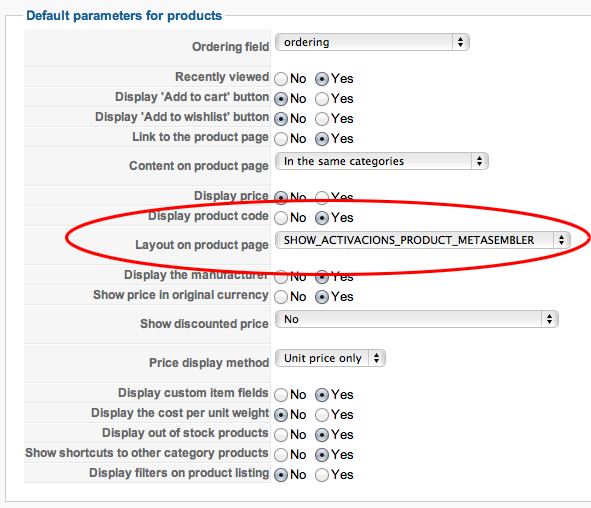
Explanation:
Menu A - Shows a product listing I can choose from the Parameters for DIV area -> On click in a product I get the Product Page with the layout selected in the Default Parameters for Products
Menu B - Shows a product listing I can choose from the Parameters for DIV area -> On click in a product I want a different Product Page Layout from the one selected in the Default Parameters for Products
I know how to set a Product Page Layout on the Default Parameters for Products, but I don't know how to define a non default one in the product menus, I can change layouts for listings but not for product page, can't find where.
Please Log in or Create an account to join the conversation.

13 years 5 months ago #102567
by Jerome
Jerome - Obsidev.com
HikaMarket & HikaSerial developer / HikaShop core dev team.
Replied by Jerome on topic Layout on product page - dual view
Hi,
You can override the layout per category and per product.
But the system is not design to have different layout depending the menu.
At this moment, I would recommend to have different templates, so you can have different override on each template.
Regards,
You can override the layout per category and per product.
But the system is not design to have different layout depending the menu.
At this moment, I would recommend to have different templates, so you can have different override on each template.
Regards,
Jerome - Obsidev.com
HikaMarket & HikaSerial developer / HikaShop core dev team.
Please Log in or Create an account to join the conversation.
- PeterChain
-
Topic Author
- Offline
Less
More
- Posts: 640
- Thank you received: 16
13 years 5 months ago #102570
by PeterChain
Sorry that I didn't catch the concept for your solution. Could you make a more extended explanation?
Replied by PeterChain on topic Layout on product page - dual view
Jerome wrote: At this moment, I would recommend to have different templates, so you can have different override on each template.
Sorry that I didn't catch the concept for your solution. Could you make a more extended explanation?
Please Log in or Create an account to join the conversation.

13 years 5 months ago #102602
by Xavier
Replied by Xavier on topic Layout on product page - dual view
Hi,
You have to use two templates (it can be the same used twice with different names).
Then set one template as the default one, set the other one to some menus.
And in the html folder of the second template, you can make view overrides to change the product display only on some menus.
Hope it will help you.
You have to use two templates (it can be the same used twice with different names).
Then set one template as the default one, set the other one to some menus.
And in the html folder of the second template, you can make view overrides to change the product display only on some menus.
Hope it will help you.
Please Log in or Create an account to join the conversation.
Time to create page: 0.068 seconds