
- Posts: 26
- Thank you received: 0
Joomla 3 config panel, what went wrong?
- unclefudgly
-
 Topic Author
- Offline
Less
More
13 years 5 months ago #103814
by unclefudgly
Joomla 3 config panel, what went wrong? was created by unclefudgly
Having issues with hikashop after updating site & component to Joomla 3.1 versions. The config menu in Hikashop has gone only to be replaced by large headers but no links, so I have to access everything through text links at bottom of widget panels, which is not convenient at all.
Any ideas?
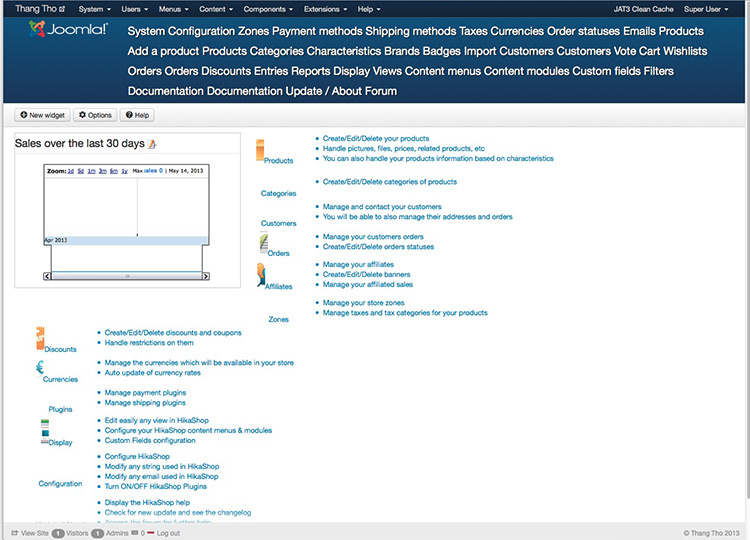
Any ideas?
Please Log in or Create an account to join the conversation.

13 years 5 months ago #103823
by Jerome
Jerome - Obsidev.com
HikaMarket & HikaSerial developer / HikaShop core dev team.
Replied by Jerome on topic Joomla 3 config panel, what went wrong?
Hi,
First, you have to display the HikaShop menu below the content.
In the HikaShop configuration (that can access thanks to the Joomla "components" main menu), you have to change the option "Menu position" in the "Display tab".
www.hikashop.com/en/support/documentatio...html#display_general
After that, it looks like you are using a custom backend css file.
Regards,
First, you have to display the HikaShop menu below the content.
In the HikaShop configuration (that can access thanks to the Joomla "components" main menu), you have to change the option "Menu position" in the "Display tab".
www.hikashop.com/en/support/documentatio...html#display_general
After that, it looks like you are using a custom backend css file.
Regards,
Jerome - Obsidev.com
HikaMarket & HikaSerial developer / HikaShop core dev team.
Please Log in or Create an account to join the conversation.
Time to create page: 0.084 seconds