
- Posts: 86
- Thank you received: 2
Error al guardar
13 years 4 months ago #109741
by vilo
Error al guardar was created by vilo
Hola.
Estoy usando la version Bussiness de Hikashop 2.1.1 y cuando quiero editar una categoría, o crear una nueva me da error: "Error al guardar".
Adjunto captura. Muchas gracias desde ya.
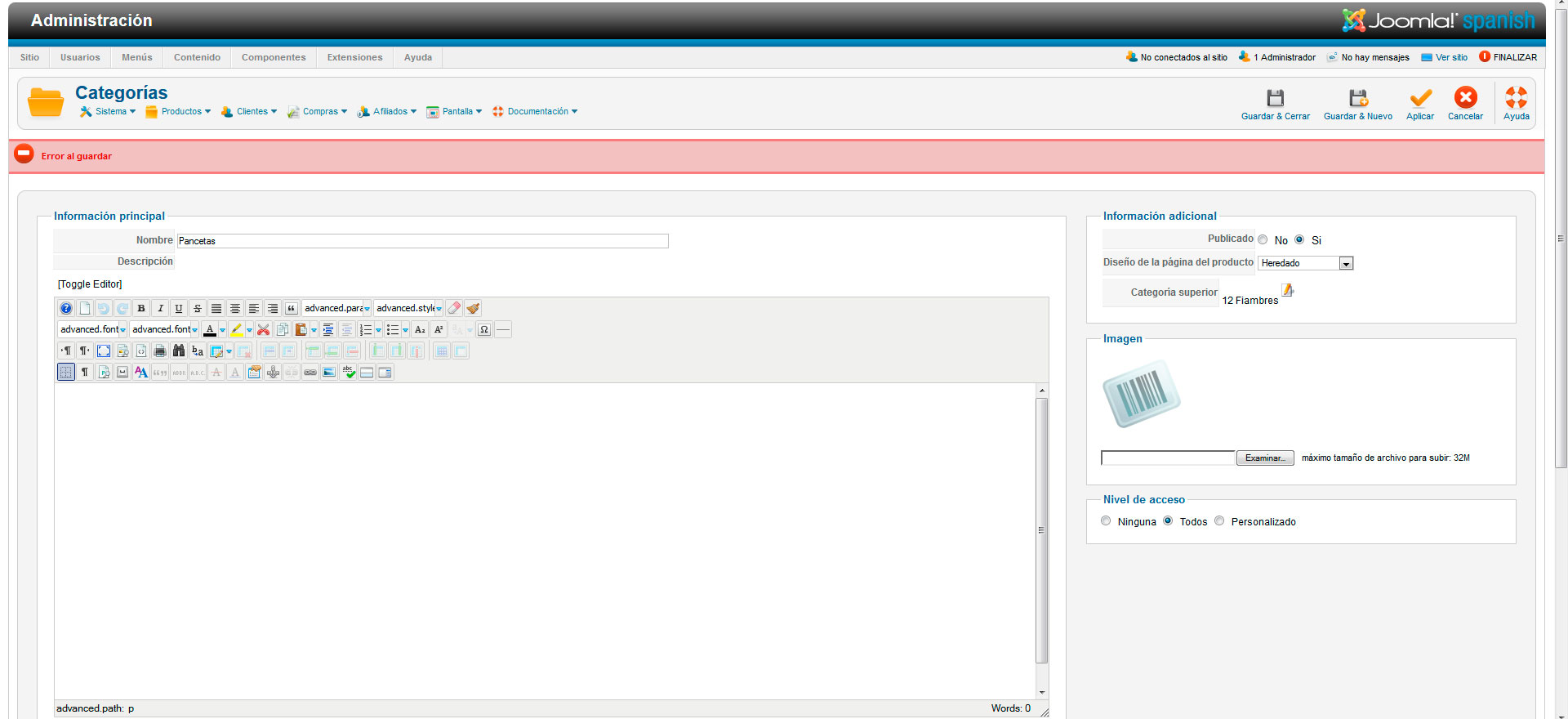
Estoy usando la version Bussiness de Hikashop 2.1.1 y cuando quiero editar una categoría, o crear una nueva me da error: "Error al guardar".
Adjunto captura. Muchas gracias desde ya.
Please Log in or Create an account to join the conversation.

13 years 4 months ago #109742
by nicolas
Replied by nicolas on topic Error al guardar
Please turn on the "debug mode" option of the joomla configuration and try again.
That should then display an error message with more information about what is going on.
That should then display an error message with more information about what is going on.
Please Log in or Create an account to join the conversation.
13 years 4 months ago #109744
by vilo
Replied by vilo on topic Error al guardar
500 - Ha ocurrido un error.
JDatabaseMySQL::query: 1054 - Unknown column 'category_canonical' in 'field list' SQL=INSERT IGNORE INTO `usrw5_hikashop_category` ( `category_name`,`category_meta_description`,`category_keywords`,`category_page_title`,`category_alias`,`category_canonical`,`category_published`,`category_layout`,`category_parent_id`,`category_access`,`category_id`,`category_type`,`category_description`,`category_modified`,`category_created`,`category_namekey` ) VALUES ( 'Pancetas','','','','','','1','','12','all','','product','','1371564592','1371564592','product_1371564592_486407005' )
Volver al Panel de Control
Call stack
# Function Location
1 JAdministrator->dispatch() /home/my000092/public_html/administrator/index.php:46
2 JComponentHelper::renderComponent() /home/my000092/public_html/administrator/includes/application.php:153
3 JComponentHelper::executeComponent() /home/my000092/public_html/libraries/joomla/application/component/helper.php:351
4 require_once() /home/my000092/public_html/libraries/joomla/application/component/helper.php:383
5 hikashopController->execute() /home/my000092/public_html/administrator/components/com_hikashop/hikashop.php:54
6 JController->execute() /home/my000092/public_html/administrator/components/com_hikashop/helpers/helper.php:1222
7 hikashopController->apply() /home/my000092/public_html/libraries/joomla/application/component/controller.php:761
8 hikashopController->store() /home/my000092/public_html/administrator/components/com_hikashop/helpers/helper.php:1008
9 hikashopCategoryClass->saveForm() /home/my000092/public_html/administrator/components/com_hikashop/helpers/helper.php:1072
10 hikashopCategoryClass->save() /home/my000092/public_html/administrator/components/com_hikashop/classes/category.php:74
11 hikashopClass->save() /home/my000092/public_html/administrator/components/com_hikashop/classes/category.php:170
12 JDatabase->query() /home/my000092/public_html/administrator/components/com_hikashop/helpers/helper.php:1273
13 JDatabaseMySQL->execute() /home/my000092/public_html/libraries/joomla/database/database.php:1253
14 JError::raiseError() /home/my000092/public_html/libraries/joomla/database/database/mysql.php:548
15 JError::raise() /home/my000092/public_html/libraries/joomla/error/error.php:251
JDatabaseMySQL::query: 1054 - Unknown column 'category_canonical' in 'field list' SQL=INSERT IGNORE INTO `usrw5_hikashop_category` ( `category_name`,`category_meta_description`,`category_keywords`,`category_page_title`,`category_alias`,`category_canonical`,`category_published`,`category_layout`,`category_parent_id`,`category_access`,`category_id`,`category_type`,`category_description`,`category_modified`,`category_created`,`category_namekey` ) VALUES ( 'Pancetas','','','','','','1','','12','all','','product','','1371564592','1371564592','product_1371564592_486407005' )
Volver al Panel de Control
Call stack
# Function Location
1 JAdministrator->dispatch() /home/my000092/public_html/administrator/index.php:46
2 JComponentHelper::renderComponent() /home/my000092/public_html/administrator/includes/application.php:153
3 JComponentHelper::executeComponent() /home/my000092/public_html/libraries/joomla/application/component/helper.php:351
4 require_once() /home/my000092/public_html/libraries/joomla/application/component/helper.php:383
5 hikashopController->execute() /home/my000092/public_html/administrator/components/com_hikashop/hikashop.php:54
6 JController->execute() /home/my000092/public_html/administrator/components/com_hikashop/helpers/helper.php:1222
7 hikashopController->apply() /home/my000092/public_html/libraries/joomla/application/component/controller.php:761
8 hikashopController->store() /home/my000092/public_html/administrator/components/com_hikashop/helpers/helper.php:1008
9 hikashopCategoryClass->saveForm() /home/my000092/public_html/administrator/components/com_hikashop/helpers/helper.php:1072
10 hikashopCategoryClass->save() /home/my000092/public_html/administrator/components/com_hikashop/classes/category.php:74
11 hikashopClass->save() /home/my000092/public_html/administrator/components/com_hikashop/classes/category.php:170
12 JDatabase->query() /home/my000092/public_html/administrator/components/com_hikashop/helpers/helper.php:1273
13 JDatabaseMySQL->execute() /home/my000092/public_html/libraries/joomla/database/database.php:1253
14 JError::raiseError() /home/my000092/public_html/libraries/joomla/database/database/mysql.php:548
15 JError::raise() /home/my000092/public_html/libraries/joomla/error/error.php:251
Please Log in or Create an account to join the conversation.
13 years 4 months ago #109746
by nicolas
Replied by nicolas on topic Error al guardar
It means that the update of the database structure was not successful last time you updated HikaShop:
www.hikashop.com/en/support/documentatio...lity-issues.html#SQL
So as explained in the documentation, you need to run yourself the query via PHPMyAdmin to fix the issue.
In your case, it's that query that you want to run:
ALTER TABLE `usrw5_hikashop_category` ADD `category_canonical` VARCHAR( 255 ) NOT NULL DEFAULT '';
www.hikashop.com/en/support/documentatio...lity-issues.html#SQL
So as explained in the documentation, you need to run yourself the query via PHPMyAdmin to fix the issue.
In your case, it's that query that you want to run:
ALTER TABLE `usrw5_hikashop_category` ADD `category_canonical` VARCHAR( 255 ) NOT NULL DEFAULT '';
Please Log in or Create an account to join the conversation.
Time to create page: 0.084 seconds