

- Posts: 8
- Thank you received: 0
directly to the checkout
13 years 4 months ago #110663
by Alib
directly to the checkout was created by Alib
Hi
In my cart module when you click the checkout button, it goes first to the product's category when you click the checkout button again it goes to the checkout.Is it possible to Link my cart module's button directly to the checkout?
thank you
In my cart module when you click the checkout button, it goes first to the product's category when you click the checkout button again it goes to the checkout.Is it possible to Link my cart module's button directly to the checkout?
thank you
Please Log in or Create an account to join the conversation.

13 years 4 months ago #110681
by Eliot
Replied by Eliot on topic directly to the checkout
Hi there,
It should go directly to the checkout, could you please give us a link to your website?
It should go directly to the checkout, could you please give us a link to your website?
Please Log in or Create an account to join the conversation.
13 years 4 months ago #110725
by Alib
Replied by Alib on topic directly to the checkout
Hi
That problem problem is solved .It seems to me everything works well But i prefer when you click the My cart instead of add to wishlist button, setup checkout button.
eleganthandel.com/
Thank you
That problem problem is solved .It seems to me everything works well But i prefer when you click the My cart instead of add to wishlist button, setup checkout button.
eleganthandel.com/
Thank you
Please Log in or Create an account to join the conversation.
13 years 4 months ago #110743
by Alib
Replied by Alib on topic directly to the checkout
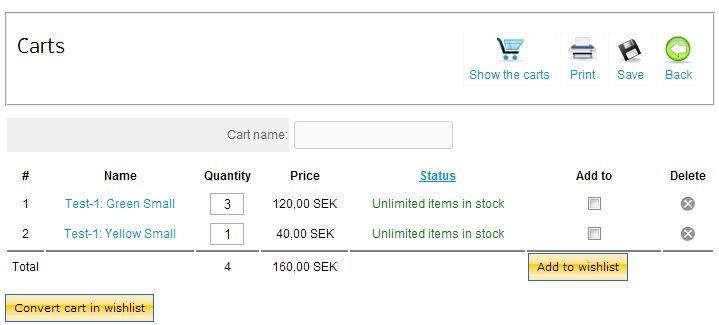
Hi is it possible to replace convert cart in wishlist and add to wishlist buttons with checkout and continue shopping buttons. please se the attached image
Please Log in or Create an account to join the conversation.
13 years 4 months ago #110746
by Eliot
Replied by Eliot on topic directly to the checkout
I don't understand what you want to do.
If you just want to change what's displayed on the button, you can take a look at the language file and find this text. Then just change the translation to display something else.
If you want to change the button behavior, then you have to edit the view showcart or cart and change the urls of the buttons.
If you just want to change what's displayed on the button, you can take a look at the language file and find this text. Then just change the translation to display something else.
If you want to change the button behavior, then you have to edit the view showcart or cart and change the urls of the buttons.
Please Log in or Create an account to join the conversation.
13 years 4 months ago - 13 years 4 months ago #110765
by Alib
Replied by Alib on topic directly to the checkout
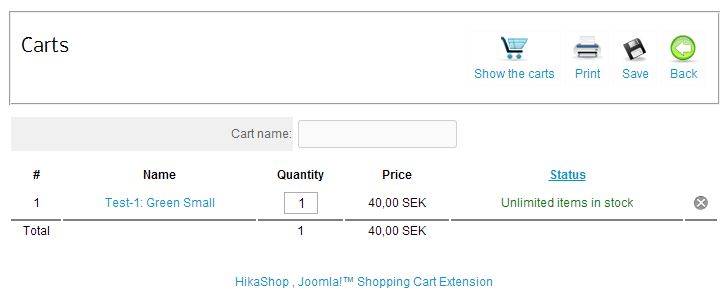
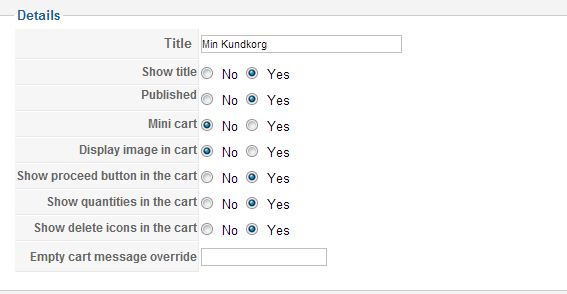
Hi thanks for the reply I didn't mean change the language.I have enabled proceed button in the cart module but it does not shows up in the my cart
Last edit: 13 years 4 months ago by Alib.
Please Log in or Create an account to join the conversation.

13 years 4 months ago #110770
by nicolas
Replied by nicolas on topic directly to the checkout
Eliot was talking about the cart module. Your screenshot show the cart menu display. There is no option to add a proceed to checkout for that view.
You could potentially add a menu item of the type hikashop checkout to your main menu via the joomla menu manager if you want such link to the checkout on your frontend.
You could potentially add a menu item of the type hikashop checkout to your main menu via the joomla menu manager if you want such link to the checkout on your frontend.
Please Log in or Create an account to join the conversation.
13 years 4 months ago #110779
by Alib
Replied by Alib on topic directly to the checkout
thanks Nicolas
Please Log in or Create an account to join the conversation.
Time to create page: 0.158 seconds