
- Posts: 223
- Thank you received: 1
more filter help, please
- plumbingdeals
-
 Topic Author
- Offline
Less
More
13 years 3 months ago #113974
by plumbingdeals
more filter help, please was created by plumbingdeals
i have created a filter based on brands/manufacturer, works OK
each brand also has a category.
Problem is, when you choose a brand from the filter, i want a brand and/or category description to appear.
i have entered a description both in the brand and the category, but it does not appear.
thank you
each brand also has a category.
Problem is, when you choose a brand from the filter, i want a brand and/or category description to appear.
i have entered a description both in the brand and the category, but it does not appear.
thank you
Please Log in or Create an account to join the conversation.

Less
More
- Posts: 12953
- Thank you received: 1778
13 years 3 months ago - 13 years 3 months ago #114038
by Mohamed Thelji
Replied by Mohamed Thelji on topic more filter help, please
Hi,
I think that you should probably display this description through the listing where you are applying your filter. Can you give me a link to your website for testing purpose ?
Thanks .
.
I think that you should probably display this description through the listing where you are applying your filter. Can you give me a link to your website for testing purpose ?
Thanks
.
Last edit: 13 years 3 months ago by Mohamed Thelji.
Please Log in or Create an account to join the conversation.
- plumbingdeals
-
Topic Author
- Offline
Less
More
- Posts: 223
- Thank you received: 1
13 years 3 months ago #114132
by plumbingdeals
Replied by plumbingdeals on topic more filter help, please
sorry, but i don't understand your reply at all...
site is plumbingdeals.net, filter is on the left..."shop by brand"...try "blanco"
site is plumbingdeals.net, filter is on the left..."shop by brand"...try "blanco"
Please Log in or Create an account to join the conversation.
Less
More
- Posts: 12953
- Thank you received: 1778
13 years 3 months ago #114140
by Mohamed Thelji
Replied by Mohamed Thelji on topic more filter help, please
I just wanted you to :
- Go the configuration page of your content menu which have the ID number 152
- Set the "Type of item layout" option to Image and description
- Go the configuration page of your content menu which have the ID number 152
- Set the "Type of item layout" option to Image and description
Please Log in or Create an account to join the conversation.
- plumbingdeals
-
Topic Author
- Offline
Less
More
- Posts: 223
- Thank you received: 1
13 years 3 months ago #114147
by plumbingdeals
Replied by plumbingdeals on topic more filter help, please
no, please read my original post...
i want the category/brand description to display, NOT the product descriptions
i want the category/brand description to display, NOT the product descriptions
Please Log in or Create an account to join the conversation.

13 years 3 months ago #114160
by Eliot
Replied by Eliot on topic more filter help, please
Hi there,
You have to edit the view of your module to do so.
Find the layout used by your Hikashop menu/module, then go in Display>Views and find the related view (for example listing_div).
You can then add some php code to display the brand and the categories.
You have to edit the view of your module to do so.
Find the layout used by your Hikashop menu/module, then go in Display>Views and find the related view (for example listing_div).
You can then add some php code to display the brand and the categories.
Please Log in or Create an account to join the conversation.
- plumbingdeals
-
Topic Author
- Offline
Less
More
- Posts: 223
- Thank you received: 1
13 years 3 months ago #114166
by plumbingdeals
Replied by plumbingdeals on topic more filter help, please
Please read my original message...
In hikashop you can add a description to brand or a category...
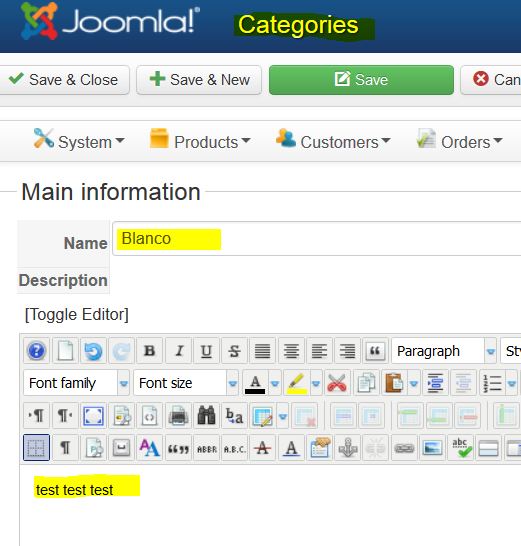
I want this description to appear when you select the brand from my filter
In hikashop you can add a description to brand or a category...
I want this description to appear when you select the brand from my filter
Please Log in or Create an account to join the conversation.
13 years 3 months ago #114167
by Eliot
Replied by Eliot on topic more filter help, please
Where do you want these informations to be displayed? At the filter selection? Or in the result page.
If it's in the result page my last post give you the solution.
If it's not what you want, please make us a screenshot to show what exactly you want.
If it's in the result page my last post give you the solution.
If it's not what you want, please make us a screenshot to show what exactly you want.
Please Log in or Create an account to join the conversation.
- plumbingdeals
-
Topic Author
- Offline
Less
More
- Posts: 223
- Thank you received: 1
13 years 3 months ago #114169
by plumbingdeals
Replied by plumbingdeals on topic more filter help, please
i would guess what you call the result page
after selecting blanco from the dropdown, and being taken to the results, i want it here:

after selecting blanco from the dropdown, and being taken to the results, i want it here:
Please Log in or Create an account to join the conversation.
13 years 3 months ago #114250
by Eliot
Replied by Eliot on topic more filter help, please
So that's exactly what I said.
You have to edit the view you are using to display these results and add some php code to display the brand/category description.
If you're not comfortable with php I can give you some tips.
You have to edit the view you are using to display these results and add some php code to display the brand/category description.
If you're not comfortable with php I can give you some tips.
Please Log in or Create an account to join the conversation.
- plumbingdeals
-
Topic Author
- Offline
Less
More
- Posts: 223
- Thank you received: 1
13 years 3 months ago - 13 years 3 months ago #114354
by plumbingdeals
Replied by plumbingdeals on topic more filter help, please
so, if i create a menu item, such as shown here

and click on blanco, it displays as i want, but since it is in a filter, i will have to create an edit...
that's what i don't understand, why as a menu item it works, but as part of a filter it does not...
wish the was more and better documentation on filters
thanks for the help
and click on blanco, it displays as i want, but since it is in a filter, i will have to create an edit...
that's what i don't understand, why as a menu item it works, but as part of a filter it does not...
wish the was more and better documentation on filters
thanks for the help
Last edit: 13 years 3 months ago by plumbingdeals.
Please Log in or Create an account to join the conversation.
13 years 3 months ago #114447
by Eliot
Replied by Eliot on topic more filter help, please
Okay, I finally understood what you wanted.
There is currently no option in Hikashop to display that information at the top the page.
Since it's a search, results can take various shape so we didn't set any page title and description.
The only option for now is to code a module in order to catch the result and display the right informations.
However, since it's not a bad idea, we'll think about integrating this.
There is currently no option in Hikashop to display that information at the top the page.
Since it's a search, results can take various shape so we didn't set any page title and description.
The only option for now is to code a module in order to catch the result and display the right informations.
However, since it's not a bad idea, we'll think about integrating this.
Please Log in or Create an account to join the conversation.
- plumbingdeals
-
Topic Author
- Offline
Less
More
- Posts: 223
- Thank you received: 1
13 years 3 months ago - 13 years 3 months ago #114536
by plumbingdeals
Replied by plumbingdeals on topic more filter help, please
well i'm glad we finally got on the same page...so to speak!
when you say code a module, not sure what you mean, and/or would that be difficult?
when you say code a module, not sure what you mean, and/or would that be difficult?
Last edit: 13 years 3 months ago by plumbingdeals.
Please Log in or Create an account to join the conversation.
13 years 3 months ago #114613
by Eliot
Replied by Eliot on topic more filter help, please
Coding a module indeed require some php and html skills.
You have to start from a blank page and write down some code to display what you want.
I would suggest if you don't have any knowledge in php to ask on our commercial job
You have to start from a blank page and write down some code to display what you want.
I would suggest if you don't have any knowledge in php to ask on our commercial job
Please Log in or Create an account to join the conversation.
Time to create page: 0.133 seconds