
- Posts: 5
- Thank you received: 0
Display problem on user control panel
- Master_Yeti
-
 Topic Author
- Offline
Less
More
13 years 3 months ago #116940
by Master_Yeti
Display problem on user control panel was created by Master_Yeti
dc-testing.dutchcorns.com/
HikaShop Starter: 2.2.0
Joomla 3.1.4
PHP Version 5.3.26
Displays problem in all browsers and versions
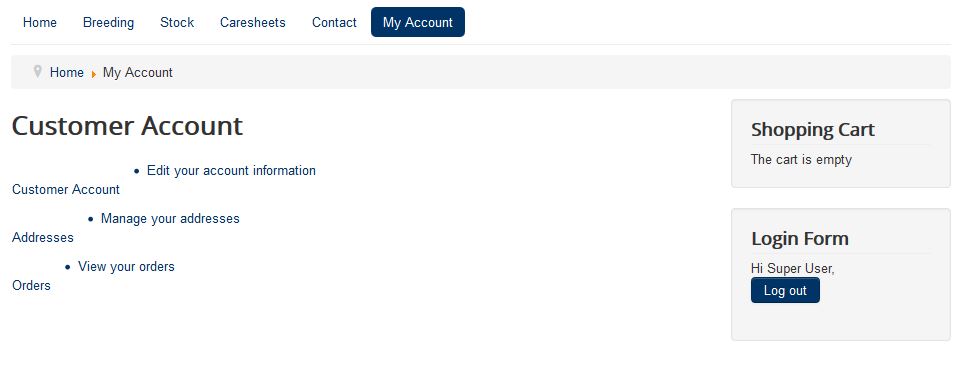
Hi. Hope you can help.
I have a big problem with the display of the hikashop user control panel (please see attached image).
The site is using the Joomla standard template Protostar and when going to the user control panel page the layout is all wrong.
I realise that this is probably a template issue but I was kind of hoping that hikashop would at least work with the Joomal standard templates.
I have made no customisation to the standard template so the code is all clean.
Does anyone have any solutions?
HikaShop Starter: 2.2.0
Joomla 3.1.4
PHP Version 5.3.26
Displays problem in all browsers and versions
Hi. Hope you can help.
I have a big problem with the display of the hikashop user control panel (please see attached image).
The site is using the Joomla standard template Protostar and when going to the user control panel page the layout is all wrong.
I realise that this is probably a template issue but I was kind of hoping that hikashop would at least work with the Joomal standard templates.
I have made no customisation to the standard template so the code is all clean.
Does anyone have any solutions?
Please Log in or Create an account to join the conversation.

13 years 3 months ago #116962
by Jerome
Jerome - Obsidev.com
HikaMarket & HikaSerial developer / HikaShop core dev team.
Replied by Jerome on topic Display problem on user control panel
Hi,
I do not see any reference of the hikashop css file in your website.
The javascript is right included (/media/com_hikashop/js/hikashop.js) but not the css file (/media/com_hikashop/css/frontend_default.css).
Please check you don't have cache activated, css cache or a plugin which make some optimization.
Regards,
I do not see any reference of the hikashop css file in your website.
The javascript is right included (/media/com_hikashop/js/hikashop.js) but not the css file (/media/com_hikashop/css/frontend_default.css).
Please check you don't have cache activated, css cache or a plugin which make some optimization.
Regards,
Jerome - Obsidev.com
HikaMarket & HikaSerial developer / HikaShop core dev team.
Please Log in or Create an account to join the conversation.
- Master_Yeti
-
Topic Author
- Offline
Less
More
- Posts: 5
- Thank you received: 0
13 years 3 months ago #116989
by Master_Yeti
Replied by Master_Yeti on topic Display problem on user control panel
Thanks for looking Jerome.
The site cache is switched off and there are no plugins making any optimisation.
I have managed to get the css loading though but only by manually adding the call into the template main page html file.
But even when this is added it is still not displaying correctly, it shows with text under the buttons?
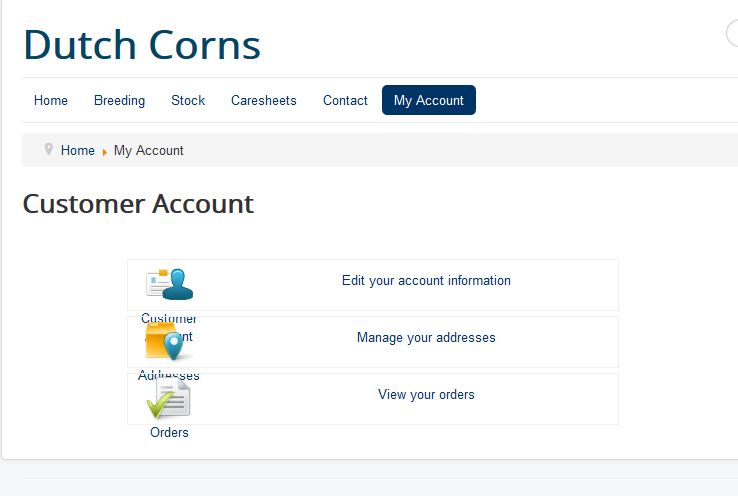
The site cache is switched off and there are no plugins making any optimisation.
I have managed to get the css loading though but only by manually adding the call into the template main page html file.
But even when this is added it is still not displaying correctly, it shows with text under the buttons?
Please Log in or Create an account to join the conversation.

13 years 3 months ago #117049
by nicolas
Replied by nicolas on topic Display problem on user control panel
I tried to create an account on your website to see the issue but the activation didn't work.
So I couldn't access that page to see what's missing.
Can you provide a test user account so that we can look at that ?
So I couldn't access that page to see what's missing.
Can you provide a test user account so that we can look at that ?
Please Log in or Create an account to join the conversation.
- Master_Yeti
-
Topic Author
- Offline
Less
More
- Posts: 5
- Thank you received: 0
13 years 3 months ago #117076
by Master_Yeti
Replied by Master_Yeti on topic Display problem on user control panel
Hi Nicolas. I have activated the account you created. You should be able to log in now.
Cheers
Cheers
Please Log in or Create an account to join the conversation.
13 years 3 months ago #117155
by Jerome
Jerome - Obsidev.com
HikaMarket & HikaSerial developer / HikaShop core dev team.
Replied by Jerome on topic Display problem on user control panel
Hi,
Adding manually the CSS files is not a solution and it won't solve any problem.
You have to fix the reason why the CSS file are not included in your template, because if HikaShop can't add a CSS file in the head, we can't know what else is blocked too.
Regards,
Adding manually the CSS files is not a solution and it won't solve any problem.
You have to fix the reason why the CSS file are not included in your template, because if HikaShop can't add a CSS file in the head, we can't know what else is blocked too.
Regards,
Jerome - Obsidev.com
HikaMarket & HikaSerial developer / HikaShop core dev team.
Please Log in or Create an account to join the conversation.
- Master_Yeti
-
Topic Author
- Offline
Less
More
- Posts: 5
- Thank you received: 0
13 years 3 months ago #117183
by Master_Yeti
Replied by Master_Yeti on topic Display problem on user control panel
Ok. thanks Jerome. On investigation Hikashop general display settings were set to none for the css on the front end. This has now been changed to default and is now adding the css into the page as it should be. An oversight on my part.
This still has not fixed the issue of the text though. Firebug is displaying that the text is using a span class of 'hikashop_cpanel_button_text' although I cannot find this class anywhere.
I have managed to fumble a way round my problem by changing line 478 of the frontend_default css file to margin-bottom:35px. This has opened the gaps between the buttons to show the text clearly but the text should be inside with the icons.
Does anyone have any idea why it is appearing outside?
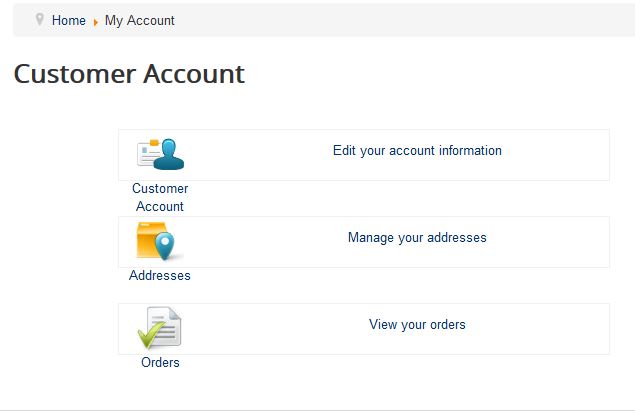
This still has not fixed the issue of the text though. Firebug is displaying that the text is using a span class of 'hikashop_cpanel_button_text' although I cannot find this class anywhere.
I have managed to fumble a way round my problem by changing line 478 of the frontend_default css file to margin-bottom:35px. This has opened the gaps between the buttons to show the text clearly but the text should be inside with the icons.
Does anyone have any idea why it is appearing outside?
Please Log in or Create an account to join the conversation.
13 years 3 months ago #117192
by nicolas
Replied by nicolas on topic Display problem on user control panel
That comes from your template CSS.
You should change the code:
#hikashopcpanel span {
display:block;
text-align:center;
background-repeat: no-repeat;
background-position: center;
height: 48px;
}
to:
#hikashopcpanel span {
display:block;
text-align:center;
background-repeat: no-repeat;
background-position: center;
}
.hikashop_cpanel_icon_image_span{
height: 48px;
}
in the frontend CSS file of HikaShop and that should help display properly.
You should change the code:
#hikashopcpanel span {
display:block;
text-align:center;
background-repeat: no-repeat;
background-position: center;
height: 48px;
}
to:
#hikashopcpanel span {
display:block;
text-align:center;
background-repeat: no-repeat;
background-position: center;
}
.hikashop_cpanel_icon_image_span{
height: 48px;
}
in the frontend CSS file of HikaShop and that should help display properly.
Please Log in or Create an account to join the conversation.
- Master_Yeti
-
Topic Author
- Offline
Less
More
- Posts: 5
- Thank you received: 0
13 years 2 months ago #117205
by Master_Yeti
Replied by Master_Yeti on topic [Resolved] Display problem on user control panel
All sorted thanks Nicolas and Jerome for your help pinning this down. I changed the css to your suggestion Nicolas and it almost did it.
I had to alter it just slightly to the following and change one line in the template css (as shown below in green):
Frontend_default.css
#hikashopcpanel span {
display:block;
text-align:center;
background-repeat: no-repeat;
background-position: center;
margin-top: 5px;
}
Protostar - template.css - line 5314
.row-fluid [class*="span"] {
display: block;
width: 100%;
min-height: 38px; - was 28px
-webkit-box-sizing: border-box;
-moz-box-sizing: border-box;
box-sizing: border-box;
float: left;
margin-left: 2.127659574%;
*margin-left: 2.0744680846383%;
}
Result:
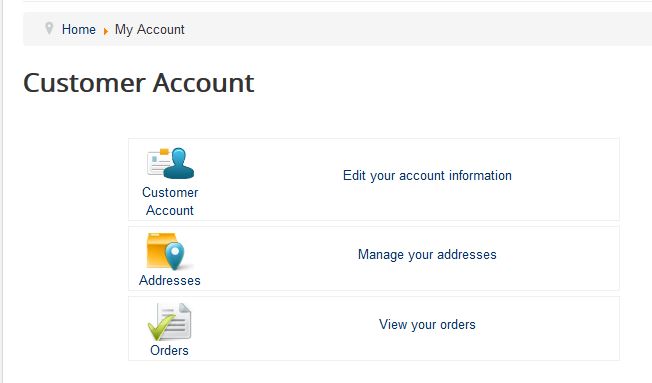
This all being said, in the long run it may be worth changing the hikashop css to override that margin and min-height rather than change the template css as the template is installed as part of joomla and I feel it shouldn't need altering to accommodate the shop component.
Had it been a third party template installed after Joomla then it would be a different story and I would have contacted the templates maker.
Cheers
I had to alter it just slightly to the following and change one line in the template css (as shown below in green):
Frontend_default.css
#hikashopcpanel span {
display:block;
text-align:center;
background-repeat: no-repeat;
background-position: center;
margin-top: 5px;
}
Protostar - template.css - line 5314
.row-fluid [class*="span"] {
display: block;
width: 100%;
min-height: 38px; - was 28px
-webkit-box-sizing: border-box;
-moz-box-sizing: border-box;
box-sizing: border-box;
float: left;
margin-left: 2.127659574%;
*margin-left: 2.0744680846383%;
}
Result:
This all being said, in the long run it may be worth changing the hikashop css to override that margin and min-height rather than change the template css as the template is installed as part of joomla and I feel it shouldn't need altering to accommodate the shop component.
Had it been a third party template installed after Joomla then it would be a different story and I would have contacted the templates maker.
Cheers
Please Log in or Create an account to join the conversation.
13 years 2 months ago #117241
by nicolas
Replied by nicolas on topic [Resolved] Display problem on user control panel
Yes, we'll adapt the default CSS to make sure that the control panel displays fine for next release.
Please Log in or Create an account to join the conversation.
Time to create page: 0.174 seconds