

- Posts: 34
- Thank you received: 1
Cart is empty message on adding first product
13 years 3 months ago - 13 years 3 months ago #117095
by ximbo
Cart is empty message on adding first product was created by ximbo
Hi - I'm getting an issue with the popup when adding my first item to the cart. I've got it set so that when "add to cart" is pressed, the customer remains on the same page whilst the popup displays and the cart is updated via AJAX.
When the first item is added I get a message in the popup "Message The cart is empty", first, followed by "Product successfully added to the cart", then the continue shopping and checkout buttons.
I don't really want the message saying that the cart is empty to display, since I've just added an item to the cart - any thoughts?
Here's the screenshot
image missing http://i42.tinypic.com/mcvsav.png
-- url of the page with the problem -- : audleymotors.smsidat.com
-- HikaShop version -- : 2.2
-- Joomla version -- : 3.1
-- PHP version -- : 5.3
-- Browser(s) name and version -- : Chrome Version 28.0.1500.95 m
When the first item is added I get a message in the popup "Message The cart is empty", first, followed by "Product successfully added to the cart", then the continue shopping and checkout buttons.
I don't really want the message saying that the cart is empty to display, since I've just added an item to the cart - any thoughts?
Here's the screenshot
image missing http://i42.tinypic.com/mcvsav.png
-- url of the page with the problem -- : audleymotors.smsidat.com
-- HikaShop version -- : 2.2
-- Joomla version -- : 3.1
-- PHP version -- : 5.3
-- Browser(s) name and version -- : Chrome Version 28.0.1500.95 m
Last edit: 13 years 3 months ago by ximbo. Reason: added screenshot
Please Log in or Create an account to join the conversation.

13 years 3 months ago #117215
by Jerome
Jerome - Obsidev.com
HikaMarket & HikaSerial developer / HikaShop core dev team.
Replied by Jerome on topic Cart is empty message on adding first product
Hi,
Do you have a link of a product ?
So we could try to reproduce you problem.
Thanks,
Do you have a link of a product ?
So we could try to reproduce you problem.
Thanks,
Jerome - Obsidev.com
HikaMarket & HikaSerial developer / HikaShop core dev team.
Please Log in or Create an account to join the conversation.
13 years 3 months ago #117222
by ximbo
Replied by ximbo on topic Cart is empty message on adding first product
Hi - sorry forgot to add the url to that, it's
audleymotors.smsidat.com/accessories
- happens when you add to a cart that is empty to begin with.
Please Log in or Create an account to join the conversation.

13 years 2 months ago #117354
by nicolas
Replied by nicolas on topic Cart is empty message on adding first product
Hi,
From what I can see this is not the case:
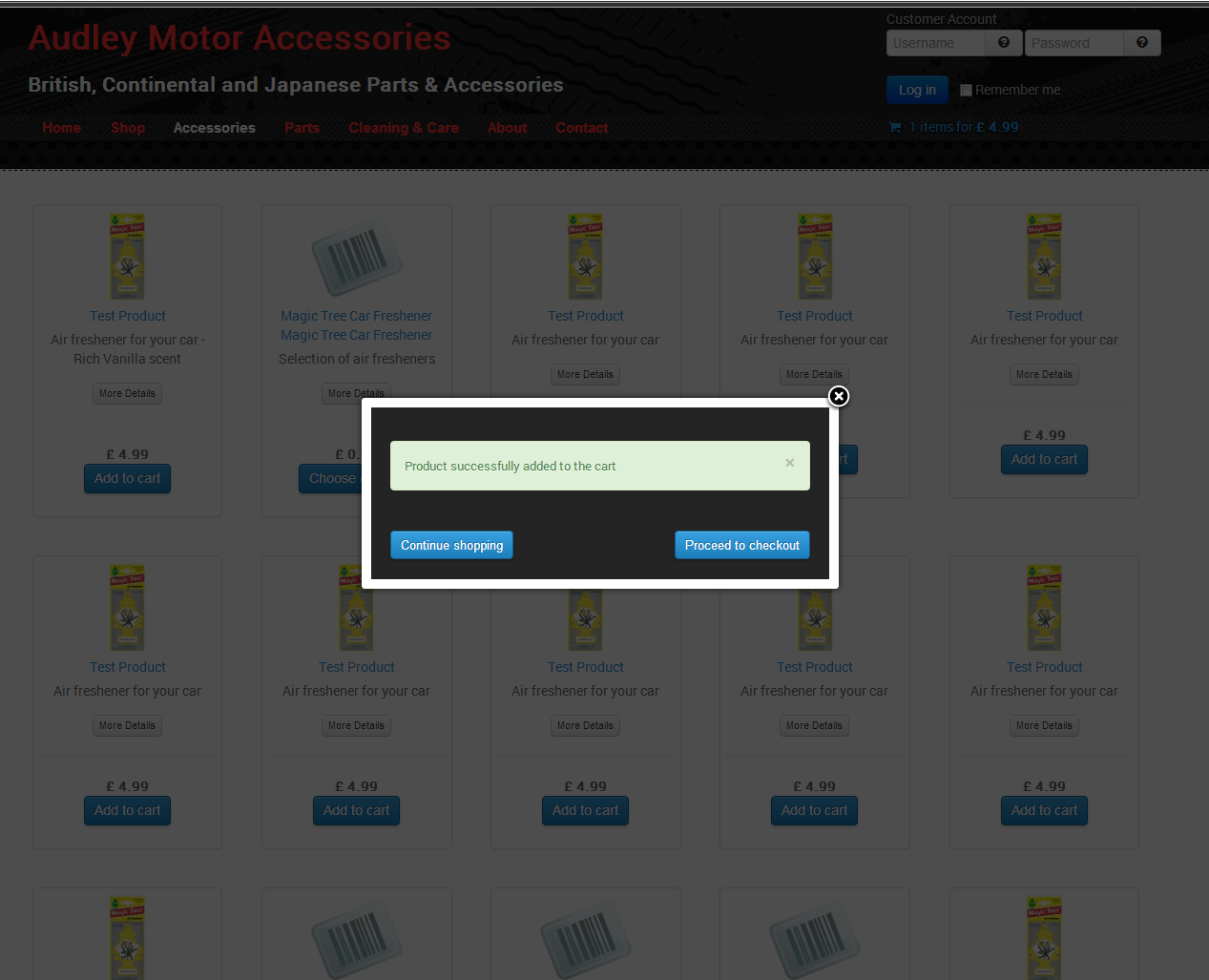
It only happens when the cart is emptied on the cart and then you add a product again.
That's because your template is not displaying messages on its main page:
www.hikashop.com/support/support/documen...tibility-issues.html
It's only displaying them in popup mode (in the component.php file).
The best is to configure your template to display messages on its main page but you can also remove the display of messages from the popup mode.
From what I can see this is not the case:
It only happens when the cart is emptied on the cart and then you add a product again.
That's because your template is not displaying messages on its main page:
www.hikashop.com/support/support/documen...tibility-issues.html
It's only displaying them in popup mode (in the component.php file).
The best is to configure your template to display messages on its main page but you can also remove the display of messages from the popup mode.
The following user(s) said Thank You: ximbo
Please Log in or Create an account to join the conversation.
13 years 2 months ago #117359
by ximbo
Replied by ximbo on topic Cart is empty message on adding first product
Ah I see - I did have messages disabled on the template, and just re-enabled, and now that sorted out the issue. However, I still don't want the message for the cart being empty being displayed at all - is there a way to de-activate it or over-ride it?
Please Log in or Create an account to join the conversation.

13 years 2 months ago #117533
by Xavier
Replied by Xavier on topic Cart is empty message on adding first product
Hi,
This come certainly from the view "product / cart" thanks to edit that view in order to remove the message.
It should come from the code:
This come certainly from the view "product / cart" thanks to edit that view in order to remove the message.
It should come from the code:
Code:
if(empty($desc) && $desc != '0'){
$this->params->set('msg',$emptyText);
}
Please Log in or Create an account to join the conversation.
13 years 2 months ago #117569
by ximbo
Replied by ximbo on topic Cart is empty message on adding first product
That's the message when the cart in empty in the cart module - what about the one that shows up in the joomla messaging system? How would I stop the message appearing there?
Please Log in or Create an account to join the conversation.
13 years 2 months ago #117576
by nicolas
Replied by nicolas on topic Cart is empty message on adding first product
You would have to remove the two occurrences of the code
in the file components/com_hikashop/controllers/checkout.php
Code:
, JText::_('CART_EMPTY')
The following user(s) said Thank You: ximbo
Please Log in or Create an account to join the conversation.
13 years 2 months ago #117948
by ximbo
Replied by ximbo on topic Cart is empty message on adding first product
Perfect that works!
Please Log in or Create an account to join the conversation.
Time to create page: 0.558 seconds