
- Posts: 102
- Thank you received: 2
Changing pagination: vertical to horizontal
- miracleecho
-
 Topic Author
- Offline
Less
More
13 years 3 weeks ago - 13 years 3 weeks ago #127242
by miracleecho
Changing pagination: vertical to horizontal was created by miracleecho
-- url of the page with the problem -- :
rps.1stopwebco.com/hand-crafted-pens-pencils
-- HikaShop version -- : HikaShop Business: 2.2.2
-- Joomla version -- : 3.1.5
-- PHP version -- : 5.4.20
-- Browser(s) name and version -- : firefox 24
As you can see by the attachment my page number are listed vertical, which looks weird. I messed around with the settings in Hikashop but I cannot seem to find a way to change these numbers so they display horizontally on the page. Thanks.
-- HikaShop version -- : HikaShop Business: 2.2.2
-- Joomla version -- : 3.1.5
-- PHP version -- : 5.4.20
-- Browser(s) name and version -- : firefox 24
As you can see by the attachment my page number are listed vertical, which looks weird. I messed around with the settings in Hikashop but I cannot seem to find a way to change these numbers so they display horizontally on the page. Thanks.
Last edit: 13 years 3 weeks ago by miracleecho.
Please Log in or Create an account to join the conversation.

13 years 3 weeks ago #127289
by Xavier
Replied by Xavier on topic Changing pagination: vertical to horizontal
Hi,
Your template seems to be overriding our css properties, that's why it is displayed like that.
Some overrides are required to solve your problem, you will have to use some properties like:
Here is the documentation on how to customize the display:
www.hikashop.com/support/documentation/1...ize-the-display.html
Your template seems to be overriding our css properties, that's why it is displayed like that.
Some overrides are required to solve your problem, you will have to use some properties like:
Code:
.list-footer a, .list-footer span{ float:left !important;}
Here is the documentation on how to customize the display:
www.hikashop.com/support/documentation/1...ize-the-display.html
Please Log in or Create an account to join the conversation.
- miracleecho
-
Topic Author
- Offline
Less
More
- Posts: 102
- Thank you received: 2
13 years 3 weeks ago #127761
by miracleecho
Replied by miracleecho on topic Changing pagination: vertical to horizontal
Thanks i am almost there but not sure how to get the page and results centered now. I can do it through firebug but not sure where to go to make permanent change. See pagination2.jpg

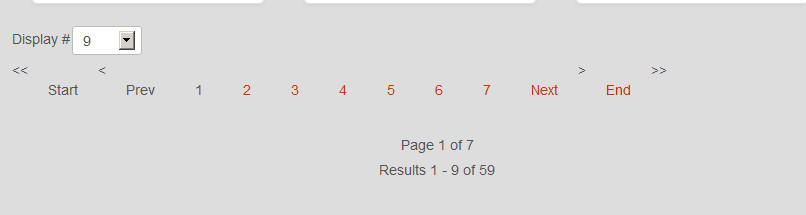
(how it is now) pagination3.jpg (how i want it). Thanks.
(how it is now) pagination3.jpg (how i want it). Thanks.
Please Log in or Create an account to join the conversation.

13 years 3 weeks ago #127774
by nicolas
Replied by nicolas on topic Changing pagination: vertical to horizontal
You can simply copy/paste the CSS of firebug in the frontend CSS file of HikaShop so that it applies to the elements permanently.
Please Log in or Create an account to join the conversation.
- miracleecho
-
Topic Author
- Offline
Less
More
- Posts: 102
- Thank you received: 2
13 years 3 weeks ago #127783
by miracleecho
Replied by miracleecho on topic Changing pagination: vertical to horizontal
Yes, i realize that i guess i wasn't very clear, sorry. The way i am doing it I am sure that i am wrong. Within firebug i find the follwoing:
<span class="hikashop_results_counter" wrap="10">
Results 10 - 18 of 59</span>
<span class="pagenav_end_chevron"> >></span>
I put a couple of breaks in <br /> and added align="center" - <br /><br /><br /><div class="counter" align="center">Page 2 of 7</div> but i did that through edit html, which i believe is wrong. I am not sure what the css i need to edit. sorry.
<span class="hikashop_results_counter" wrap="10">
Results 10 - 18 of 59</span>
<span class="pagenav_end_chevron"> >></span>
I put a couple of breaks in <br /> and added align="center" - <br /><br /><br /><div class="counter" align="center">Page 2 of 7</div> but i did that through edit html, which i believe is wrong. I am not sure what the css i need to edit. sorry.
Please Log in or Create an account to join the conversation.
13 years 3 weeks ago #127840
by Xavier
Replied by Xavier on topic Changing pagination: vertical to horizontal
You can use something like:
Code:
.counter, .hikashop_results_counter{
position: relative; right: 290px; top: 40px;
}
The following user(s) said Thank You: miracleecho
Please Log in or Create an account to join the conversation.
Time to create page: 0.099 seconds