

- Posts: 447
- Thank you received: 20
Remove Text at the top of shipping invoice
12 years 10 months ago #136031
by davec
Remove Text at the top of shipping invoice was created by davec
-- HikaShop version -- : x2.2.3
-- Joomla version -- .2
.2
When I print a shipping invoice the site admin address is at the top of the page. administrator/index.php?option=com...
1 If I print it to PDF it also a live link.
I just wondered if it is possible to remove this or if it is part of the printer setting which I will have no control over for the end user?
Dave
-- Joomla version --
.2When I print a shipping invoice the site admin address is at the top of the page. administrator/index.php?option=com...
1 If I print it to PDF it also a live link.
I just wondered if it is possible to remove this or if it is part of the printer setting which I will have no control over for the end user?
Dave
Please Log in or Create an account to join the conversation.

Less
More
- Posts: 12953
- Thank you received: 1778
12 years 10 months ago #136045
by Mohamed Thelji
Replied by Mohamed Thelji on topic Remove Text at the top of shipping invoice
Hi Dave,
Note that you'll be able to edit your invoice by editing the code of the "invoice" file of the "order" view of your front-end template through the page "Hikashop->Display->Views"
Note that you'll be able to edit your invoice by editing the code of the "invoice" file of the "order" view of your front-end template through the page "Hikashop->Display->Views"
Please Log in or Create an account to join the conversation.
12 years 10 months ago #136051
by davec
Replied by davec on topic Remove Text at the top of shipping invoice
Thanks for the relpy Mohamed
I did find that part cannot see where the code is to remove it. It is the 2 top lines on the attachments that I would like to remove
Dave

I did find that part cannot see where the code is to remove it. It is the 2 top lines on the attachments that I would like to remove
Dave
Please Log in or Create an account to join the conversation.
Less
More
- Posts: 12953
- Thank you received: 1778
12 years 10 months ago #136070
by Mohamed Thelji
Replied by Mohamed Thelji on topic Remove Text at the top of shipping invoice
I just tested it and I don't have it on my invoice, did you done some modifications trough your "invoice file" or your INVOICE / SHIPPING_INVOICE translation word ?
Please Log in or Create an account to join the conversation.
12 years 10 months ago #136076
by davec
Replied by davec on topic Remove Text at the top of shipping invoice
Do you mean the invoice file in the Hikashop folder in the administrator folder?
administrator/components/com_hikashop/views/order/tmpl/invoice.php
I haven't changed that part of the translation.
Dave
administrator/components/com_hikashop/views/order/tmpl/invoice.php
I haven't changed that part of the translation.
Dave
Please Log in or Create an account to join the conversation.

12 years 10 months ago #136117
by nicolas
Replied by nicolas on topic Remove Text at the top of shipping invoice
These at the top are added by your browser when you print a page, not by HikaShop.
If you use Chrome, there is an option to deactivate that when you print the page.
For other browsers I don't know the exact location of the option but it should also be possible to deactivate that.
In any case, that's not a problem of HikaShop.
If you use Chrome, there is an option to deactivate that when you print the page.
For other browsers I don't know the exact location of the option but it should also be possible to deactivate that.
In any case, that's not a problem of HikaShop.
Please Log in or Create an account to join the conversation.
12 years 10 months ago #136176
by davec
Replied by davec on topic Remove Text at the top of shipping invoice
Thought that may be the case Nicolas.
Thanks
Dave
Thanks
Dave
Please Log in or Create an account to join the conversation.
11 years 5 months ago #203748
by shanem
Replied by shanem on topic Remove Text at the top of shipping invoice
For anyone using Firefox Browser, this is where to turn these options on & off.
Open your Browser, then click File>Page setup from the top browser menu, then select the Margins & Header/footer tab.
You will see the options available to change what does or doesn't display on the header & Footer of the page when you print.
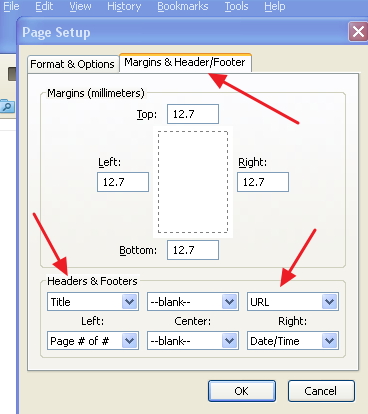
The IE browser has a similar setup page, just Open your Browser, then click File>Page setup from the top browser menu.
Then you will see the same options as Firefox, change them as you desire.
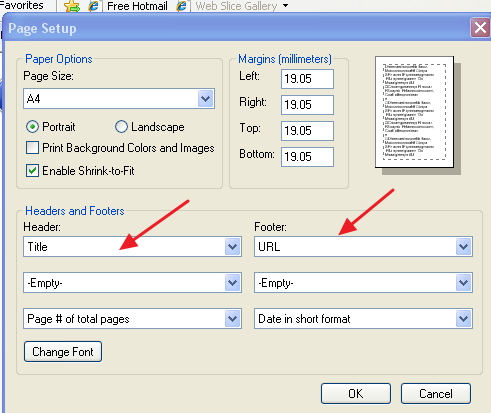
Then the URL text at the top of Order & Shipping invoices will not appear.
Open your Browser, then click File>Page setup from the top browser menu, then select the Margins & Header/footer tab.
You will see the options available to change what does or doesn't display on the header & Footer of the page when you print.
The IE browser has a similar setup page, just Open your Browser, then click File>Page setup from the top browser menu.
Then you will see the same options as Firefox, change them as you desire.
Then the URL text at the top of Order & Shipping invoices will not appear.
Please Log in or Create an account to join the conversation.
Time to create page: 0.074 seconds