
- Posts: 214
- Thank you received: 7
Wrong default variant in shopping cart
- conticreative
-
 Topic Author
- Offline
Less
More
12 years 2 months ago #167625
by conticreative
Wrong default variant in shopping cart was created by conticreative
-- url of the page with the problem -- :
livelaughlove.com/component/hikashop/classic-script-boxy-tee
-- HikaShop version -- : 2.3.2
-- Joomla version -- : 3.3.3
-- PHP version -- : 5.3
-- Browser(s) name and version -- : ALL
-- Error-message(debug-mod must be tuned on) -- : N/A
We have a product (at least this is the only one so far) that has a number of size variants.
The product default is in Medium size "M". And if the customer chooses any other size it will reflect that size in the shopping cart.
The problem arises if the customer does not make a size selection and adds the product directly to cart. In that case the product is added with a XS size
Here is the link: livelaughlove.com/component/hikashop/classic-script-boxy-tee
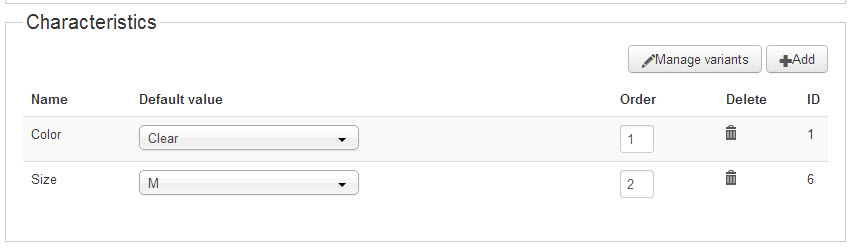
Here is a screenshot of the product variant screen in the back end. Additionally, there is nothing out of place, that I can see either in the XS or M variant internally
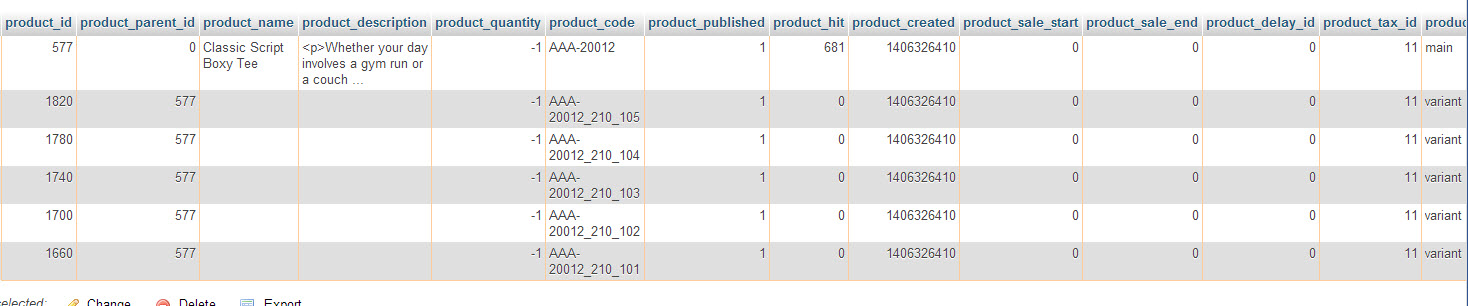
This is what it loos like in the DB:
And finally here is the CSV
-- HikaShop version -- : 2.3.2
-- Joomla version -- : 3.3.3
-- PHP version -- : 5.3
-- Browser(s) name and version -- : ALL
-- Error-message(debug-mod must be tuned on) -- : N/A
We have a product (at least this is the only one so far) that has a number of size variants.
The product default is in Medium size "M". And if the customer chooses any other size it will reflect that size in the shopping cart.
The problem arises if the customer does not make a size selection and adds the product directly to cart. In that case the product is added with a XS size
Here is the link: livelaughlove.com/component/hikashop/classic-script-boxy-tee
Here is a screenshot of the product variant screen in the back end. Additionally, there is nothing out of place, that I can see either in the XS or M variant internally
This is what it loos like in the DB:
And finally here is the CSV
This attachment is hidden for guests.
Please log in or register to see it.
Please log in or register to see it.
Please Log in or Create an account to join the conversation.

12 years 2 months ago #167626
by Jerome
Jerome - Obsidev.com
HikaMarket & HikaSerial developer / HikaShop core dev team.
Replied by Jerome on topic Wrong default variant in shopping cart
Hi,
The variant with the combination "Clear / M" does not exist.
At this moment HikaShop can't select it as the default value because the value does not exist.
So you have ot choose a default combination which exists or, create the variant for the combination "Clear / M".
And for the question "Why the variant 'Athletic Heather XS' is selected ?"
It's because it is the first variant in your listing (with the lower position or at least, the lower product_id).
The default combination does not exist, so HikaShop has to add something in the cart, it take the first variant it found for the variant when it sees that the default does not exist (instead of displaying you a big error message which will afraid the customer)
Regards,
The variant with the combination "Clear / M" does not exist.
At this moment HikaShop can't select it as the default value because the value does not exist.
So you have ot choose a default combination which exists or, create the variant for the combination "Clear / M".
And for the question "Why the variant 'Athletic Heather XS' is selected ?"
It's because it is the first variant in your listing (with the lower position or at least, the lower product_id).
The default combination does not exist, so HikaShop has to add something in the cart, it take the first variant it found for the variant when it sees that the default does not exist (instead of displaying you a big error message which will afraid the customer)
Regards,
Jerome - Obsidev.com
HikaMarket & HikaSerial developer / HikaShop core dev team.
Please Log in or Create an account to join the conversation.
- conticreative
-
Topic Author
- Offline
Less
More
- Posts: 214
- Thank you received: 7
12 years 2 months ago - 12 years 2 months ago #167914
by conticreative
Replied by conticreative on topic Wrong default variant in shopping cart
Thank you for the kind reply.
I didn't notice the "Clear" was selected in the backend. All this time I was seeing the correct color.
I didn't notice the "Clear" was selected in the backend. All this time I was seeing the correct color.
Last edit: 12 years 2 months ago by conticreative.
Please Log in or Create an account to join the conversation.
12 years 2 months ago #167921
by Jerome
Jerome - Obsidev.com
HikaMarket & HikaSerial developer / HikaShop core dev team.
Replied by Jerome on topic Wrong default variant in shopping cart
Hi,
We are working on the new product interface in HikaMarket and such problem (for the selection of the default variant) won't be possible anymore.
We are doing a lot of "research" in order to provide a better UI for the product management ; I hope that the new interface (which will firstly available in HikaMarket) will pleased you.
Regards,
We are working on the new product interface in HikaMarket and such problem (for the selection of the default variant) won't be possible anymore.
We are doing a lot of "research" in order to provide a better UI for the product management ; I hope that the new interface (which will firstly available in HikaMarket) will pleased you.
Regards,
Jerome - Obsidev.com
HikaMarket & HikaSerial developer / HikaShop core dev team.
The following user(s) said Thank You: conticreative
Please Log in or Create an account to join the conversation.
Time to create page: 0.105 seconds